Riot’s fighting game, 2XKO, differs from many in this genre by not utilizing a peer-to-peer connection. Instead, it has a server-based rollback netcode that helps stabilize the connection when one of the players is having some network issues.
So it’s even more important than ever to have a stable connection. So if 2XKO won’t connect, matchmaking keeps failing, or you’re stuck at login, the first thing to figure out is whether you’re dealing with Riot-side downtime or a problem on your end.
Here’s how to know if 2XKO’s servers are down, troubleshoot the issues, and check the server status.
2XKO’s servers
Riot’s servers go offline for scheduled maintenance around patches. While 2XKO has no set patch cadence yet, it most likely will, so learning about the update drops beforehand can save you some frustration.
2XKO is a fighting game that utilizes Riot’s existing server infrastructure, so any outages could affect multiple games at once. However, Riot has extensive knowledge of handling servers for games with much bigger audiences, like League of Legends and Valorant, so 2XKO is in safe hands.
How to check if 2XKO’s servers are down
Thankfully, Riot Games has a handy website that can tell you the status of any server in any region for all their games.
Usually, the important info about outages is displayed on the main page, and you can even check some of the past issues that were resolved.
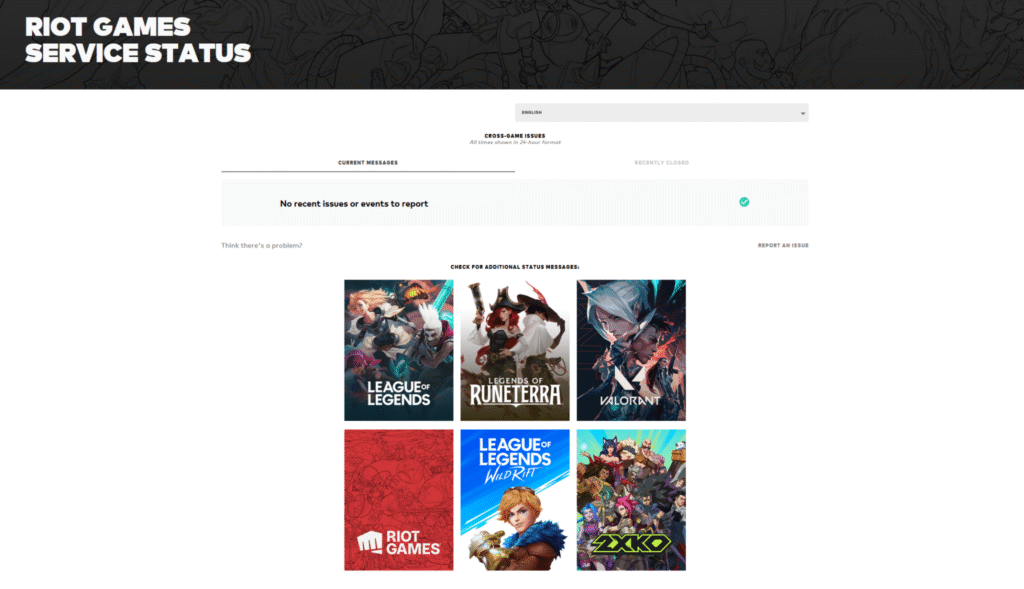
For more granularity, you can open the 2XKO’s page, pick your server from the dropdown menu, and check if there’s any info about the outages or issues. Additionally, this page lists all the upcoming patches and their maintenance schedules, during which the game will be taken offline.
If there’s nothing on these pages yet, you’re still experiencing connectivity issues, check 2XKO’s official social channels like X and Bluesky. Riot regularly posts maintenance windows ahead of time, including expected downtime ranges and patch-related service interruptions. These posts won’t always include every regional detail, but they’re usually the fastest way to confirm that a shutdown is intentional. They also usually mention if there are some interruptions that are not necessarily server-related and won’t be up on the server status page.
What to do if 2XKO servers are up but you still can’t connect
You checked all the status pages and socials, yet you still can’t connect. Then the issue is most likely on your end. Start with the basics: restart the Riot Client and make sure the game is fully updated. Riot support also recommends using a wired connection where possible, since unstable Wi-Fi can cause repeated disconnects that look like server issues.
If you’re using a VPN or proxy, disable it. Riot’s troubleshooting guide notes that these services can interfere with connections and make problems harder to diagnose.
If nothing is helping, and the game was working fine before, don’t do anything drastic. Contact your ISP and ask if there are any connectivity issues, and only then go into more involved steps mentioned in the guide, like updating your network adapter drivers or tinkering with the firewall and DNS. And if everything else fails, you can always join the dedicated 2XKO Discord servers and ask for assistance.