
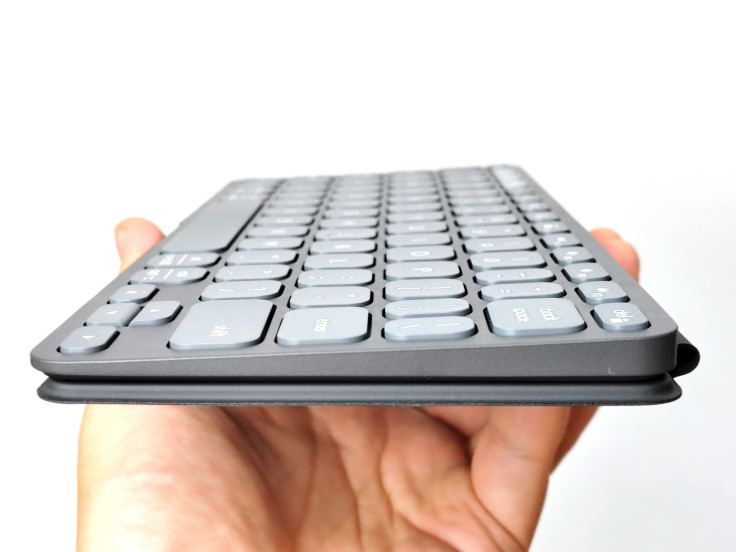
Portable keyboards have always required some degree of compromise. The models comfortable enough for an entire day of work are usually too large to carry everywhere, while those thin enough to disappear into a travel bag often make the typing experience feel secondary.
The Logitech Keys-to-Go 2 attempts to find a place somewhere between the two. This portable Bluetooth keyboard is designed to travel alongside a tablet, phone or laptop without adding much weight, making it particularly appealing for anyone moving between meetings, flights and hotel rooms.
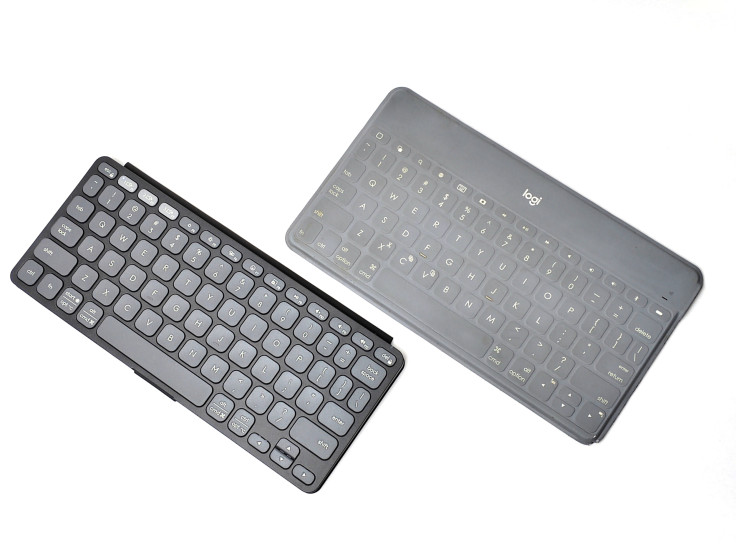
This is not Logitech's first attempt at the idea. The original Keys-to-Go wrapped almost the entire keyboard in a protective membrane, creating a design that was impressively portable, easy to clean and remarkably resistant to dust. However, its soft and somewhat mushy key action also took time to get used to.
Nearly a decade later, Logitech has returned with exposed keys, a more conventional layout and many of the productivity features found on its larger keyboards. The question is: can the Keys-to-Go 2 retain the portability of the original without making typing feel like the compromise?
Logitech Keys-to-Go 2: Key Specifications
- Connectivity: Bluetooth
- Device switching: Up to three devices with Easy-Switch
- Key travel: 0.04 inch (1 mm)
- Width: Approximately 9.8 inches (25 cm)
- Battery: Two replaceable CR2032 coin cells
- Claimed battery life: Up to three years based on two hours of daily use
- Built-in cover: Yes
- Backlighting: No
- Software: Logi Options+
Logitech officially describes the Keys-to-Go 2 as an ultra-portable wireless keyboard for tablets, mobile devices and laptops, with a built-in protective cover and Bluetooth switching between as many as three devices.
Pros
- Exceptionally thin and easy to carry
- Quiet and unusually tactile typing action
- Built-in cover protects the keys and improves the typing angle
- Easy-Switch support for three devices
- Long battery life with replaceable batteries
Cons
- Compact layout can feel cramped during longer sessions
- No keyboard backlighting
- Battery compartment requires a T5 screwdriver
- Built-in cover cannot be removed
Testing note: This review is based on extended hands-on typing sessions, inspection of the cover and battery compartment, and several short Monkeytype typing tests.
Portable Design and Built-In Cover
I knew the Keys-to-Go 2 was going to be thin from the photos online, but I did not expect it to feel quite this slim in person.
It is the kind of keyboard that can slide into a work bag alongside an 11-inch (27.9 cm) tablet without substantially changing the weight or space required. That may sound like a small advantage, but it becomes increasingly valuable when traveling with a laptop, chargers, headphones and everything else needed for a day away from the office.
The built-in cover was initially one of the aspects I was least certain about. It is permanently attached, and my first thought was that Logitech should have made it removable.
After using the keyboard for some time, however, I began to understand the decision.
When folded underneath, the cover gives the keyboard a slight height boost. The difference is small, but it creates a more natural position for my wrists. Without it, the keyboard feels almost too flat against the desk.
The cover therefore becomes part of the typing experience rather than simply something placed over the keys.
It also makes more sense when the keyboard is being carried regularly. The cover closes magnetically, with 12 magnets—as far as I could determine—distributed throughout the thin panel, protecting the keys and preventing accidental inputs inside a bag.
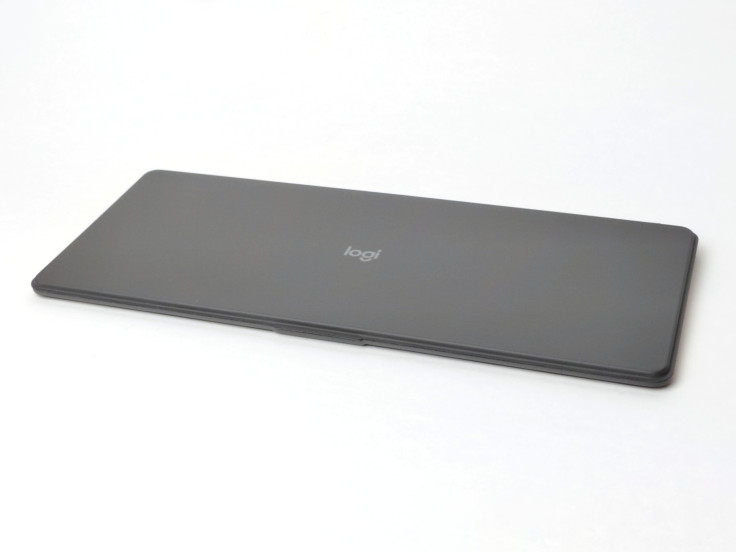
Closing it automatically switches the keyboard off as well. Because the cover is always attached, using it quickly became a natural part of packing the keyboard away after working at a meeting table, airport lounge or hotel desk.
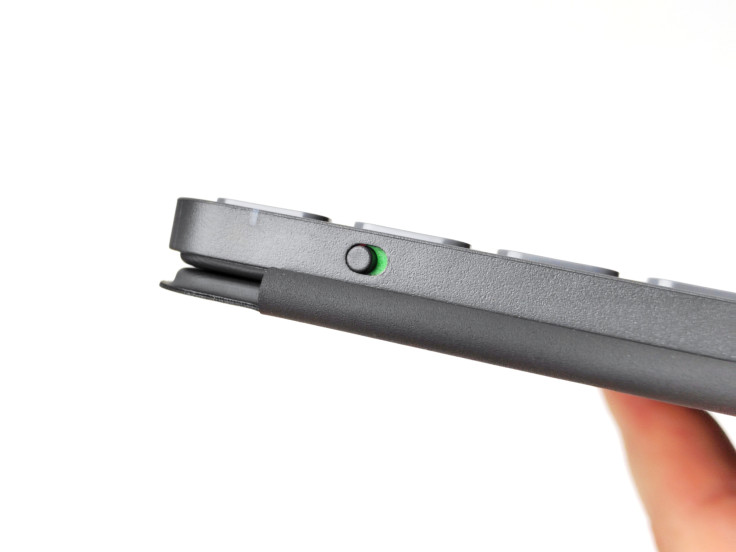
Logitech still includes a dedicated physical power toggle rather than asking one of the keys to perform double duty as a power button. It is a small detail, but it gives the keyboard a more thoughtful and dependable feel.
Keys-to-Go 2 Typing Experience and Key Travel
The greatest concern with any keyboard this thin is naturally the key travel—Apple's butterfly keyboard already taught us that shaving off millimeters, or fractions of an inch, can sometimes shave off reliability and typing quality as well.
The Keys-to-Go 2 offers only 0.04 inch (1 mm) of key travel, which does not sound especially promising on paper. In practice, however, the typing action feels considerably more substantial than the number suggests.
Each keypress is quiet, distinct and tactile. There is no loud mechanical click, yet every key provides a clear sense that it has registered.
The closest comparison I can make is to the clicking mechanism used on Logitech's newer MX 3S-series mice. One of Logitech's more impressive recent improvements was making those mouse buttons considerably quieter without removing the tactile response that makes each click feel precise.
Typing on the Keys-to-Go 2 almost feels as though a similar idea has been applied beneath every key.
It does not feel like a mechanical keyboard, but neither does it have the vague or spongy action often associated with ultra-thin designs. Each press feels deliberate, even when typing quickly.
The quiet action also makes sense for the environments in which a keyboard like this is likely to be used. It is discreet enough for meetings, shared workspaces and airplane cabins while still providing enough feedback for confident touch typing.

Compact Layout and Typing Speed
At approximately 9.8 inches (25 cm) wide, the Keys-to-Go 2 is close to the landscape width of an 11-inch (27.9 cm) tablet. This makes it a natural match for a compact mobile setup, although keeping the keyboard within those dimensions inevitably requires a tighter layout.
The keys and the spaces between them are slightly smaller than those on Logitech's full-size MX Keys.
As a traditional touch typist with an approximately 3.35-inch (85 mm) palm width, I begin to miss the extra room of a larger keyboard after typing for an extended period. There is a subtle feeling of wanting to stretch my hands back across a full-size layout.
However, I suspect part of this is simply familiarity. The tighter arrangement becomes easier to navigate with use, and for shorter sessions involving emails, notes or document editing, it rarely feels like a serious disadvantage.
What surprised me was that the smaller layout may actually help me type faster.
The combination of the short travel, clear tactile action and reduced distance between keys means my fingers do not need to move quite as far. In several short tests using Monkeytype, my typical cruising speed increased from approximately 90 words per minute to around 100.
This was not a controlled scientific comparison, and typing performance will naturally differ from person to person. Nevertheless, the improvement was consistent enough to be noticeable.
It is an unusual trade-off. The Keys-to-Go 2 may not feel as spacious as a desktop keyboard during an entire day of work, but its responsiveness and compact layout make it remarkably efficient for the shorter bursts of writing that often happen while traveling.
Easy-Switch, Bluetooth and Logi Options+
Although the Keys-to-Go 2 is considerably smaller than Logitech's desktop keyboards, the company has retained most of the productivity features its users will expect.
Easy-Switch allows the keyboard to remain paired with up to three devices. Dedicated buttons along the top row make it possible to move between a computer, tablet and phone without repeatedly entering Bluetooth settings.
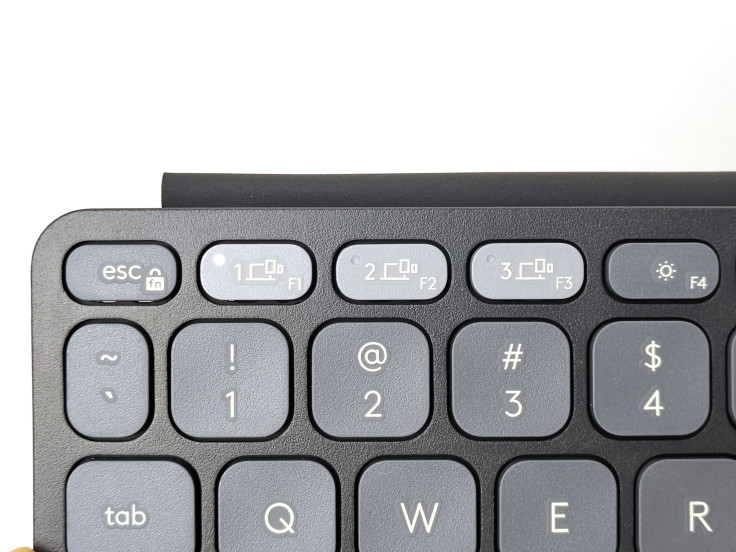
This becomes especially useful when traveling with several devices. The same keyboard can be used for longer work on a laptop, note-taking on a tablet and replying to a detailed message on a phone.
The function row also contains the familiar Logitech shortcuts, making the layout easy to understand for anyone who has used one of the company's other keyboards.
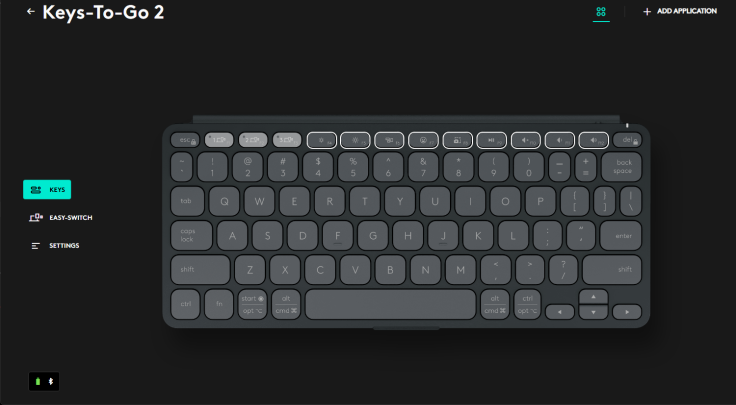
Full Logi Options+ support adds another level of customization. Many of the function keys can be reassigned, and different actions can be configured for individual applications.
Not every user will need this degree of control, but its inclusion helps the Keys-to-Go 2 feel like a compact productivity tool rather than a basic accessory intended only for occasional tablet use.
Battery Life, CR2032 Batteries and No Backlighting
The battery design is perhaps the most unusual decision Logitech made.
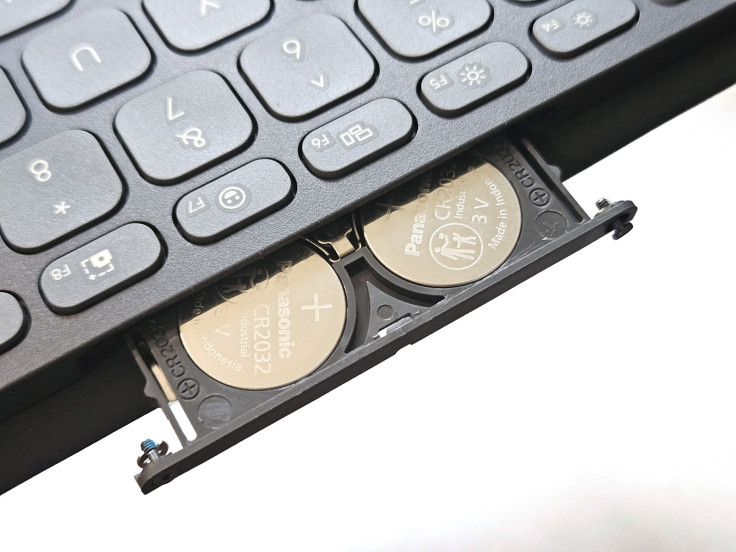
Instead of an internal lithium-ion battery with USB-C charging, the Keys-to-Go 2 runs on two replaceable CR2032 coin cells.
My initial preference would have been USB-C. Most business travelers already carry at least one compatible cable for a phone, tablet or laptop, and being able to recharge the keyboard using the same connection would feel more conventional.
The battery compartment is also more difficult to access than expected. Removing the tray requires a T5 screwdriver, which not every owner will have readily available.
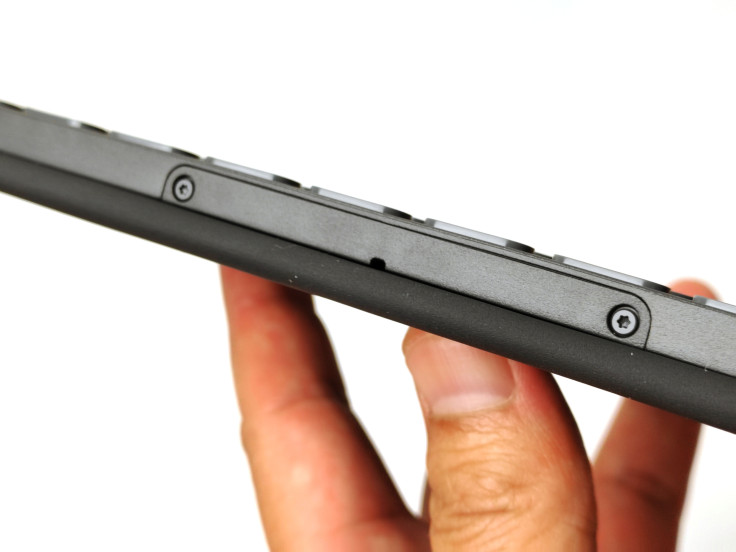
Logitech thoughtfully made the two screws captive so they remain attached to the tray and are less likely to disappear. However, even after loosening them completely, the tray on my unit was difficult to remove. I eventually used a plastic tool intended for phone disassembly because I did not want to risk damaging the keyboard. Anyone attempting the same should naturally proceed with caution.
Fortunately, this should not become a frequent maintenance task.
Logitech rates the two batteries for up to three years of use based on approximately two hours of typing each day. That changes the practical meaning of the design. Instead of becoming another device that needs to be charged before a trip, the keyboard can remain in a work bag for months without requiring much thought.
There is also a long-term benefit to using replaceable cells. Once they are depleted, they can simply be exchanged for a fresh pair rather than leaving the keyboard dependent on a permanently installed lithium battery that gradually loses capacity.
The Keys-to-Go 2 does not include backlighting, which likely helps Logitech maintain both its thin profile and long battery life.
I usually disable keyboard lighting to conserve power, so its absence does not significantly affect how I use the product. However, I could imagine missing it while typing in a dark airplane cabin or another poorly lit environment.
Logitech Keys-to-Go 2 Final Verdict
The Logitech Keys-to-Go 2 answers the question raised at the beginning of this review more convincingly than I expected.
It retains the qualities that made the original concept interesting: it is exceptionally thin, easy to carry and protected by a cover that is always there when the keyboard goes back into a bag. Easy-Switch connectivity, Logi Options+ support and long battery life also make it practical for working across several devices while away from a permanent desk.
There are still compromises. The layout can feel tight during longer writing sessions, the keys are not backlit and the battery compartment is more difficult to access than it should be. However, these limitations feel secondary to what Logitech has improved most.
The original Keys-to-Go demonstrated how portable a keyboard could become, but its membrane-covered keys made the typing experience part of the sacrifice. The Keys-to-Go 2 keeps the portability while introducing keys that feel quiet, distinct and remarkably tactile.
For an entire day at a desk, I would still choose a full-size keyboard. For answering emails between meetings, taking notes during a presentation or working from an airport lounge or hotel room, the Keys-to-Go 2 offers an unusually effective balance between portability and productivity.
Is it the best travel keyboard? That will depend on whether someone values a larger layout, backlighting or USB-C charging more highly. For business travelers who prioritize portability, quiet typing and multi-device flexibility, however, it is one of the strongest options I have used.
Most importantly, it is no longer simply a thin keyboard that is convenient to carry. It is a thin keyboard I genuinely enjoy typing on.
David is a tech enthusiast/writer who is often on the move and is on a mission to explore ways to make his overhaul flights more enjoyable. This is a contribution to an ongoing IBTimes review series on gadgets for Business Travelers.
Frequently Asked Questions
Is the Logitech Keys-to-Go 2 rechargeable?
No. It uses two replaceable CR2032 coin-cell batteries rather than an internal rechargeable battery.
Does the Logitech Keys-to-Go 2 have backlighting?
No. The keyboard does not have backlit keys, which may be noticeable when working in a dark airplane cabin or another poorly lit environment.
Can the Keys-to-Go 2 connect to multiple devices?
Yes. Easy-Switch allows it to remain paired with up to three devices and switch between them using dedicated keys.
Is the built-in cover removable?
No. The cover is permanently attached. It folds underneath the keyboard while typing and closes over the keys for protection when the keyboard is being carried.
Is the Keys-to-Go 2 suitable for long typing sessions?
It is responsive and comfortable for a keyboard of its size, but the compact spacing may become noticeable during an entire day of typing. I would use it for mobile work and travel while keeping a full-size keyboard at a permanent desk.
Logitech provided the Keys-to-Go 2 review unit at no cost. No payment was received, and Logitech had no editorial control over this review. All opinions and conclusions are based on my independent hands-on experience with the product.