If you’re tired of staging elaborate surprises every time you want to buy your duo a skin, VALORANT’s gifting feature is here to save the day.
Before gifting was a thing in VALORANT, players could either purchase VP gift cards from third-party vendors or log into the recipient’s account to add VP and make a purchase. Not only was it difficult to surprise anyone, but all of that came with significant security concerns and considerable inconvenience.
But now that the highly requested feature is here, here’s how to use skin and VP gifting in VALORANT.
Table of contents
How to send skins in VALORANT
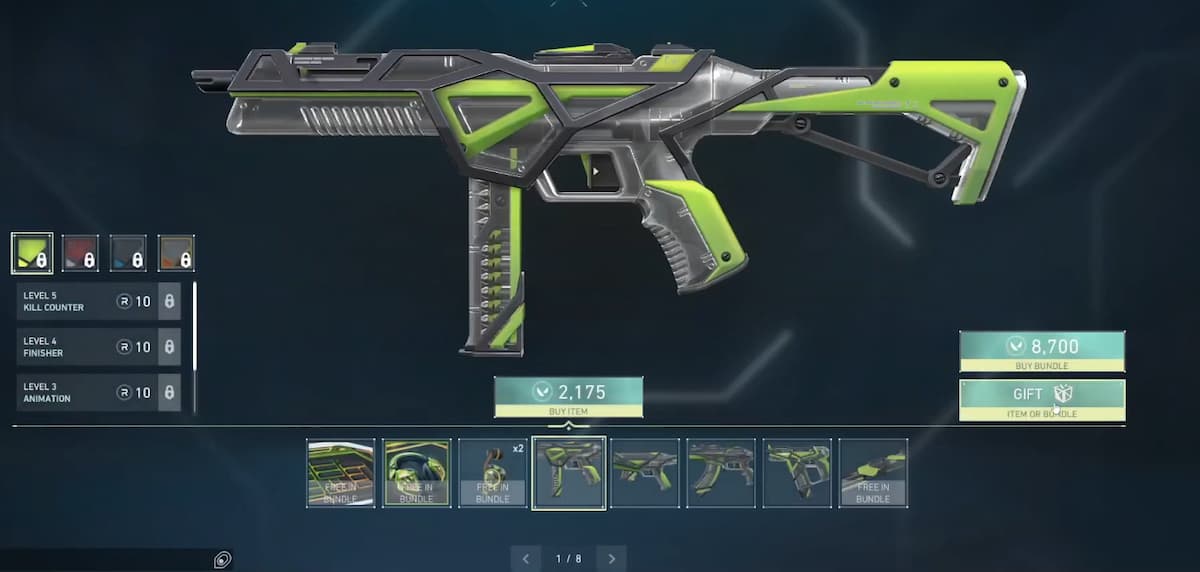
You can gift VALORANT skins to friends starting with Season V25, Act Three.
Gifting is only available in VALORANT PC.
To gift your friend a weapon skin in VALORANT, here’s what you should do:
- Open the Store page in the game.
- Click on the bundle in the Featured Section that has the gift you want to send.
- On the details page, you’ll see a new Gift button in the bottom-right corner. Click on it and then select the recipient from your Riot friend list.
- Choose whether you want to send them the bundle or just an item.
- Complete the payment to send the gift.
After you send the gift, the recipient will receive a prompt to accept or decline the gift the next time they log into the game. If they don’t accept the gift within 60 days, Riot will refund the price you paid.
Here are some things you need to keep in mind:
- You can send or receive up to 10 gifts per day.
- Neither your account nor your friend’s account must have received any restrictions in the past week. You also need to be friends for at least a week.
- The sender must have a level 15 account or higher.
- To avoid duplicate content, you can’t send an item or bundle that your friend already owns. If they own only some of the items in a bundle, the price will be adjusted accordingly.
Besides all this, there’s also a regional restriction on sending gifts. For starters, you and your friend need to be on the same game shard: APAC, EU, KR, LATAM, BR, or NA.
Riot also has specific restrictions for certain locations that prevent you from sending gifts outside of them, even if your friend belongs to the same shard as you: the Philippines, Indonesia, Thailand, Vietnam, Turkey, Russia, Ukraine, and Iran.
How to gift VP in VALORANT
Starting Patch 11.11 in Season V25, Act Six, you can gift VP (VALORANT Points) to your friends, not just skins. So, if you’re not sure about what your duo likes or their shop hasn’t yet spawned the skin they want, you can just choose to gift them VP, letting them purchase at their own convenience. Here are the steps to follow:
- From the lobby, select the VP icon between the Account level button and the RP button.
- Choose the amount of VP you want to send. VP is only available in packs of 475, 1000, 2050, 3650, 5350, and 11,000. You can’t select a custom amount. Once you’re sure about the pack, select the Gift button beside the price label of the pack.
- Select the recipient from your Riot friend list.
- Confirm the VP amount you want to send, then select Next.
- Enter payment information and complete the payment to successfully send the gift.
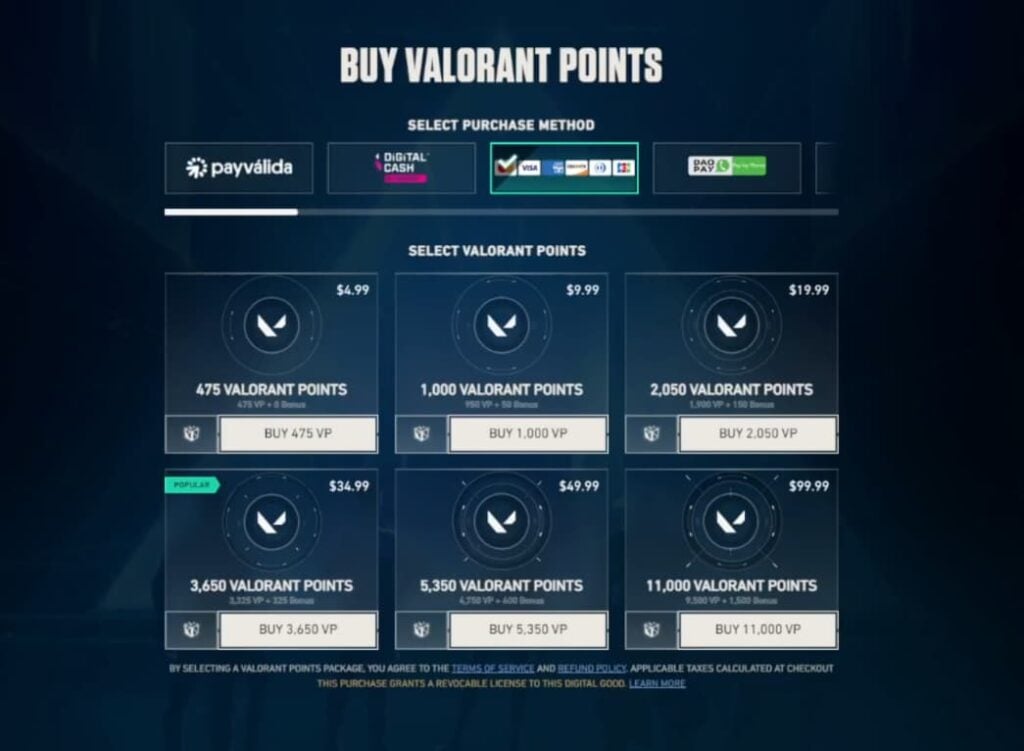
As a sender, make sure you’re added to the receiving player’s Riot list for at least a week. Also, your account must be Level 15 or higher. Both the sender and receiver’s accounts must not have received any restrictions in the past week. For the rest of the rules, read the section for skin gifting in VALORANT.
Can you refund a gift in VALORANT?
As long as it’s not accepted, you can drop Riot Support a message to withdraw a VALORANT gift or wait for 60 days to receive an automatic refund. If your friend accepts the gift, however, you generally can’t claim a refund.
Some regions, however, mandate refunds on such features, whether or not the gift is accepted, so you can drop Riot Support a message to confirm if you’re eligible for a refund or not.