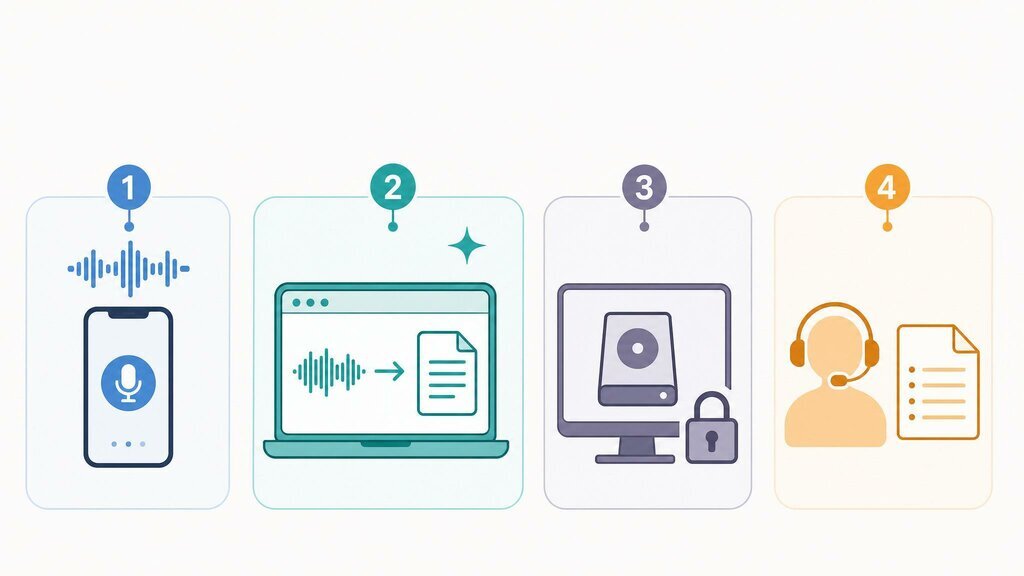
You have a recording. A lecture, a meeting, an interview, a voice memo. You need it as text. There are four realistic ways to get there in 2026, and the right one depends on three questions: how long is the audio, how accurate does it need to be, and how much is your time worth?
Here's each method with its honest trade-offs, from free-and-fiddly to paid-and-polished.

Method 1: Your phone's built-in dictation (free, live audio only)
Both iOS and Android can transcribe speech in real time. Open any notes app, tap the microphone on the keyboard, and talk. For capturing your own thoughts, this works fine and costs nothing.
The catch: dictation is built for live speech from one person near the microphone. It has no way to process an existing file, it won't distinguish speakers, and it gives up on punctuation during long stretches. Playing a recording into your phone's mic technically works and practically doesn't. Accuracy craters and anything over a few minutes becomes soup.
Use it for quick voice notes to yourself. Skip it for anything already recorded.
Method 2: AI transcription web apps (the default answer for most people)
This category matured fast. Modern web-based converters take an uploaded file and return a transcript in minutes, and the better ones no longer stop at raw text.
A representative example is Vomo's audio to text converter. The workflow is what you'd hope: drag in a file, either audio (MP3, WAV, M4A, FLAC, AAC, OGG) or video like MP4, MKV, and MOV, from which it pulls the audio track itself. Pick the language or let it auto-detect among 50+, and a few minutes later you have a transcript with each speaker labeled, plus an AI-generated summary and action-item list. Claimed accuracy is 95%+, which matches testing on reasonably clean audio. Exports cover TXT, DOCX, PDF, Markdown, and HTML, and there's no per-file length limit, so a 3-hour recording goes through whole.
Cost is where this category surprises people. Vomo's free tier covers 30 minutes a week with no credit card, and unlimited use runs $1.92/week. Comparable tools like Otter.ai price at $16.99/month, with the free tier capping single files at 30 minutes.
Use it for meetings, interviews, lectures, and any recorded file where you want readable results fast. Skip it for audio that policy forbids uploading anywhere.
Method 3: Offline transcription with Whisper (free, technical)
OpenAI's Whisper model is open source and runs entirely on your own computer. Nothing gets uploaded, which makes this the right answer for genuinely sensitive recordings: legal, medical, or confidential business material under strict policy.
The costs are in kind rather than cash. You'll install Python or a wrapper app, and processing happens at your hardware's pace. A one-hour file can take 20+ minutes on an ordinary laptop versus 3 to 5 minutes for cloud services. Out of the box you get accurate raw text but no speaker labels, no summary, and no editor; adding those means more tooling.
Use it for confidential audio, or if you enjoy the tinkering. Skip it if your afternoon is worth more than the subscription you're avoiding.
Method 4: Human transcription services (highest accuracy, highest cost)
Services like Rev still employ people, at around $1.99 per audio minute with a turnaround of hours to days. A human transcriber handles what AI still fumbles: heavy crosstalk, thick accents on bad microphones, technical jargon, and formatting requirements like verbatim legal transcripts.
For a one-hour recording that's roughly $120, sixty times the weekly cost of an unlimited AI plan. That premium buys accountability and near-perfect output, which some contexts (court, compliance, medical records) genuinely require.
Use it for transcripts with legal or medical consequences. Skip it for everything routine.
The decision in one table
| Method | Cost | Speed | Speaker labels | Best for |
|---|---|---|---|---|
| Phone dictation | Free | Real-time | No | Voice notes to yourself |
| AI web app (e.g. Vomo) | Free tier; ~$1.92/wk unlimited | Minutes | Yes | Recorded files, meetings, lectures |
| Whisper (offline) | Free + your time | Slow locally | Not built-in | Confidential audio |
| Human service | ~$1.99/min | Hours to days | Yes | Legal/medical stakes |
One tip before you commit
Whatever you choose, run the same ten-minute chunk of your audio through the free tiers before paying anything. Ideally the worst-sounding section. Accents, room echo, and microphone quality affect every engine differently, and ten minutes of testing beats any comparison table, including this one.