Microsoft Build has spent the last several years becoming the most important calendar event for developers working on the Microsoft platform. The 2026 edition, running June 2–3 at Fort Mason Center in San Francisco, looks to carry that momentum further, with AI sitting at the center of almost everything on the agenda.
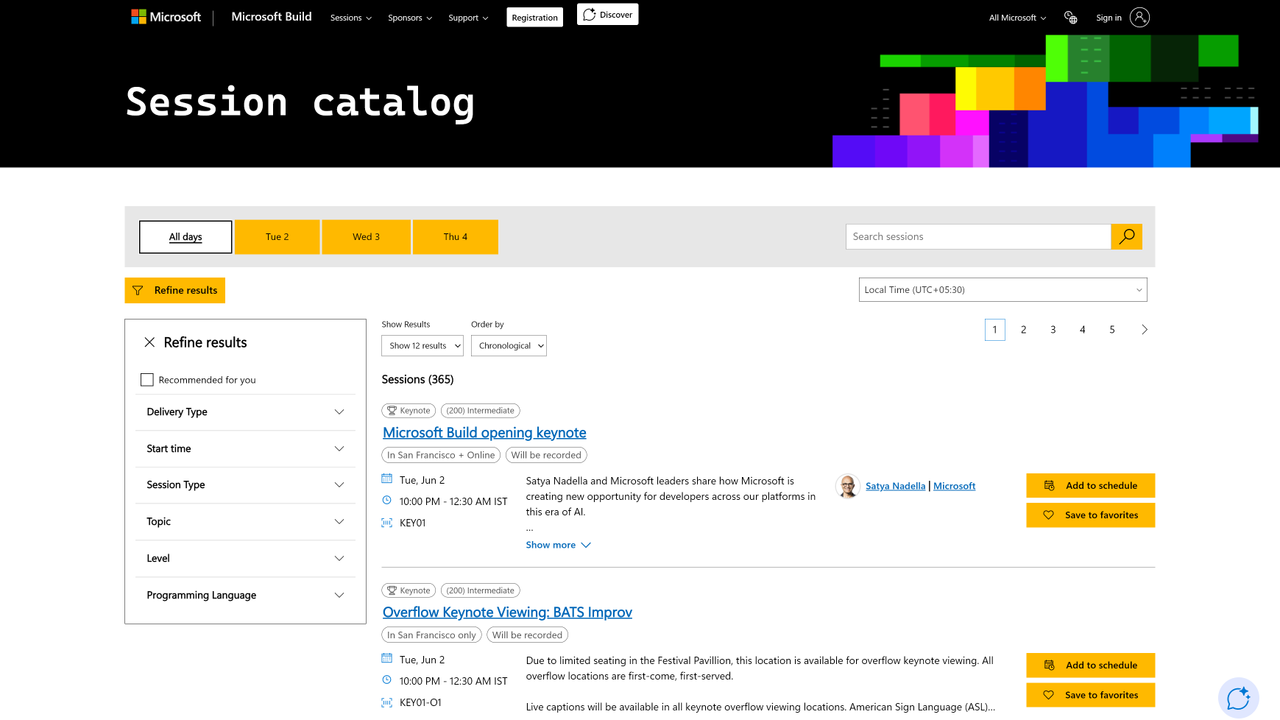
Whether you're attending in person or watching online for free, the session catalog has over 90 entries covering everything from agentic AI to model training. Registration for online access costs nothing, which means the full two days of content, including the opening keynote from CEO Satya Nadella, are open to anyone with an internet connection.
Why Build 2026 is crucial to AI's future
Last year's conference set a high bar. Build 2025 produced more than 50 announcements under the theme of AI agents, including a new GitHub Copilot coding agent that could autonomously fix bugs, write tests, and open pull requests without developer prompting. That shift, from AI tools that assist to AI systems that act, is the thread running through almost every session this year.
Microsoft has moved quickly since then. Copilot Studio has gained autonomous agent capabilities, and the AutoGen multi-agent framework has matured into a platform developers are using in production. Build 2026 is where much of that work is expected to be demonstrated publicly for the first time, with the session catalog organized around six main themes: developer tools and frameworks, cloud platform and data, model training, agents and apps, responsible AI, and Windows.
The conference is also notable for its format. This year's edition is one of the more intimate Microsoft Build events in recent memory, with around 2,500 in-person attendees expected, down from the larger crowds of previous years. Microsoft and GitHub leadership have described that as a deliberate choice to keep the focus on technical depth rather than broad-audience product launches.
Azure is central to the picture as well. The Azure AI platform has expanded significantly over the past year, adding services around retrieval-augmented generation, fine-tuning, and agent orchestration. Sessions this year are expected to move past introductory concepts and address the harder question of what it actually costs to ship AI-powered applications reliably at scale.
For developers who want to understand where AI-assisted software development is heading, Build 2026 offers a clear view. You'll get a close look at what Microsoft's engineering teams are building, alongside honest takes from practitioners on what's working in production right now.
10 free Microsoft Build sessions you should attend this year
All keynotes and most breakout sessions at Build 2026 are available online at no cost, so you can follow the conference without a travel budget. For each session below, online streaming or recorded access has been confirmed through Microsoft's published session catalog.
These are the ten sessions worth blocking out on your calendar, whether you're focused on AI agents, GitHub Copilot updates, local model inference, or understanding how Microsoft is thinking about the next phase of developer AI.
You can view Microsoft's online session catalog for a complete list of keynotes and events.
Opening keynote: Creating new opportunity for developers in the era of AI
The opening session is where Microsoft sets the direction for the entire conference. Satya Nadella is headlining, and based on the session description, the focus is on what Microsoft calls "creating new opportunity for developers across our platforms in this era of AI."
Expect live product announcements and demos from Azure and Windows engineering teams, with OpenAI likely represented given how central that partnership is to Microsoft’s current direction. This is the session to watch if you want the big picture before diving into the technical tracks. It tends to be dense with news, so plan to watch it live and return to the recording to catch anything worth noting in detail.
BRK233: Software defensibility in the era of AI coding
One of the more philosophically pointed sessions in the catalog, this one is aimed at developers thinking about where their work is heading as AI agents become capable of generating code, writing tests, and deploying applications autonomously. The question of what human developers uniquely contribute in that environment is pressing for a lot of teams right now.
The session is likely to frame that challenge as an opportunity, with practical guidance on the kinds of higher-order work AI cannot easily replicate. For engineering leads and product teams, it should surface useful thinking about where to focus development effort in an AI-first environment.
BRK260: Build local AI experiences that harness the GPU, NPU and CPU on every Windows PC
Microsoft's on-device AI story has become considerably more specific in the past year.
This session covers Windows AI APIs, now expanding beyond the NPU to support GPU and CPU, alongside Foundry Local for running open-source models directly on a Windows machine. There's also new tooling for VS Code to help you optimize and prepare models for on-device deployment, and Windows ML now supports web apps through WebNN.
If you're building applications that need to run AI models locally rather than calling cloud APIs, this is the session to prioritize. On-device inference matters most where data privacy and low latency are non-negotiable, particularly in disconnected or air-gapped deployments.
BRK261: Build and ship faster with a developer-optimized experience on Windows
This session sits at the intersection of Windows platform development and AI tooling, covering how Microsoft's developer experience improvements over the past year fit together. It's likely to address the improvements to the inner-loop development experience on Windows, including how Copilot integrates into everyday workflows for developers building cloud-native and AI-powered applications.
For developers who spend most of their time on Windows machines, this one offers practical value even if autonomous AI agents aren't yet part of your day-to-day work. The faster feedback loops being added to the platform are worth tracking regardless of what you're building.
BRK222: The honest practitioner's take on agentic AI on Kubernetes
The title does most of the work here. This is positioned as a no-hype reality check from engineers who have shipped agentic AI systems in production on Kubernetes, which makes it stand out in a catalog that can sometimes lean toward polished demos over field experience.
You'll likely hear about the specific failure modes of multi-agent systems at scale and the gaps between what product announcements promise and what production deployments actually deliver. If you're already building agentic systems or planning to, this is probably the most directly useful session in the entire track.
BRK207: GitHub Copilot in Visual Studio: agents that debug, profile, and test
This demo-heavy session covers what Copilot agents inside Visual Studio can do beyond generating code. You'll see agents root-cause bugs using live runtime behavior and pinpoint performance bottlenecks with targeted fix recommendations. There's also a thread on building test coverage to catch regressions before they ship, with all of it aimed specifically at enterprise developers working in C#, .NET, and C++.
If your team uses Visual Studio for production work, this is probably the most immediately applicable session at the conference. The focus on diagnostics and code quality rather than just code generation is what makes it worth attending over the many other Copilot-adjacent sessions in the catalog.
BRK202: Azure DevOps meets GitHub, the path to AI-powered SDLC
Many development teams currently run both Azure DevOps and GitHub, managing two systems that overlap considerably but don't fully unify. This session lays out Microsoft's current integration story and the direction it's heading, with AI-powered software development lifecycle management as the connecting thread.
The AI angle here goes beyond GitHub Copilot. It also covers how hybrid patterns connecting GitHub with Azure Boards and Azure Pipelines can enable what Microsoft calls Agentic DevOps, with a first-person account from Microsoft's own engineering teams who have already adopted this approach.
For engineering managers planning a tooling consolidation or migration, this session offers a clear picture of what's actually available now.
DEM322: Smaller, faster, smarter: distilling agents with fine-tuning
Inference costs are a growing concern for teams running AI applications at scale, and this session addresses one of the more practical strategies for managing them. Model distillation, training a smaller model to replicate the outputs of a larger one, lets you hit latency and cost targets without sacrificing too much on quality.
The session covers distilling frontier models into purpose-built agents, a pattern that's gaining traction in production environments where running large models on every request isn't economically viable. Expect concrete examples of where distilled models perform well and where they fall short, which is exactly the nuance that's missing from most AI cost discussions.
BRK234: Shipping custom models at scale from fine-tuning to inference
Fine-tuning a model on Azure is relatively straightforward. Getting it into production, keeping it performant as usage grows, and managing the operational overhead is considerably less so. This session covers the end-to-end workflow, including the parts that most product demos skip over.
You'll likely hear about the infrastructure decisions that affect cost and reliability at scale, and the monitoring approaches that surface problems before users encounter them. The handoff between training and operations teams also gets coverage, which is one of the more practical topics that production teams actually care about.
DEM364: Simplify app dev with cloud-native PostgreSQL in Azure HorizonDB
The last session on this list is one of the more technically specific, but it addresses a problem a growing number of teams are hitting: AI-driven applications are sprawling across separate services for vector search, models, and retrieval pipelines, and the complexity is becoming a liability. This session introduces Azure HorizonDB, which embeds AI and search directly into a cloud-native PostgreSQL database.
You'll see how to run hybrid vector queries and call managed AI models directly from SQL, prototyping agentic workflows without stitching together a separate stack of services. For developers who want to keep their architecture tighter and ship faster, this is a session worth watching.
What to expect from Microsoft Build 2026?
Build 2026 takes place at a point where the initial wave of AI announcements has settled into something more operational. The questions this year are less about whether AI belongs in the development stack and more about making it work reliably at production scale without blowing the budget. That shift shows up clearly in the session titles, which lean toward production concerns and honest tradeoffs rather than introductory overviews.
The San Francisco venue is also worth noting. Fort Mason is a departure from the Seattle convention spaces that have hosted most recent editions. It looks like Microsoft has used the change in venue to justify a tighter event with a smaller participant capacity. Fewer attendees means fewer broad-audience sessions and more depth in the technical tracks, which should make the content more useful for developers who have found previous editions too surface-level.
Online attendance remains free, which makes Build accessible to developers who aren't in San Francisco. Keynotes and recorded breakout sessions are available through build.microsoft.com, and many sessions run simultaneously online and in person. If you want to track how AI development is evolving on the Microsoft platform, this is the clearest two-day view available.