The new Xbox CEO Asha Sharma has only been leading Microsoft's gaming brand for a little over two months now, but she's already made some very popular changes and additions to the platform in that timeframe. Last week brought us a hugely popular Xbox Game Pass price drop, and before that, it was confirmed that upgrades to customization and Achievements are in testing and on the way.
Now, as April comes to a close, Microsoft has fully released some of these features, along with some others that have been in consideration and testing for a while now. These upgrades add more options to both Xbox consoles and the Xbox on PC app, giving players more ways to refine and personalize their experience.
On Xbox, you now have the ability to create up to 10 groups (up from two) to organize your games with on the Home screen, and it's been made easier to move and pin individual groups around your interface as well. In the spirit of customization, Microsoft has also implemented the ability to give the Xbox UI a custom color, complete with options to tweak brightness and saturation.
Quick Resume — the popular Xbox Series X|S feature that suspends games when you close them, allowing you to quickly reopen them later or rapidly switch between titles — can now also be disabled on a per-game basis, which is useful for games that have issues causing them to run worse the longer they're open or when they require a constant internet connection to keep you in-game.
Some other minor additions include a new Play History tab in the My games & apps section of the UI that makes it easier to see your recent gameplay, along with a cleaner horizontal display for it, and also the option to choose your preferred resolution while streaming and a Network Quality Indicator (NQI) that provides "lightweight, real-time visibility into your network’s health.
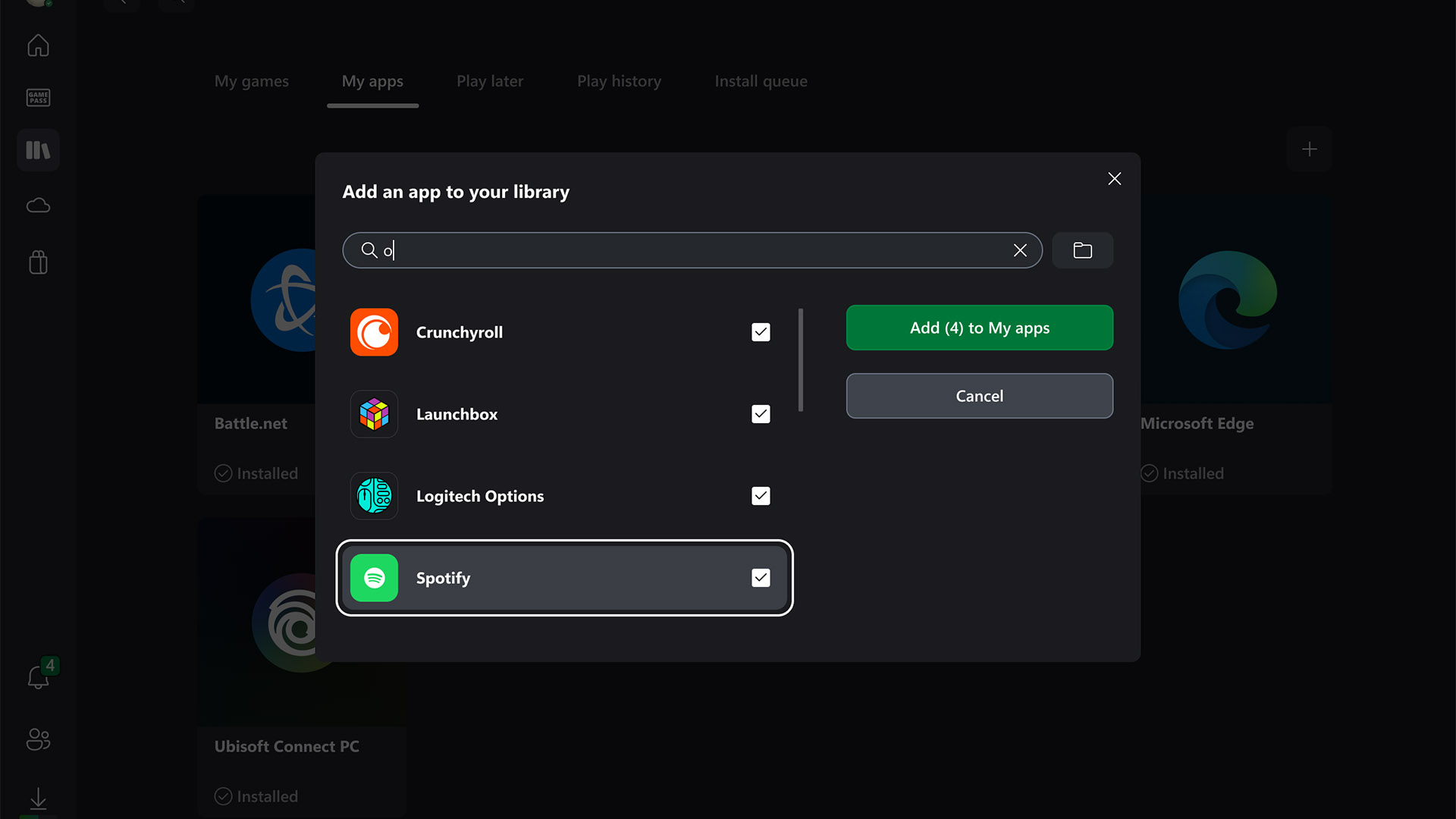
Moving onto PC, the Xbox on PC app has finally gotten a feature I've wanted for years now: the ability to add any installed game or app on your system to the Xbox app, no matter where you've installed it or what client or storefront it originates from. This is effectively Xbox's version of the convenient "Add a Non-Steam Game" feature available on Steam, complete with options to customize names, icons, launch options, and mod parameters.
As Microsoft continues to build for a multiplatform future for Xbox with the console-PC hybrid Project Helix device on the horizon, this is a huge step towards helping the Xbox on PC app rival other PC gaming storefronts.
Additionally, you can now pin up to three games from your Jump back in and Most Recent lists of games, making it easier to quickly start playing your current favorites without having to dig through your library a bit. Once pinned, games will be moved to the front of your lists until you unpin them.
You now also have the option of using a controller like a mouse with the new Gamepad Cursor feature you can enable in More settings > General in Xbox Game Bar's Settings widget. Once Gamepad Cursor is on, your left thumbstick will function like a computer mouse would.
Finally, you can now also reposition where notifications appear for things like unlocked Achievements and invites from friends in Xbox Game Bar. In the Settings widget > More settings > General, you'll see an option to have notifications pop up in one of nine sections of your screen.
All in all, these are all excellent changes and improvements, and paired with new Xbox Ally enhancements, the Xbox ecosystem as a whole has become smoother and more user-friendly to use no matter where you're engaging with it. It's been great to see all the positive changes and additions that've come since Asha Sharma began leading Xbox, and I hope many more are on the way, too.
What do you think of all these new improvements to the Xbox experience on console and PC? Share your thoughts in the comments, and vote in our poll as well.

Join us on Reddit at r/WindowsCentral to share your insights and discuss our latest news, reviews, and more.