
Your product page is live. The photos are fine. The copy already helps close a few sales. Then you turn that same page into a retargeting video draft and it still falls flat.
That happens a lot, especially for home decor sellers trying to get creative ready before a weekend sale. A Shopify listing can do a decent job selling a lamp, throw, or mirror on-page. A short Meta ad has a different job. It needs a stronger opening, faster pacing, one clear reason to care, and a format that feels at home in the feed. When the first draft misses, it usually does not mean you need to rebuild the whole campaign. More often, you just need a quicker way to turn the assets you already have into one ad concept worth testing.
One option is a URL-based workflow through Media.io and its tool to turn shopify product pages into video ads. The value here is simple: less setup work between a product page that already performs and a short ad draft you can review and test.
Best For Sellers Who Need One Retargeting Draft From A Product Page, Not A Full Campaign Rebuild
This setup works best for a specific use case: a small Shopify team or solo marketer with a live product page, a product to push this week, and a need for one short Meta retargeting draft without a long production cycle. It is not for rebuilding the full funnel. It is for getting one usable draft from what already exists.
That is why AI ads can help in this situation. The raw material is already there. A product URL or a batch of product images gives the tool something to work with: page copy, gallery images, pricing context, and likely selling points. From there, you can build a first script, choose a social-style format like UGC, review, unboxing, or lifestyle, add captions and a CTA, and use an AI Avatar if you want a presenter-style delivery without filming.
The main benefit is speed. When the product input, script, avatar, and output settings sit in one browser workflow, there is less friction between idea and draft. If you need to make a second version later, reusable Product Library and Avatar Library assets can save time there too.
When A URL-Led Ad Builder Is Not The Right Rescue Move
This approach has limits. If the Shopify page is thin, unclear, or short on proof, the ad draft will usually reflect that. AI can reorganize what is on the page. It cannot create convincing proof that was never there.
A manual editor or a more traditional creative process makes more sense when the brand needs custom motion work, precise art direction, or a campaign concept that goes well beyond the source listing. The same applies to regulated categories or pages with sensitive claims. In those cases, human review needs to stay in the loop.
There is also a simpler issue: if the landing page buries the real selling angle or uses vague language, the ad builder has less to work with. AI ad tools are good at reducing setup time. They are less helpful when the source page itself is weak.
A Lean Recovery Flow From Product URL To A Testable Meta Draft
Here is the lean version of the process.
Step 1. Open the AI ads workspace and feed it the right product source
Open Media.io and go to AI Ads. Paste the Shopify product URL or upload the product images you want to use. The goal is to pull in the useful basics first: product title, page copy, gallery assets, pricing cues, and likely USPs.
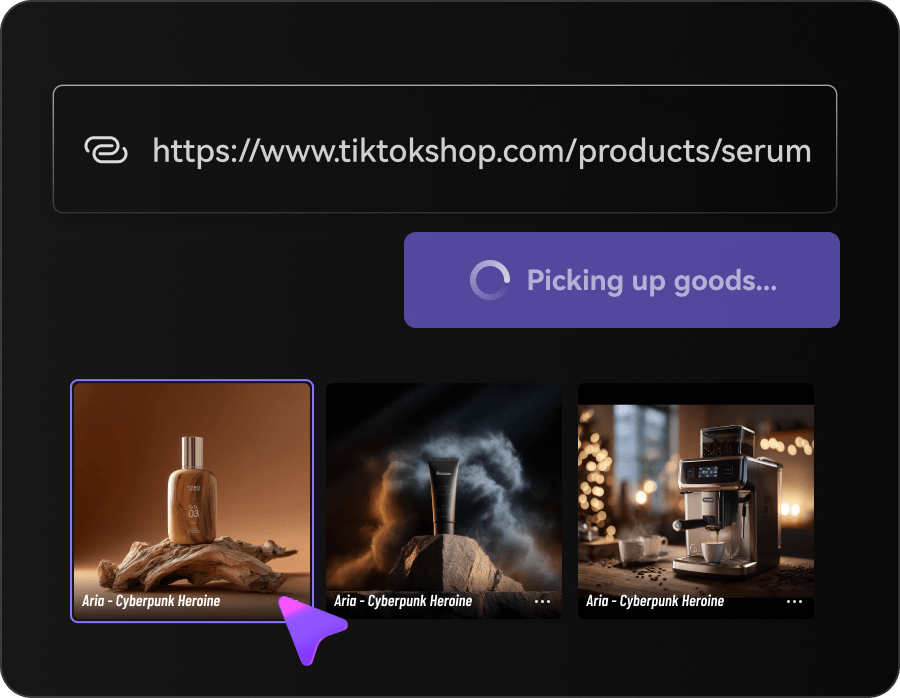
Start with the product page that already converts best, even if it is only modestly better than the rest. A stronger source page usually gives you a better first draft.
Step 2. Keep the creative direction tight before the script expands
Move through the 4-step flow: Product > Settings > Script > Video. This is where a lot of weak drafts go sideways, mostly because the ad tries to say too much.
Choose one ad style. One persona. One format. One language. One CTA. If you are retargeting shoppers for a home decor item, the angle might be “finish the room” or “easy style upgrade.” It probably should not be five selling points squeezed into a very short ad. If needed, pick an AI Avatar or upload a real-person avatar reference for a more creator-led feel. Keep the hook, captions, voice, and pacing close to the language already used on the product page.
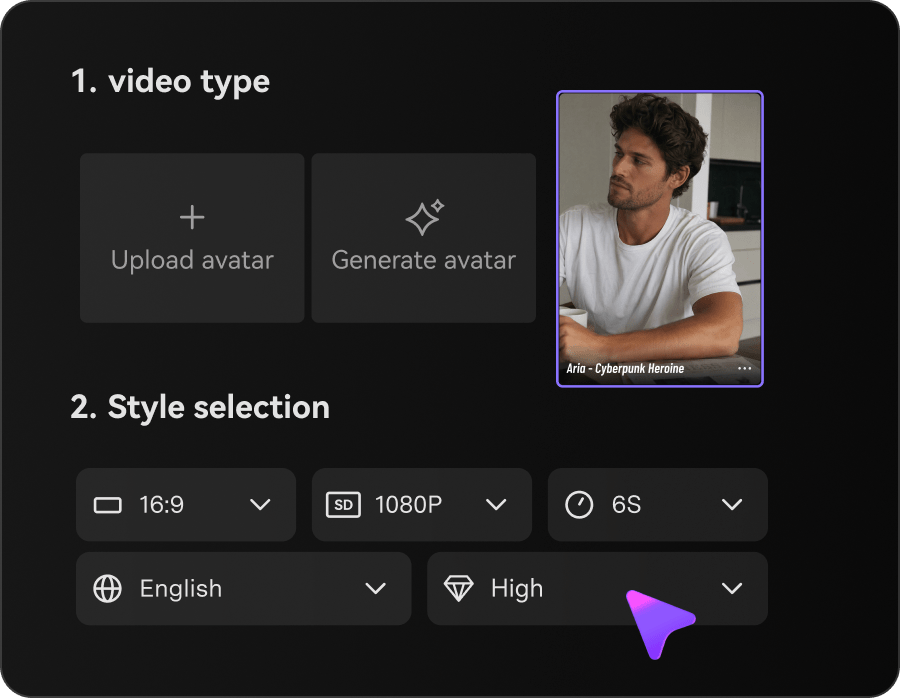
Step 3. Review the script like a media buyer, not like a fan
Before you generate the final cut, read the script carefully. Check the hook, captions, CTA, pacing, avatar voice, and any product-related claims. One small edit at this stage can do more than a bigger edit later.

Then generate the first version, compare one or two variations, and pick the one that feels easiest to test. It does not need to be perfect. It needs to be usable. From there, you can export it, tighten the captions, or move it into the next test batch.
Small Adjustments That Usually Make The Draft Easier To Test
The most useful adjustment is usually focus. A short retargeting ad tends to work better when it pushes one reason to buy instead of trying to cover the whole product page. For home decor, that might be visual impact, comfort, giftability, or a limited-stock angle. Pick one and stay with it.
It also helps to edit the script before video generation. If the hook is too broad, the CTA sounds generic, or the avatar voice does not match the product page, fix that first. It is faster than trying to repair a weak cut afterward. If you sell in more than one market, multi-language output can help, but the same rule still applies: keep the message narrow.
There are tradeoffs. Some advanced features may require a subscription, and results still depend on the quality of the page and the clarity of the creative direction. Better inputs usually produce steadier drafts.
If you are trying to salvage weak retargeting creative before a sale window closes, the next step is fairly practical: start with the Shopify page that already shows some buying intent, build one focused draft, review the claims and pacing, and test the version that looks usable enough to learn from. That is often more realistic than waiting on a full custom production cycle when the deadline is already close.