What you need to know
- A third-party app called Ink Workspace was recently updated to visually align with Windows 11.
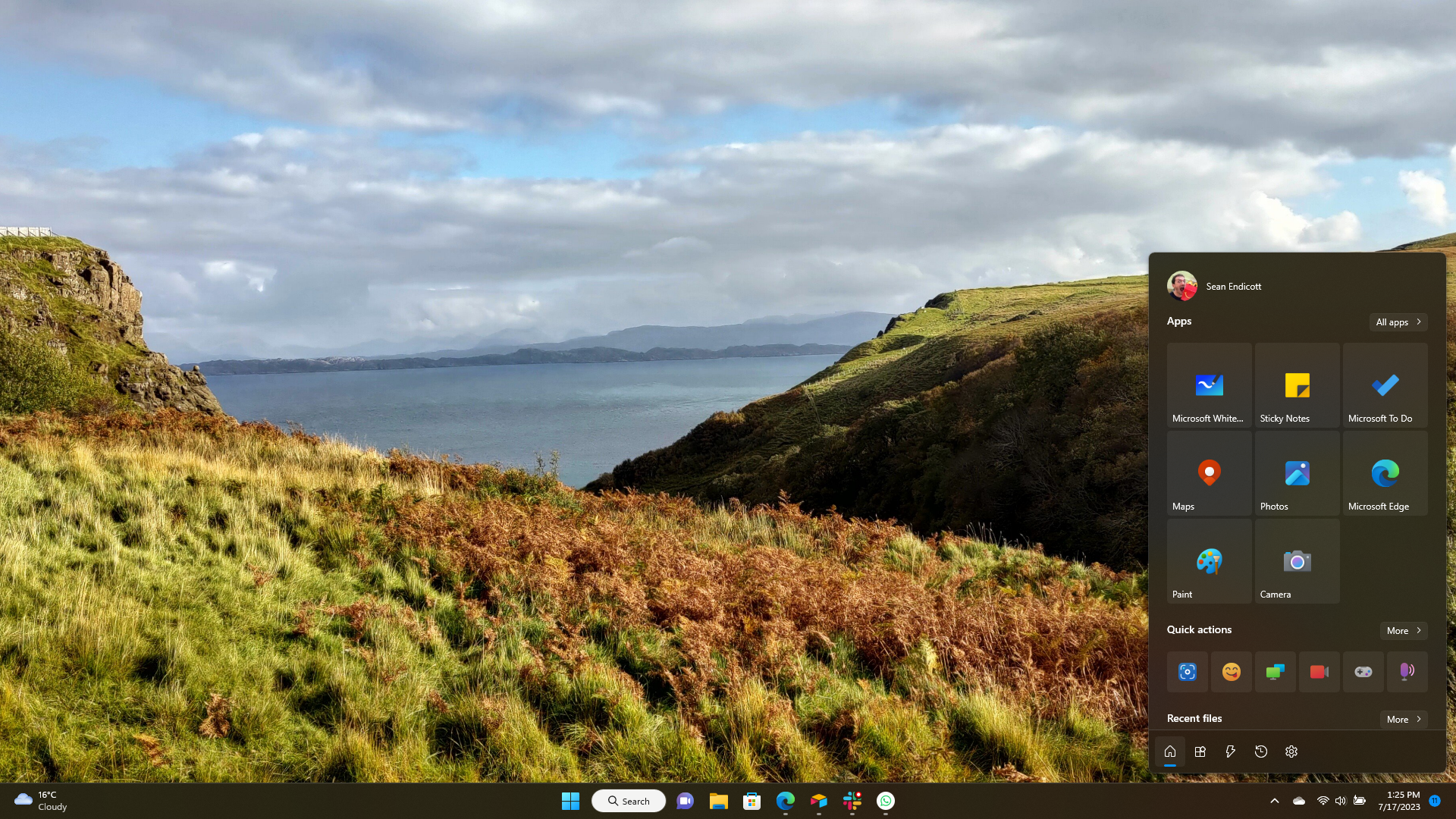
- The app allows you to pin apps that work with a pen and supports several quick actions, such as recording your screen.
- Windows 11 has its own built-in Ink Workspace, but it does not have as many features as the third-party app that shares the same name.
Windows 11 has a built-in Ink Workspace that allows you to pin pen-focused apps. It shows any apps that you've pinned and suggests other inking apps, but it's relatively basic. Third-party developer Michał Łeptuch has their own app, also called Ink Workspace, that's designed to deliver a more robust inking experience.
Ink Workspace also allows the pinning of apps, but it adds a quick actions section for screen recording, projecting your screen, and more. These quick actions can be customized as well. Below your pinned apps and quick actions, Ink Workspace shows your pen's battery level and some shortcuts.
Łeptuch recently released an update to Ink Workspace that brings the app to version 2.3. Here's everything that's new, as shared by the developer on Twitter:
- new Windows 11 Mica app style
- new font for Windows 11 users
- Segoe UI Variable
- new Sleep feature (in Shut down quick action)
- new parallax animation for Bing wallpaper
- new icons for Screen Sketch, Clipboard and Virtual touchpad
- fixes for grouping apps in Apps view
- fixes for Rotate screen feature
- new languages other fixes
While the feature set of Ink Workspace is nice, some may like it more for its looks. Our Managing Editor Jez Corden said he wished the app could be the new Start menu on Windows 11.
i unironically want this to be the new start menuJuly 16, 2023
Following its recent update, Ink Workspace fits in on Windows 11. It also picked up a few handy fixes and features, such as the ability to put it to sleep through quick actions.