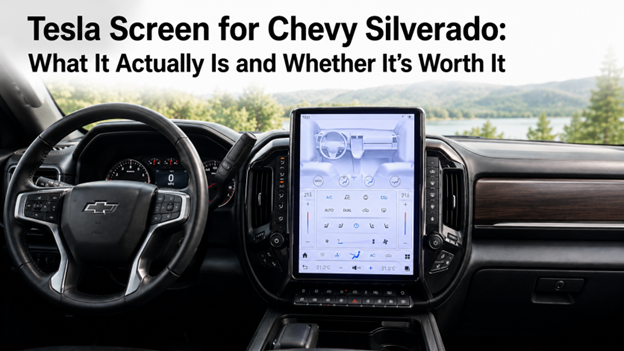
A Tesla screen for a Chevy Silverado is a large-format aftermarket touchscreen typically vertical and ranging from 12 to 16 inches designed to replace or supplement the factory infotainment unit. These screens are inspired by Tesla's center-mounted display format and bring a similar visual overhaul to trucks that were never designed with that kind of interface in mind. If you're wondering whether they actually work as advertised, the honest answer is: yes, with important caveats that generic product pages rarely mention.
- A "Tesla screen" for the Silverado is an oversized aftermarket Android-based touchscreen that replaces the factory head unit.
- Most units run Android Auto and Apple CarPlay, but the depth of feature integration varies significantly by model year and trim.
- Installation is more complex than a standard head unit swap wiring harness compatibility and cluster integration are the real challenges.
- Not every screen on the market is built specifically for the Silverado; fit, finish, and CAN-bus support differ between generic and vehicle-specific units.
- For Silverado owners who want a purpose-built option, the Mergescreens tesla screen chevy silverado page is a useful starting point for spec comparison.
Things You Should Know
- Screen size alone doesn't determine quality. A 14-inch display with poor CAN-bus integration will underperform a well-engineered 12-inch unit that reads your truck's native data correctly.
- Climate control integration is the make-or-break factor Some Silverado trims route HVAC controls through the factory screen; a replacement that doesn't replicate this forces you to either lose climate control or accept a workaround.
- Android-based units are not all the same. The version of Android, processor speed, and RAM determine whether navigation, CarPlay, and media run smoothly or with noticeable lag.
- Model year matters more than most buyers expect A screen compatible with a 2019 Silverado may not natively support the same features on a 2022, even if the physical connector looks identical.
- Professional installation is worth the cost for most people. The wiring complexity, particularly around the amplifier bypass and speaker integration, creates failure points that DIY installs often miss on first attempt.
📌 Keep reading for the full breakdown below.
Why Silverado Owners Start Looking for This Upgrade
The Chevy Silverado is one of the best-selling trucks in North America, and for most of its owners it does exactly what a work truck should do. But the factory infotainment system even in more recent model years has drawn consistent criticism for its response time, its relatively small screen real estate, and the way it handles navigation compared to what drivers now expect from everyday technology. When you've spent time in a vehicle with a large-format display, going back to a 7- or 8-inch factory unit can feel like a step backward.
Getting a Tesla-style screen for your Silverado isn't just about looks, though the difference in how it looks is noticeable. In other words, it's about getting back to a driving experience that feels modern. Drivers want faster touch response, larger navigation maps, a better interface for Android Auto or Apple CarPlay, and in some cases, features like a built-in dashcam view or rear camera that displays at a genuinely usable resolution. The factory screen technically checks most of those boxes but the execution often frustrates.
What "Tesla Screen" Actually Means in This Context
The term "Tesla screen" in the aftermarket world is informal shorthand, not a licensed product category. It refers to the design language popularized by Tesla: a large, vertically oriented touchscreen dominating the center console applied to non-Tesla vehicles through aftermarket hardware. These units are Android-based, typically running a customized version of Android to support both wired and wireless CarPlay and Android Auto, as well as native apps, Bluetooth audio, and built-in GPS navigation.
For the Silverado specifically, a properly engineered version of this screen needs to do more than look the part. It needs to interface with the truck's existing systems: the Bose or stock audio amplifier, the steering wheel controls, the backup camera input, and in many cases the climate control display. This is where the gap between a "generic big screen" and a "Silverado-specific big screen" becomes very real, very fast.
The Integration Problem: Where Generic Screens Fall Short
Here's a specific issue that most product listings gloss over: the Chevy Silverado, depending on trim and model year, often routes climate control through the factory radio. On trims that use a physical button cluster for HVAC, a screen swap is relatively clean. On trims where the touchscreen is the primary interface for heat, fan speed, and AC which is common on higher trims from the late 2010s through the current generation replacing that screen without a unit that replicates the HVAC interface means losing in-cab climate control.
This isn't a minor inconvenience in a truck that gets used in Minnesota winters or Texas summers. It's a functional problem that forces either a dual-screen solution (retaining a secondary display for HVAC) or accepting that you'll dig into the console to adjust temperature. Neither is ideal. The screens that get this right include a mirrored climate interface as part of the replacement unit's software layer which adds cost and complexity to the engineering but is non-negotiable for a clean install.
Similarly, the factory amplifier on Silverado trims equipped with the Bose system requires a specific bypass or signal adapter to work with aftermarket head units. Running the new screen without addressing this results in audio that sounds thin, distorted, or simply incorrect in terms of channel balance because the amp is expecting a pre-processed signal that the aftermarket unit isn't delivering in the same format.
What to Actually Compare When Evaluating Options
|
Feature |
What to Look For |
Why It Matters |
|
Screen Size |
12" to 15.6" vertical format |
Larger isn't always better fit to the dash opening matters |
|
Processor / RAM |
Octa-core minimum, 4GB+ RAM |
Determines CarPlay/Android Auto smoothness and multitasking |
|
CAN-bus Support |
Must be Silverado-specific |
Reads vehicle data like speed, temperature, door status |
|
HVAC Integration |
Replicated on-screen controls |
Critical on trims with touchscreen climate control |
|
Amplifier Compatibility |
Bose bypass harness included or available |
Prevents audio degradation on premium audio trims |
|
Wireless CarPlay / AA |
Native wireless preferred |
Eliminates cable management and improves day-to-day usability |
|
Backup Camera |
OEM camera retention or direct input |
Maintains safety functionality without additional hardware |
Model Year Compatibility: Why This Isn't One-Size-Fits-All
Silverado owners frequently run into a frustration that stems from assuming the same screen works across generations. The 2014–2018 Silverado, the 2019–2021, and the current generation all have different infotainment architectures. The physical dash opening changed. The wiring connectors changed. The way HVAC integrates changed. A screen built for the 2019 platform will not simply drop into a 2022 without additional adaptation and in some cases, the adaptation required makes the project substantially more involved.
Before any purchase, confirming the exact model year, trim level (WT, LT, LTZ, High Country), and whether the vehicle has the factory premium audio system is the minimum due diligence. Reputable suppliers will ask for this information before confirming fitment. If they don't ask, that's a signal worth paying attention to.
Installation: DIY Versus Professional
The honest assessment is that this is not a typical head unit swap. Standard aftermarket radio installations in most vehicles are beginner-friendly: unplug the factory unit, use a wiring harness adapter, plug in the new unit, done. A Tesla-style screen on a Silverado involves more decision points: the harness connection, the amplifier bypass if applicable, the CAN-bus adapter configuration, routing the new screen's larger frame into the dash cavity, and software setup that may require some initial calibration.
Experienced DIY installers with prior Silverado radio work under their belt can handle it. Owners who've never opened a dash before will likely encounter at least one setback that requires troubleshooting. The most common first-attempt issues are related to audio (wrong amp bypass adapter, phasing problems) and steering wheel controls not mapping correctly, both of which are fixable but add time and frustration to the process.
A professional mobile electronics installer familiar with the Silverado platform will typically complete the job in a half-day. The cost of labor is worth weighing against the risk of installation errors that could introduce electrical gremlins.
Practical Next Steps for Silverado Owners Considering This Upgrade
- Confirm your exact model year and trim. Pull your door jamb sticker or run the VIN if you're unsure. The trim level determines whether your climate control is integrated into the screen.
- Check your audio package. Bose-equipped trucks need a specific amplifier integration strategy. This should be decided before choosing a screen, not after.
- Research vehicle-specific fitment. Look for suppliers who engineer their screens for named Silverado year ranges, not universal Android units sold with vague compatibility claims.
- Read installation documentation before buying. A supplier who provides thorough, Silverado-specific install guides is demonstrating that the product was actually engineered for the vehicle.
- Explore purpose-built options. The Mergescreens store is one source focused on vehicle-specific screen upgrades where Silverado compatibility details and specifications are documented by trim and year.
Frequently Asked Questions
Does a Tesla-style screen void the Chevy Silverado warranty?
It depends on what the modification affects. Under the Magnuson-Moss Warranty Act in the United States, a dealer cannot void an entire vehicle warranty simply because an aftermarket part was installed. However, if the aftermarket screen is found to have caused a specific failure such as an electrical issue, warranty coverage for that particular repair could potentially be denied. Consult your dealer and review your warranty documentation before proceeding.
Will my backup camera still work after installing a Tesla-style screen?
Yes, if the screen supports OEM camera input which purpose-built Silverado units should. Most quality aftermarket screens include a dedicated camera input that connects to the factory reverse camera. Always verify this is included and tested during installation, as it's a safety-critical feature.
Can I still use the settings that came with my steering wheel?
Yes, with a steering wheel control adapter. Most reputable aftermarket screens include or support SWC adapters that allow the factory buttons on the steering wheel to retain their audio and call management functions. Configuration may require a brief setup step, but the functionality is preserved.
What's the difference between a generic Android screen and a Silverado-specific one?
The physical fitting, the CAN-bus interface, and the HVAC replication. A generic screen is designed to fit a standard DIN opening and lacks native vehicle data access. A Silverado-specific screen accounts for the truck's unique dash dimensions, connects to the vehicle's CAN-bus network to read speed and sensor data, and on supported trims replicates the climate control interface that was handled by the factory unit.
How long does installation typically take?
Between two and five hours depending on trim and installer experience. A straightforward install on a trim without integrated HVAC or premium audio can be completed faster. A High Country or LTZ with Bose audio requires the amplifier bypass step, which adds time and precision to the process.
Will the screen work with wireless CarPlay on my iPhone?
Most current-generation aftermarket screens support wireless CarPlay, but verify before purchasing. Look for explicit confirmation of wireless (not just wired) CarPlay and Android Auto in the product specifications. Some lower-cost units still require a cable connection for CarPlay, which is a meaningful usability difference.
Is a larger screen always better for the Silverado dash?
Not necessarily the dash opening has physical limits. Screens that are oversized for the cavity require modifications to the bezel or dash trim that can affect the finished look. A screen that fits the specific Silverado opening cleanly will look more factory-integrated than a larger one that required cutting or gap-filling to install.