What you need to know
- Spotify is integrating the TuneMyMusic library transfer service directly into its mobile apps to make switching easier.
- TuneMyMusic supports playlist transfers between Spotify, Tidal, Apple Music, YouTube Music, Amazon Music, Deezer, and more services.
- The TuneMyMusic web client supports transfers both ways, but Spotify is the first to build the platform into its iOS and Android apps.
Enjoy our content? Make sure to set Android Central as a preferred source in Google Search, and find out why you should so that you can stay up-to-date on the latest news, reviews, features, and more.
There's plenty of competition in music streaming, with Spotify leading the pack. Apple Music and YouTube Music aren't far behind, and there are niche options like Deezer, Tidal, and Amazon Music too. Switching music streaming services can be stressful, as users worry they'll use their stats, playlists, and music libraries. In an effort to court new subscribers, Spotify is adding in-app TuneMyMusic playlist transfers to make the process of switching nearly seamless.
The company is partnering with TuneMyMusic to bring the versatile library transfer tool to the Spotify app. TuneMyMusic supports playlist transfers between Spotify, Tidal, Apple Music, YouTube Music, Amazon Music, Deezer, and more services, and it has a web client. It can transfer, share, or backup your music library, or use AI to create "the perfect playlist" based on its contents.
However, this process previously relied on users knowing about TuneMyMusic and seeking out the web-based transfer tool. Spotify's in-app TuneMyMusic integration completely removes that barrier to entry, making it easier for users to switch.
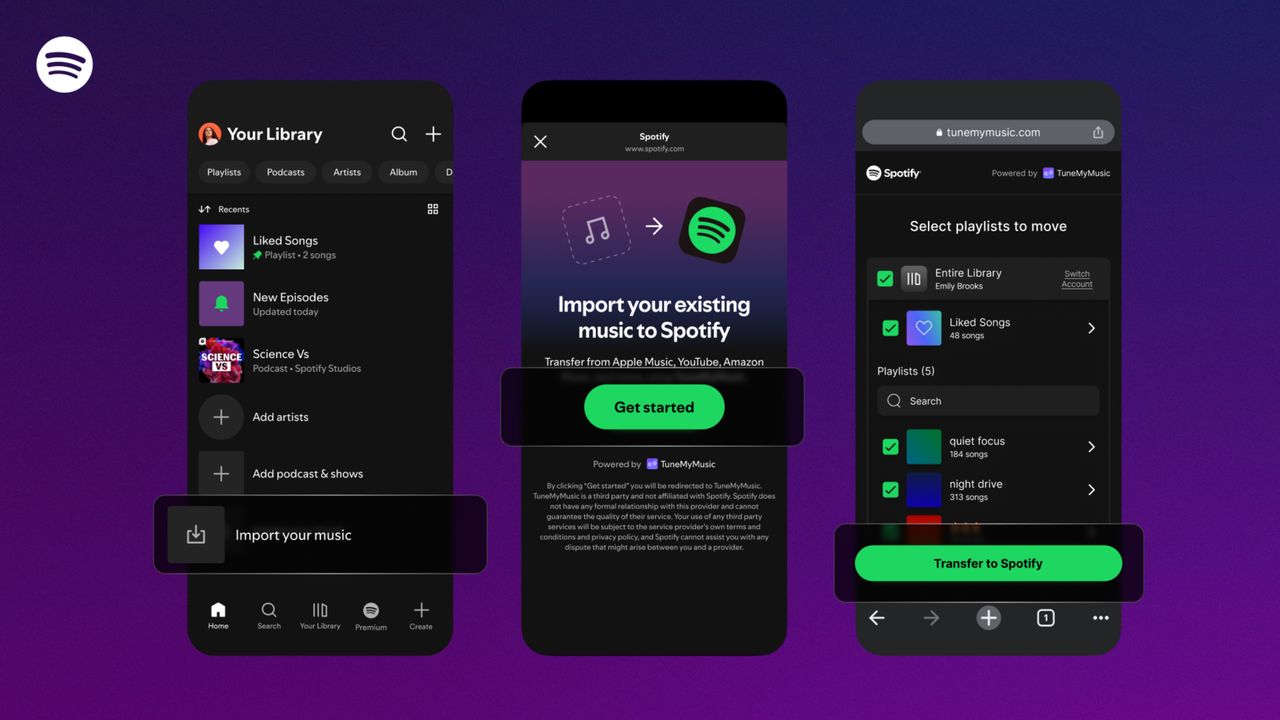
Now, Spotify users can scroll down to the bottom of the Your Library tab in the app, where they'll find an Import your music button. A few prompts will appear that connect to the TuneMyMusic service, where users can select the streaming service they want to transfer from. After that, users need only to select the playlists they want to import, and continue to have everything appear in their Spotify app library.
This feature reduces the friction involved in switching music streaming services, and it's available now on the iOS and Android versions of the Spotify app. It's rolling out globally over the next few days.
The other ways you can switch music streaming services
It's worth noting that TuneMyMusic will help you transfer a library to or from any of the following services, plus some others: Spotify, Tidal, Apple Music, YouTube Music, Amazon Music, and Deezer. Spotify is the only streaming service to integrate TuneMyMusic directly into its mobile streamer. However, you can use the TuneMyMusic web client to transfer from Spotify to another music streaming service as well.
It's not the first time streaming companies have banded together to make switching easier. Previously, Apple Music and YouTube Music partnered in 2024 to create library transfer tools between its music streaming services.