I have a Samsung N130 netbook running Windows XP. Recently, it started locking up while editing Word documents (Office 2003), though I’ve narrowed this down to a dodgy Word document that I had previously edited on my Google Nexus tablet. Android tablets are great for emails and internet access (games, social media etc) but not for any serious work applications. I am beginning to think that a Windows tablet might have been a better purchase, as I am past the age where I want to spend time on social media, and I make a lot more use of Word, Excel and Access than anything else. Peter
Netbooks were a boon when they appeared in 2007-08, because the best ones – such as your Samsung N130 – provided users with cheap, very portable mini-laptops with decent battery life. However, their day has gone. You can now get more capable “netbooks” such as the HP Stream models, and more versatile 2-in-1 laptops such as the Asus Transformer T100 and the Acer Switch range, for around the same price or less.
The best way to refresh an old, slow Windows PC is to back up all your data and applications and reinstall the operating system. Often you can do this by using the “restore to factory condition” option on Windows PCs that have a hidden recovery partition; this now seems to be standard on all new Windows laptops.
Unfortunately, both Windows XP and Word 2003 are more than a decade old and Microsoft has stopped supporting them. This means that, although they still work well offline, there are no more security updates, leaving online users vulnerable to malware.
In theory, you could upgrade your Samsung N130 by installing Windows 7 or 7 Pro (which is still a current Microsoft product) and Microsoft Office 2010 or 2013. This might be worthwhile if you had a high-end laptop with lots of memory, but frankly, the N130 isn’t worth the cost. The major limitations are the Samsung’s 1024 x 600-pixel screen resolution and meagre 1GB of memory. For the price of Windows 7 Pro and Office, you could almost buy a whole new PC.
There is, of course, a free alternative. You could replace Windows XP and Office with a version of Linux and the Office Libre suite. This could be a good solution for home users, and might be viable for people who only work online. However, I don’t recommend this route to business users of Microsoft Office, because neither Office Libre nor Google Docs is sufficiently Office-compatible to rely on, and they’re not worth the cost of the time they will inevitably waste. If your business really can’t afford Office 365 Business – roughly 25p a day – then perhaps you should be in a different business.
The good news is that Office 365 Business allows you to use Microsoft Office on five PCs or Macs, five tablets (Windows, iPad, and Android), and five smartphones, so you could also use the Office apps. The bad news is that it doesn’t include Microsoft Access. You might need to buy a separate copy of Access 2013.
Netbook replacements
Netbooks were cheap because they had very limited specifications, imposed by Intel and Microsoft, and because Microsoft offered manufacturers cheap copies ($11 to $15) of an ultra-low-cost personal computer (ULCPC) version of Windows XP. Today’s netbook-equivalents have much better specifications at the same sorts of prices – usually between £200 and £250, but sometimes climbing towards £300
The main advantages come from the extra power of newer Intel Atom-based chips and from Windows 8.1, which provides fast booting and almost instant start-up from sleep. Processors such as the Pentium N3520, Celeron N2940 and Atom Z3775 are roughly as fast as a second-generation Core-i3, which is far superior to the Atom N270 in your Samsung 310 and similar netbooks. Also, instead of 1GB of memory, they have at least 2GB and sometimes 4GB, plus a standard screen resolution of 1366 x 768 pixels.
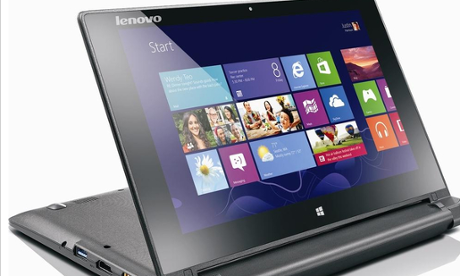
The HP Stream 11 is one of the cheapest and most colourful netbooks at £179.99 with 2GB of memory and 32GB of Flash memory for a hard drive. Alternatives include the Asus X205TA (£171.29), Acer Aspire ES1-111M (£179), and the Asus X200MA with 500GB hard drive (£199.99). But I’d suggest going for a Lenovo Flex 10 with 4GB of memory and 320GB hard drive for £229.99, which is probably what you paid for your Samsung.
The main weakness of these machines is battery life, so check the numbers if you need more than “up to four hours”.
However, you can get the benefits of tablet operation without buying a separate Windows tablet by choosing a 2-in-1 laptop where the keyboard detaches from the screen. The Asus Transformer Book T100TA (from £249.99) is the best known example, and still buyable even though it came out in 2013. (Asus is bringing out new models this year in a Transformer Book Chi range.) The Acer Switch 10 (£269.99 or £279.99) is a robust alternative, with the Switch 11 providing a larger 11.6in screen.
A cheaper option is the HP Stream x360 11-p010na (£229.95), where the screen rotates instead of detaching, much like Lenovo’s pricier Yoga 2 and Yoga 3 convertibles. In fact, if you fancy splashing out, the Yoga 2 with 11.6in screen has the advantage of a faster Pentium N3540 processor, and is an attractive machine for £349.95.
As usual in the Windows laptop world, there are many variations at different prices. I’ve mostly quoted PC World and John Lewis for convenience, but shop around for your preferred spec. Notebookcheck’s table, Comparison of Mobile Processors, provides a simple way to compare the speeds of the various chips.
What about a tablet?
If they’d been available at the time, a cheap Windows tablet would have been better for your Office-using purposes than a Google Nexus tablet. However, cheap tablets – whether running Windows or Android – generally do not deliver quite enough performance for more serious applications. And while you could go for a more powerful tablet with 2GB or more memory, by the time you’ve added a decent mobile or Bluetooth keyboard, you won’t have saved much compared with buying a 10in laptop or 2-in-1 convertible.
If you only plan to use it around the house, then a Windows tablet will work with any USB keyboards and mice you already own, though you will need to buy an adaptor or an external hub to plug them in.
Either way, I think an 8in Windows tablet is a useful companion to a 13.3in or 15.6in laptop, but not a very useful companion to a 10in or 11.6in device. Rather than buying both, I’d put any extra cash into a better 2-in-1 or convertible.
Have you got a question? Email it to Ask.Jack@theguardian.com