
Eufy is a technology company that’s just as well known for its security cameras as its robot vacuum cleaners. In fact, while you can’t yet have your robovac patrol the hallway like a security guard, the two sets of products live in the same ecosystem and are controlled by a single Eufy app.
This is where the company’s security products are set up, adjusted and interacted with. You can add a single security camera, a video doorbell, or an entire home alarm system full of sensors, sirens and local storage. All that can then link into smart home platforms like Alexa and Apple HomeKit – and unlike many of its rivals, Eufy doesn’t charge a monthly fee, since camera recordings can be stored locally.
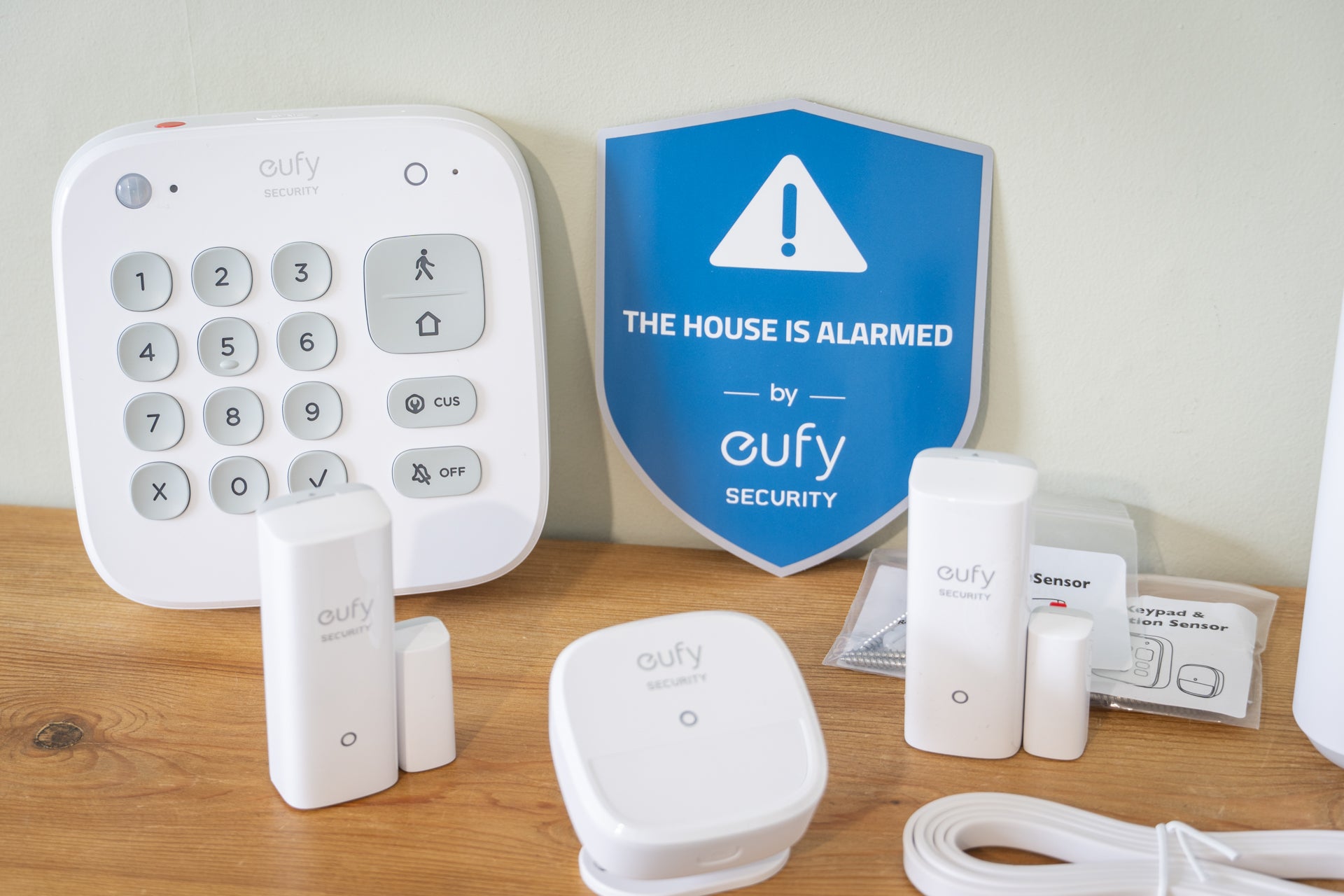
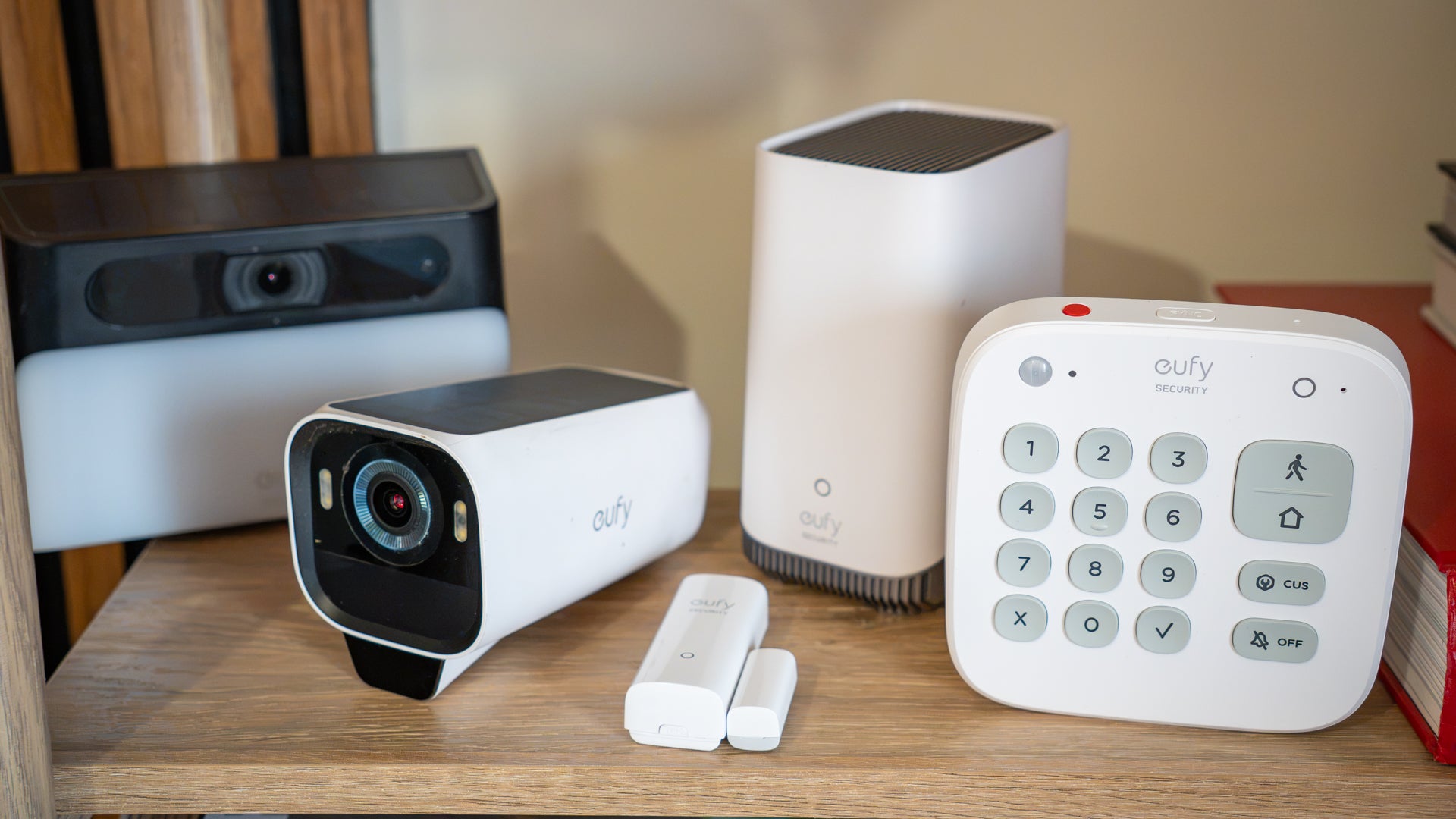
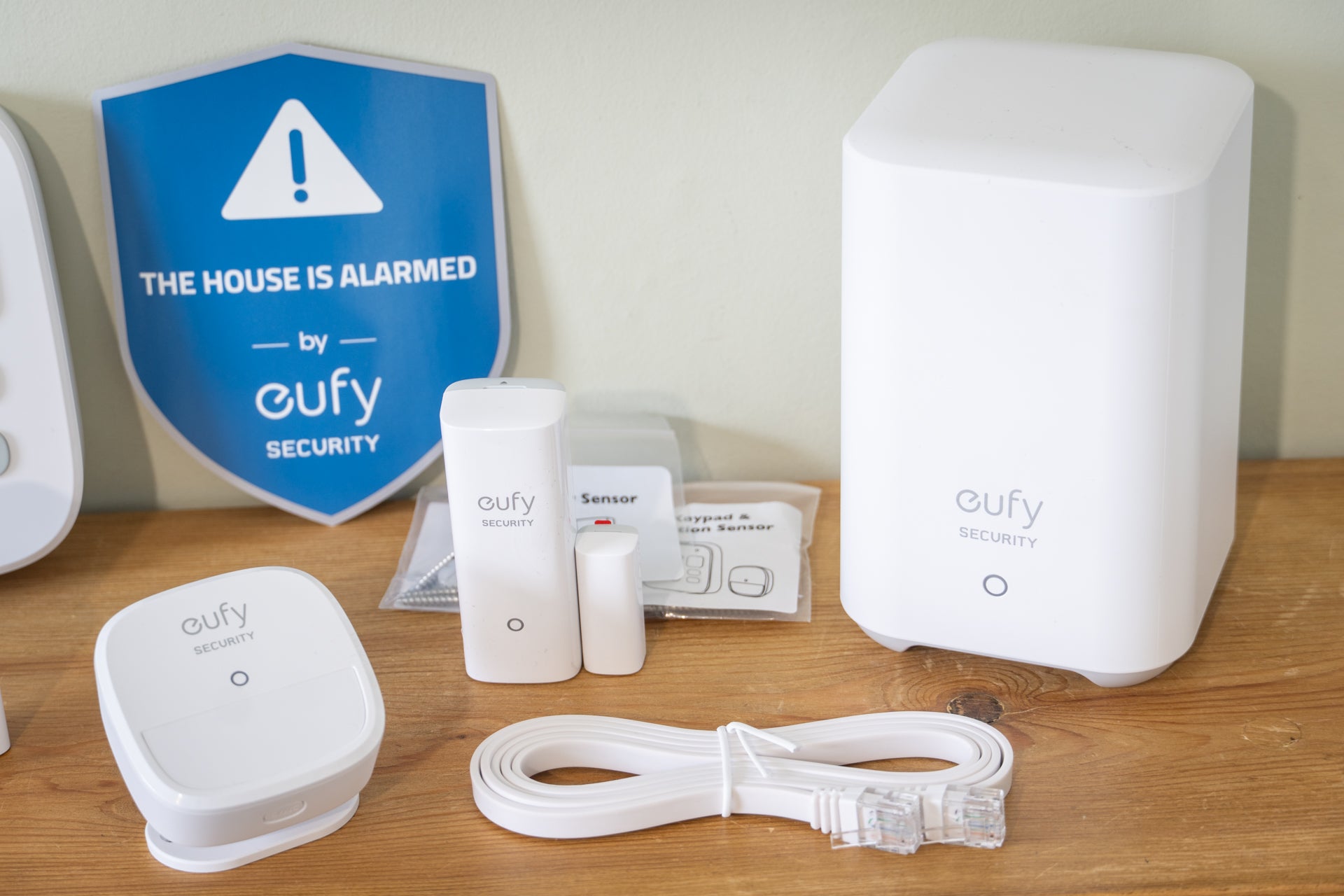
This review focuses on Eufy’s five-piece home security kit, but the set up and installation process is broadly the same for all of its devices – and, helpfully if you start with the five-piece kit, it’s easy to expand the system over time, as I’ve done, and will explain in more detail later. For now, the starter kit featured here includes a base station, plus two door/window contact sensors, a motion detector and a wireless keypad.
As well as acting as a siren, a doorbell chime and a gateway between the individual components and the internet, the base station also connects to Eufy’s smart home security cameras and includes 16GB of storage for saving video recordings. An upgraded version of the hub, called the HomeBase S380, can have its storage increased to 16TB and brings artificial intelligence to your Eufy security cameras.
The basic kit is priced at £159, which makes it cheaper than equivalent systems like Ring Alarm and Yale, and there’s no ongoing subscription fee required to unlock full functionality.
While a good thing for overall cost, the lack of a subscription means this Eufy alarm is a self-monitored system. Unlike Verisure and Simplisafe, it does not connect to an alarm response centre that can call the emergency services and dispatch a private guard. It also lacks a system for alerting you and your emergency contacts by automated phone call, as Ring offers in the UK. Instead, this is an alarm that triggers a siren and alerts you via a smartphone app.
Think this might be the best home security system for you? Read on to continue the rest of our review.
Eufy Home Alarm Kit
Rating: 4.5/5
Wireless protocol: Proprietary
Base station backup battery: No
Door/window sensor battery: Replaceable, up to two years
Keypad battery: Rechargeable, up to 180 days
Motion detector battery: Replaceable, up to two years
Base station dimensions: 8.5cm x 13cm x 8.5cm
Base station connectivity: Wifi, Ethernet
Sensor/accessory limit: 50 (16 cameras, 16 door/window sensors, 15 motion detectors, 3 keypads)
Base station wireless range: Up to 90 metres
Why we love it
- Great value
- Easy to set up and configure
- Expandable with cameras, doorbells and more
Take note
- No battery or cellular backup
- Door/window contact sensors are quite large
- No professional monitoring in the UK
Eufy’s five-piece alarm kit serves as an introduction to a brand that also sells a wide range of additional smart security products. These include indoor and outdoor cameras, solar panels for unlimited battery life, spotlights, sirens, key fobs and a more powerful hub with AI smarts and expandable storage. Eufy also sells robot vacuum cleaners and floor mops, and since 2025 these are all controlled from the same smartphone app.
The starter kit featured here includes everything you need to monitor a door and a window, track motion in one location of your home, arm or disarm with a keypad, and connect your system to the internet and Eufy’s smartphone app. The HomeBase is also ready to work with other Eufy security products, including indoor and outdoor cameras, allowing you to easily build up the right system to suit your property, security needs and budget.
Unlike the Ring Alarm, Eufy does not require a paid subscription to perform basic functions. Instead, a subscription is only needed if you want cloud backup storage for your cameras, which otherwise save footage locally. Unlike Verisure and Simplisafe, Eufy does not offer professional monitoring in the UK; as with Ring, this service is exclusive to the US and available there with a subscription.
Despite its lack of professional monitoring, Eufy’s alarm still works very well, represents excellent value for money, and can be expanded with a wide range of extra devices to create a comprehensive self-monitored security system. My only real criticisms are its lack of a backup battery to keep the system online during a power cut, and the lack of 4G connectivity to take over during a broadband outage.
Read on to learn more about the starter kit, and also how it integrates with Eufy’s broader home security ecosystem.
Buy now £159, Eufy.com
Eufy Home Alarm Kit hardware
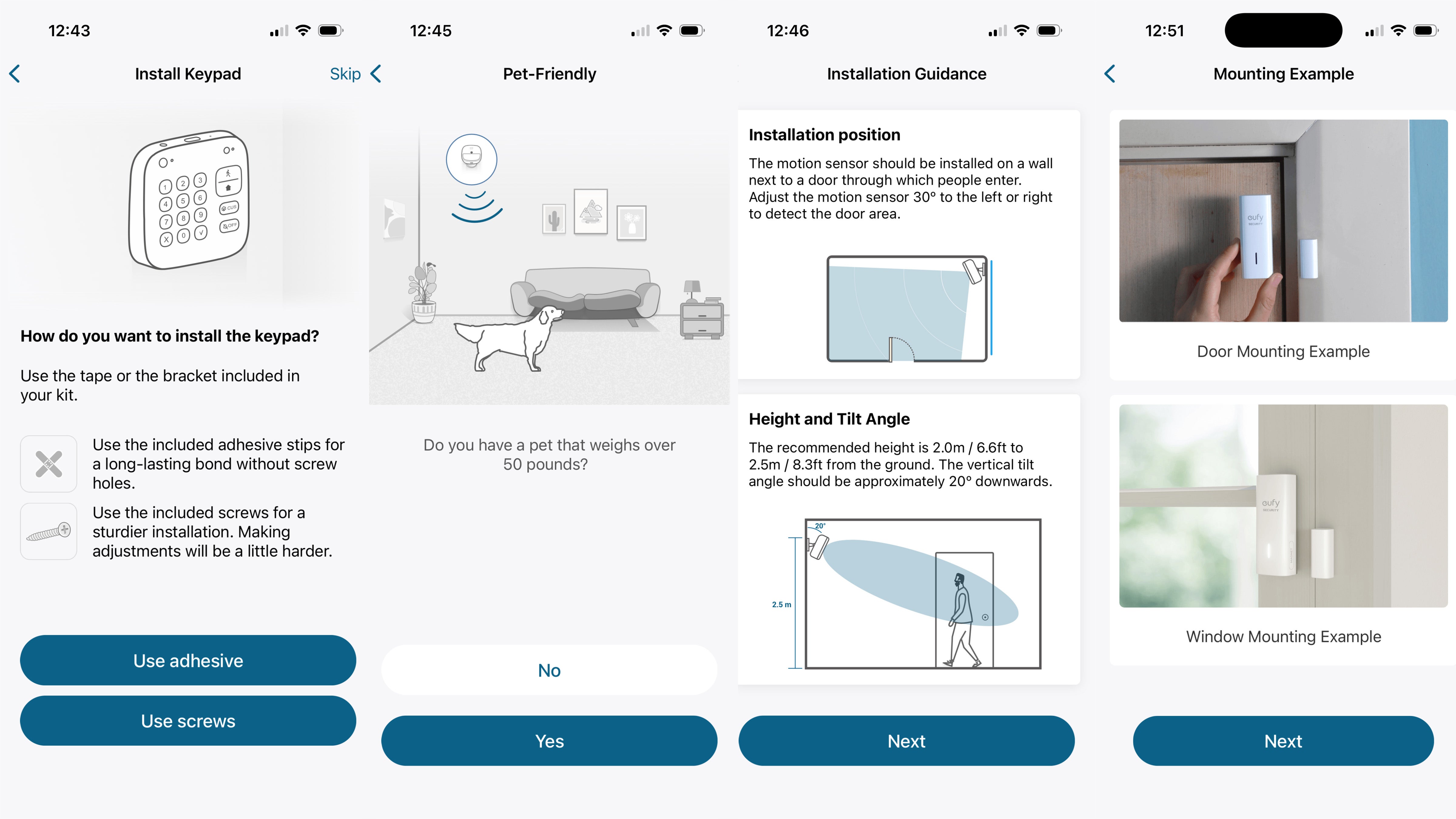
Eufy’s five-piece kit is quick and easy to install, with the Eufy smartphone app guiding you through the setup process. The instructions are clearly written and the app uses images to help explain each step.
The HomeBase is first connected to your router with the included Ethernet cable, but after the initial setup you can switch to a wifi connection. I like the flexibility here, as not everyone has a spare plug socket next to their router, or a spare Ethernet port on the router itself.
Next, the app walks you through the installation of the door/window sensors, the motion detector and the keypad. You can give each of these their own name and assign them to a location, such as the hallway for the keypad, and front door for the door sensor.
The battery-powered door/window sensors work like many others, in that they stick to your door and the frame (or you can use the included screws instead), and use a magnet to tell whether the door or window is open or closed. Eufy says these sensors work with a gap of up to 4cm between the main unit and the small magnet, which is more than most other alarm systems and makes it easier to install on a broader variety of door and window frames.
Read more: New Eufy E10 smart screen has a catch
Eufy’s motion sensor also works like most others, but instead of being designed to stick into the corner of a room, it comes with an adjustable mount/stand. This can stand up on its own, or is attached to the sensor with a ball-and-socket joint, then fixed to any flat surface with two screws or an adhesive pad. Eufy also includes screws and pads for the door/window sensors and the keypad.
The rechargeable keypad attaches to a mounting plate, which can then be either stuck or screwed to a wall. As well as numbers for your passcode and a pair of buttons for arming and disarming the alarm, the keypad has a customisable button. This can activate the alarm’s geofencing mode, where its status depends on the location of your phone, or enable a user-defined alarm schedule. Passcodes can be between four and eight digits long, and you can assign unique codes to each user – and since the app keeps a log of the alarm’s activity, you can see when the cleaner has disabled the alarm using their own code, for example.
I was immediately impressed by the hardware of this kit. Every component looks good and feels well-made, and nothing seems particularly dated, as can often be the case with alarm systems like this. An external siren would be welcome, like the one offered by Yale in its equivalent (but rather more expensive) alarm kit. However, Eufy sells additional wireless sirens which cost £40 and can be installed outdoors.
Read more: Do Ring doorbells work without a subscription?
Eufy Smart Display E10
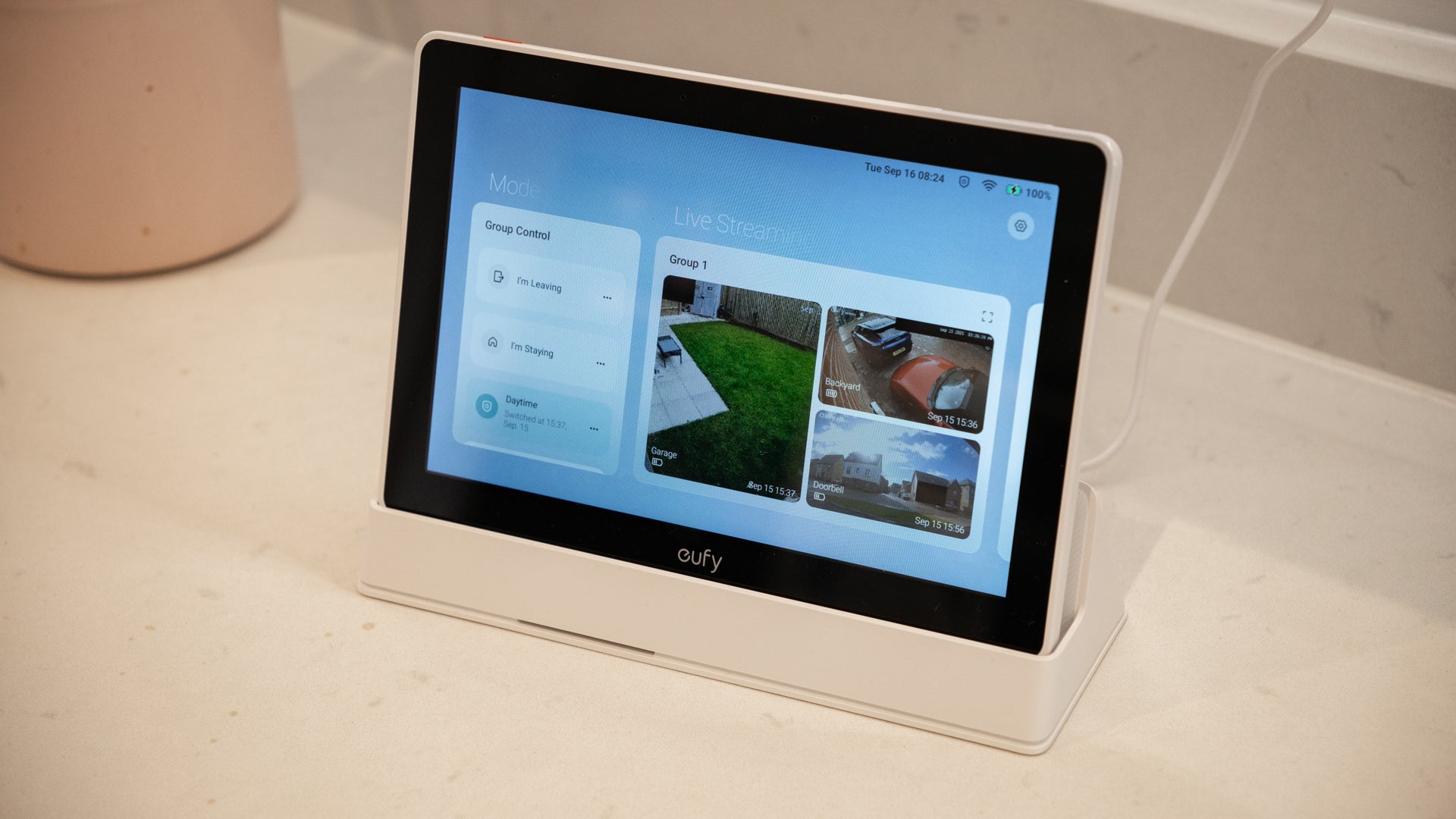
Smart displays are becoming an increasingly common addition to smart home security systems. Eufy’s is called the E10, and it’s a wireless, battery-powered touchscreen tablet that comes with a dock and is used to view live video from your security cameras. It also displays a live feed from your Eufy video doorbell the moment a visitor presses the button, and its dashboard highlights any recent activity detected by your cameras.
I’ve used the E10 as a portable video doorbell display. Since I tend to work upstairs with headphones on and my phone silenced, I sometimes don’t hear the doorbell. The E10 fixes this, since it can sit on my desk all day, then light up, sound a chime, and show a live video feed whenever the bell is pressed. I can then tap to speak to the visitor or head downstairs. The battery is impressive, with a whole working day often using under 10 per cent of its charge.
The E10 can also be used to arm and disarm the rest of the Eufy smart system, and it can live-stream video feeds from several cameras at once – although, naturally, that’ll eventually deplete the batteries of your cameras and the display itself if undocked. It’s not the cheapest accessory, at £179, but it feels well-made and was entirely reliable during my month-long test period. I can see it being beneficial if you have an outbuilding, like an office, workshop, or summer house, where you can be alerted to the doorbell and cameras without feeling tethered to your phone.
Read more: Eufy E10 smart screen comes with a catch
All that lets the E10 down is how it doesn’t work with other smart home systems. It can’t control your smart lights, music, or thermostat, and it can’t even tell your Eufy robotic vacuum to clean the floor, which is a bit of a disappointment. Rivals like the Tapo H500 and Amazon Echo Hub perform better in this regard.
Eufy security cameras and video doorbell
I have a pair of Eufy S3 Pro outdoor security cameras, reviewed for The Independent’s best home security camera guide. These are wall-mounted and monitor both my garden and drive. The solar panel on top of each camera is usually enough to keep the battery charged all year round, although more frequent use paired with less frequent sunshine can cause the battery to drop. In a year of use I think I’ve plugged each camera in for a top-up only once, which is impressive given they’re active every night and record whenever motion is spotted.
The S3 Pro records in 4K resolution and has very impressive full-colour night vision capability – honestly, it’s so good that footage recorded in the dead of night can look like it was taken in broad daylight.
These cameras came bundled with Eufy’s HomeBase S380, which is an upgrade to the S280 included in the basic five-piece kit highlighted earlier. The main upgrades include expandable storage (up to 16 TB from the 16GB included as standard) and artificial intelligence. The latter gives your compatible cameras an AI upgrade, including human, vehicle, pet and face detection, which helps prevent false alarms by recognising familiar faces. I like how the HomeBase doubles as a siren and a doorbell chime, and that the S3 Pro is compatible with Alexa, Google Assistant and Apple HomeKit.
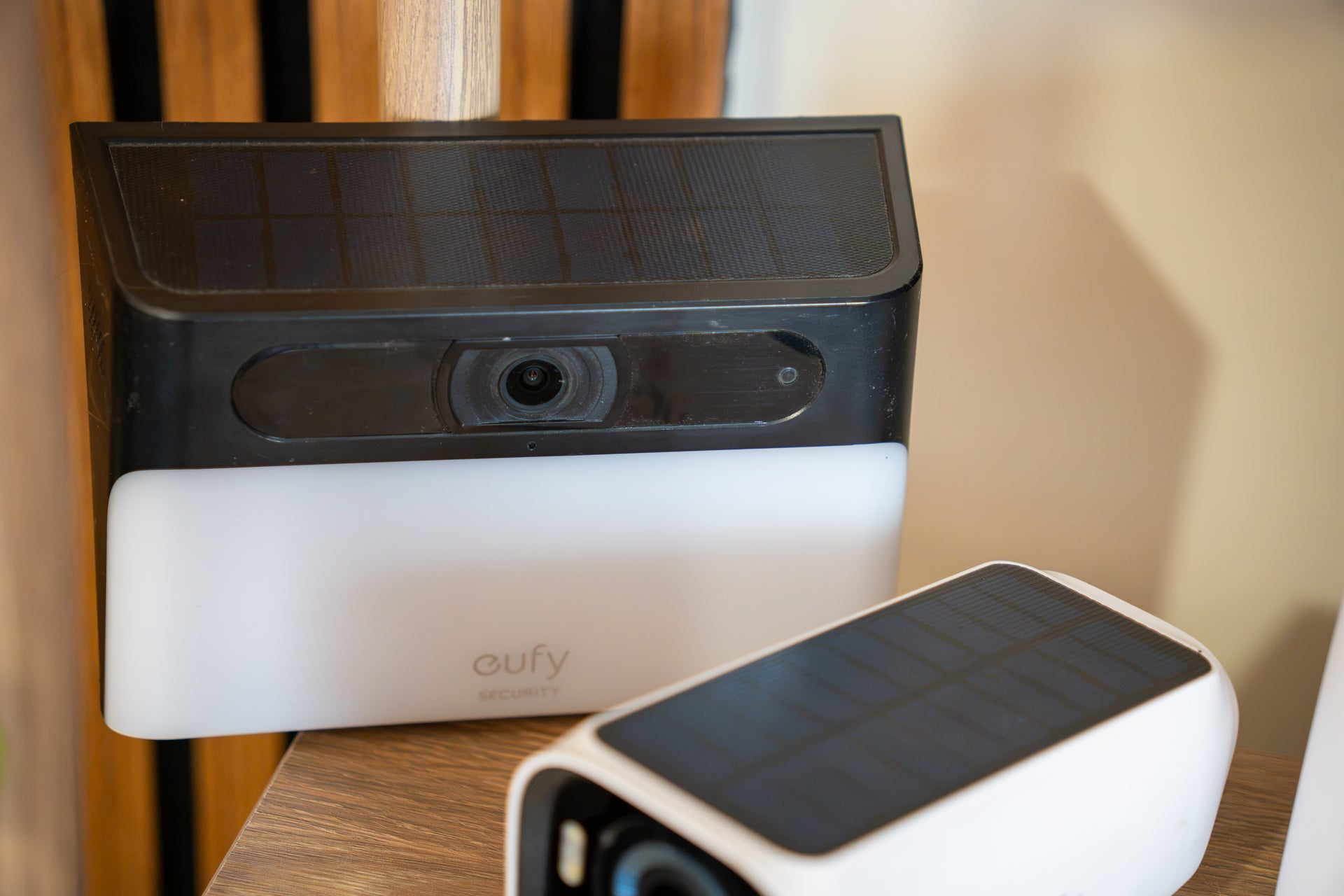
I also expanded my system with the Eufy Solar Wall Light Cam S120, which combines a solar-powered outdoor security camera with a spotlight. I bought this because after sunset our outside bins are in total darkness at the back of the drive, making it too easy to accidentally put food in the recycling bin and vice versa. The light of the S120 comes on when nearby motion is detected, and the camera can be configured too start recording too. I’ve had it for almost a year now and haven’t once needed to plug in the battery; as I write this it’s at 94 per cent, thanks to getting enough sunlight every day to offset the energy it consumes.
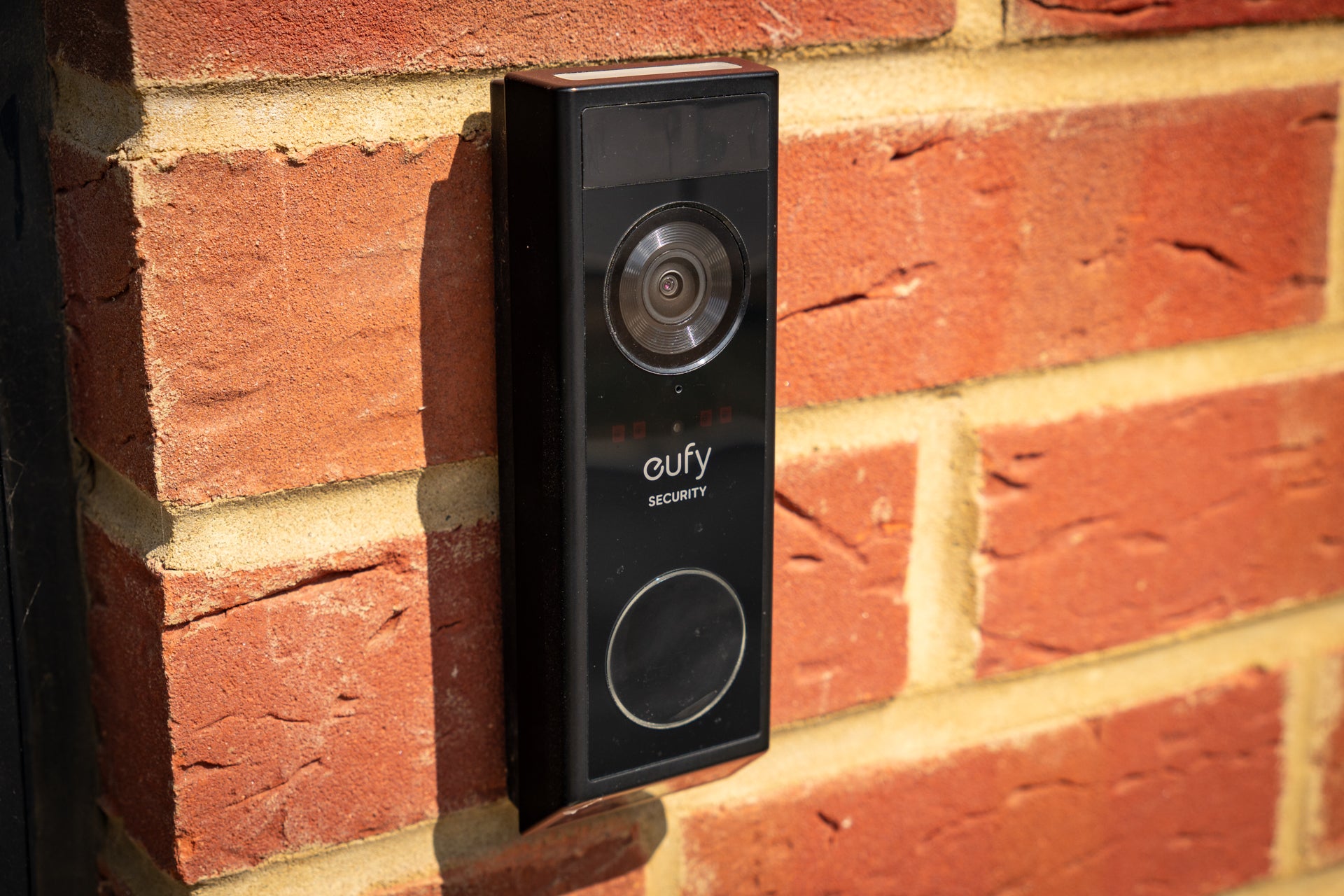
Finally for the cameras, my system has a Eufy E340 video doorbell. This works much like any other video doorbell, but what helps it stand apart is the secondary camera lens, which points downwards to provide a view of parcels delivered to your doorstep.
Eufy Home Alarm Kit software
I’ve already said how good the Eufy app is during the installation process, but it’s worth stressing again how clear and concise the instructions are. Everything makes perfect sense, and I encountered no installation issues at all. It’s also worth noting that, in 2025, Eufy combined its security and cleaning apps into one, where both its security devices and robotic vacuums can be set up and controlled together.
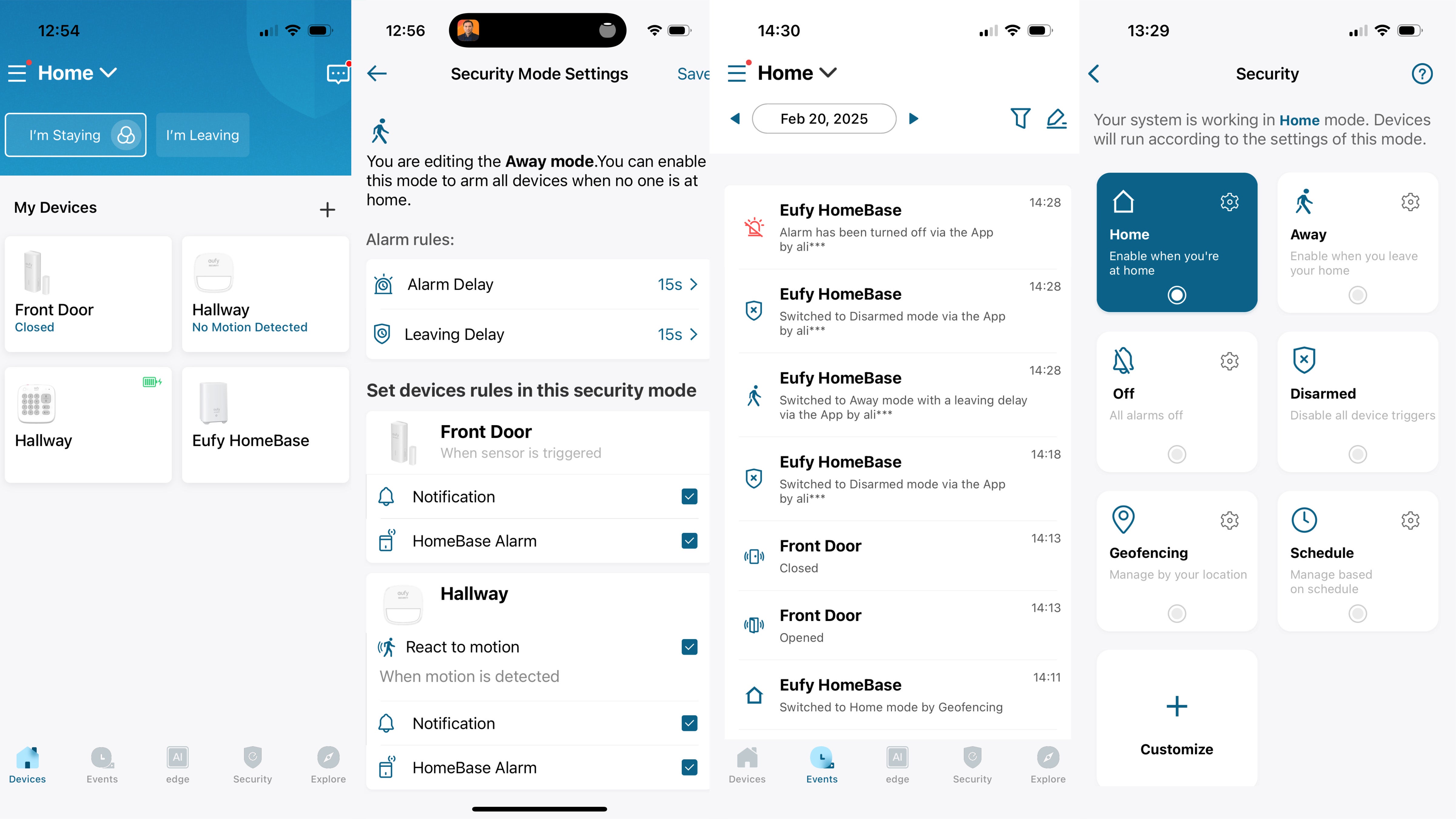
Once set up, the app gives quick and easy access to buttons for arming and disarming the system, and for checking the status of every component, such as whether the door is opened or closed, and the battery level of each device. The app also shows a simple timeline for every motion detector and door/window sensor, making it easy to see when motion was spotted or a door was opened.
As well as simply arming or disarming, the system can be controlled with a set of configurable modes. The most interesting is called Geofencing, and it uses the location of your smartphone to automatically change the alarm mode depending on where you are. I set this mode to arm the system when my phone leaves home, then disarm it again when the phone re-enters a geofenced area with a radius of about 50 metres.
Multiple devices can be added to this system, ensuring the phones of you and your partner are both accounted for, and the alarm will only arm when both are away from home, then disarm when either returns. It’s a smart system and one that I found works quickly and reliably. It’s also possible to set a more regimented alarm schedule, if you prefer.
Eufy’s security cameras and video doorbells are added to your alarm system via the app. Speaking of cameras, the S280 HomeBase included in this kit has 16GB of storage that can be used by Eufy cameras – or, if you purchase the aforementioned S380 HomeBase you can increase its storage to a massive 16TB (16,000GB). And because this is all done locally, there’s no monthly fee.
Eufy Home Alarm Kit smart home features
Some elements of Eufy’s security system work with voice control and smart home systems like Amazon Alexa, Apple HomeKit and Google Assistant. This is most useful with Eufy’s security cameras and doorbells, which can show a live video feed on compatible smart displays, or on your television via the Apple TV streaming box. Voice assistants can also be used to control Eufy floodlights and smart door locks.
I added the Eufy alarm kit to my Alexa system. This gave the Amazon assistant access to the HomeBase and the door/window sensor, and meant I could ask Alexa to arm or disarm the Eufy alarm system. For security reasons, stating a four-digit code to Alexa is required to disarm the alarm. Speaking to the system can occasionally be more convenient than opening the Eufy app and tapping an icon, but that requires an Amazon Echo smart speaker to be nearby. I preferred using the keypad, but it’s nice to have various ways to arm and disarm the system.
Eufy subscription plans and monitoring
Unlike Ring, Eufy’s alarm systems offer a lot of features without the need for a subscription. However, if you want the extra protection of cloud backup – where camera footage is uploaded to Eufy’s cloud storage service, as well as being saved locally – you’ll need to pay £3.99 a month or £39.99 a year.
That fee covers one device, such as a doorbell or a single camera, and stores footage in the cloud for 30 days. If you need more, Eufy’s Plus Plan costs £12.99 a month or £129.99 a year and stores footage from all of your devices for 30 days.
Unlike Verisure and Simplisafe, Eufy does not offer any form of monitoring service in the UK. This means there will be no human response if your alarm is triggered, and no response from, or interaction with, the emergency services. Instead, your system will sound the alarm and record footage, if you have a camera, but it’s up to you to call 999 if required.
Just like Ring, Eufy does offer professional monitoring in the US, but this isn’t available from either company in the UK.
The verdict: Eufy Home Alarm Kit
This is a great alarm kit at a good price, and one that is easy to expand and upgrade as required. The hardware looks smart and feels well-made, while the installation process is straightforward and the app is easy to use – at least once you get the hang of how each of the alarm’s various modes can be configured. I especially like how the geofencing mode effectively automates the arming and disarming based on your location.
I also like how Eufy’s HomeBase acts as an expandable storage hub for its security cameras, and as a chime for Eufy doorbells too. The wireless keypad doesn’t look as archaic as some rivals do, while the base station is smaller than that of Simplisafe, and the included stand adds flexibility to where the motion detector can be installed. The door/window sensor is bulkier than some rivals, but is still easy to install and relatively discrete.
Eufy loses marks for the HomeBase not having any battery or cellular backup, so if there’s a power cut or broadband outage the alarm system stops working, and the system doesn’t notify you when this happens.
That negative aside, the Eufy kit scores points for not hiding features behind a subscription, as Ring does. Local, expandable video storage is very welcome, while a cloud backup is there, and at a fairly reasonable price, for those who really need it.
How I tested
I installed the Eufy alarm system in my home and used it for several days. The setup process included naming each component in the app, diving into the settings pages to make adjustments, and understanding what happens when the alarm is armed, disarmed and triggered. I also looked at how the kit works with smart home systems like Alexa and Apple HomeKit.
Why you can trust us
The Independent is committed to providing unbiased reviews and expert shopping advice across a range of home improvement products. Our team of experts has spent years testing and rating the latest smart home tech in our homes, gardens and under real-world conditions, so you can be sure our verdicts are authentic and based on personal experience with each product featured. When it comes to security systems, our expert testers consider everything from app features and ease of setup to ongoing subscription costs.






.png?w=600)