
If you’ve played Pokémon, you might think attributes in LumenTale work like abilities in Game Freak’s star series, but you’d be wrong. Unlike Pokémon, there are only five traits in LumenTale, and they can be activated during combat to empower an Animon’s attack at the cost of additional SP.
LumenTale offers a brief tutorial on how traits, or attributes, work, but it isn’t until a bit further into the game that you’ll be introduced to this feature. If you’re wondering what your Animon’s trait does and how to use it, look no further.
Table of contents
- All traits in LumenTale and their effects
- How to use a trait in LumenTale
All traits in LumenTale and their effects
In addition to having one of 13 different typings, every Animon species will have one of the five following traits. You can see which trait your Animon has in their stat screen, next to where it says “Attribute.” Most of the traits offer extra damage in one way or another, though the Felicis trait allows its user to heal party members after an attack.
| Trait | Effect |
|---|---|
 Felicis |
Allows an Animon to slightly heal its allies after attacking. |
 Mestus Mestus
|
The Animon uses a percentage of its HP to deal additional damage to its opponent. |
 Furor Furor
|
Increases damage dealt by a skill. |
 Horrens Horrens
|
Neutralizes an opponent’s resistance and makes an Animon’s next attack super effective if the opponent would have been defeated. |
 Sereum Sereum
|
Considerably increases an Animon’s chance of dealing a critical hit. |
How to use a trait in LumenTale
Traits need to be activated in combat prior to attacking. To use a trait in LumenTale, first hover over the attack you want to use and look for the Animon’s trait symbol to the left of their move list. If you’re using a controller, press R1 to activate the trait. For those on mouse and keyboard, you’ll need to click on the trait’s symbol inside the dotted lines.
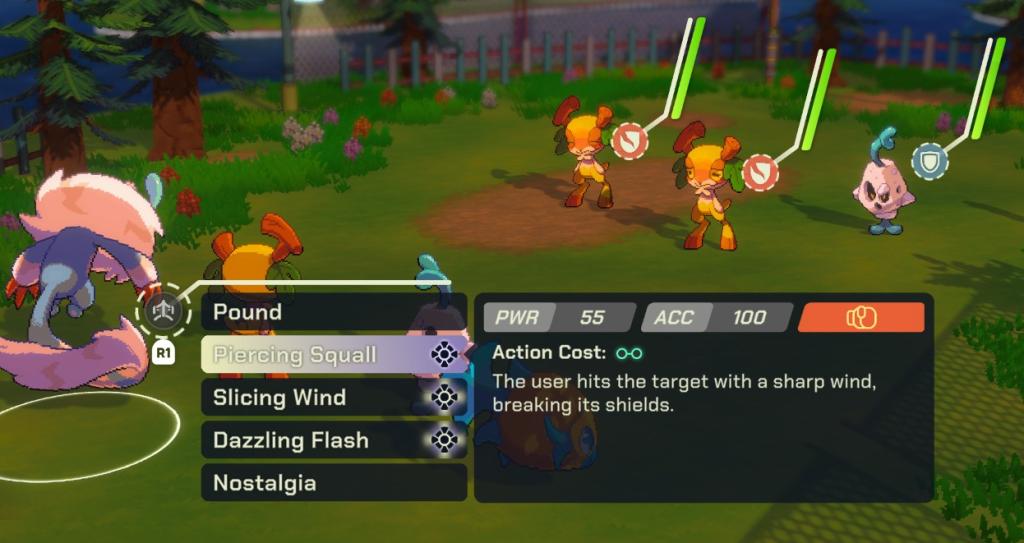
When you’ve properly activated a trait, the symbol will glow blue before you pick the move you want to use. The trait’s symbol will then appear beneath the Animon when it uses its move.
You can activate the trait of each Animon you have out on the field every turn—so long as your max SP will allow it. Using a trait costs an additional unit of SP on top of the base cost of the move, so plan your attacks accordingly.
The post LumenTale attribute guide – All traits and how they work appeared first on Destructoid.