We’ve all heard it — the overly polite, slightly hollow tone of ChatGPT’s built-in voices. After the hundredth "As an AI language model,'" the sound alone started to grate on my nerves. So, I stopped trying to fix the prompt and started fixing the sound.
If you ask me, ChatGPT’s voice is mediocre. Sure, there are several voices to choose from, but none of them seem quite natural. I even find them annoying. This is especially true when compared to the various personalities of Alexa+ such as sweet, chill and sassy.
Although ChatGPT has a voice, you really don’t get to control it. You can switch between a few built-in options, but that’s about it. No custom uploads. No voice cloning. No real personalization.
So I tried something different. Instead of changing ChatGPT itself with prompts to “be more authoritative” “direct” or “expert,” I changed how it sounds all together.
I used prompts to shape how it speaks, then ran those responses through ElevenLabs — one of the most realistic AI voice generators available right now — to see if I could make it feel like a completely different assistant.
And honestly? It worked better than I expected.
The idea: split the experience in two
To be clear, I didn’t actually change ChatGPT’s built-in live voice. What I did, however, was split the experience into two layers:
Layer 1: “Vibe” (ChatGPT) — control how it talks
Layer 2: “Sound” (ElevenLabs) — control how it’s heard
In other words, I used ChatGPT’s brain, gave it a new personality and a completely different voice. Then I download the response such as an article summary, review, talking points for an interview or news story.
This doesn't change the ChatGPT live voice. This hack is taking ChatGPT's written response and utlizing the many voices available in ElevenLabs. Think of it like this: I didn’t rewrite the script — I recast the actor.
The setup is surprisingly simple:
- Ask ChatGPT for a response
- Shape the tone using a detailed prompt
- Copy the output
- Paste it into ElevenLabs
- Generate audio using a different voice
- Same words, totally different delivery
The first time I played it back, it didn’t feel like ChatGPT anymore. The voice was warmer. More natural and less robotic assistant-like. It changed more than just the sound — it changed how the response actually felt.
So, I tested a few different “versions” of ChatGPT
To see how far this could go, I experimented with a few different combinations —pairing a fast, slightly sarcastic expert tone with an energetic voice, a calm and reassuring explainer style with a warm narrator and a casual, conversational tone with a more human, imperfect voice.
Each version felt like a completely different assistant. What surprised me most was how the exact same answer could come across as more trustworthy, more engaging, or far less robotic, depending entirely on the voice delivering it.
What actually worked (and what didn’t)
What worked was being highly specific about tone in ChatGPT, pairing that tone with the right voice in ElevenLabs, and keeping responses shorter so they sounded more natural when played back.
What didn’t work was relying on vague prompts like “make it sound better,” expecting it to function like a real-time conversation, or depending on the free plan for heavy use— you’ll hit limits much faster than you think.
How to give ChatGPT a new voice
If you want to test this, here’s the simplest way to do it:
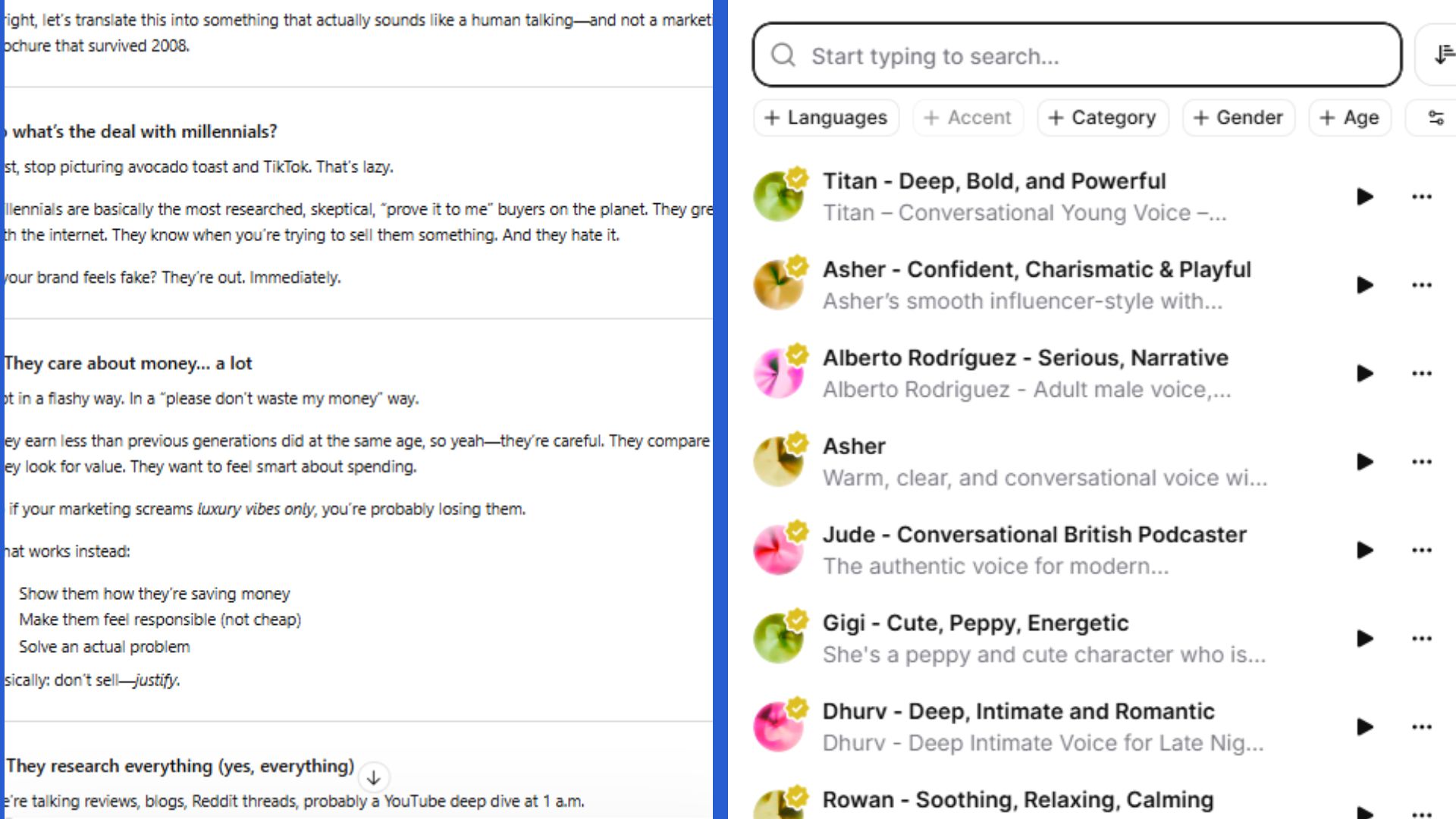
Step 1: Start with a strong prompt: Don’t just ask for an answer — direct the tone. For this experiment, I uploaded a white paper about marketing to millennials. From there, I prompted exactly how I wanted the text to sound:
“Explain this like a fast-talking, slightly sarcastic expert. Keep it conversational, avoid corporate phrasing, and use short sentences.”
You can ask ChatGPT to read the response with the prompt “Read this aloud” to get an idea of the voice you’ll be changing.
Step 2: Copy and paste the response into ElevenLabs: Go to ElevenLabs and login. It’s free to get an account. Paste the text and experiment with the voices on the right side panel. Once you find one you like, have it read your text.
Choose a voice. From there, you can download the final generation and upload to Soundcloud or similar platform.
Bottom line
If you're tired or bored of ChatGPT's voice, I encourage you to give this a try. SImply, take one ChatGPT responses — and hear it in completely different voices. That way, when you play it back, you may actually absorb the information rather than cringing.
There are so many different voices to test (you can even upload your own!). For me, this experiement changed how I use AI voice completely. A confident tone paired with an energetic voice feels punchy and engaging, while a calm tone with a warm voice comes across as more trustworthy and soothing.
That’s the core of this two-layer AI voice hack: ChatGPT controls how it speaks, while ElevenLabs controls how it sounds. On their own, they’re useful, but together, they create something that feels like a completely different experience. Give it a try and let me know what you think in the comments.