If you're a beginner in SEO writing, it's likely you've already encountered WriterZen. It's arguably the most-used tool for SEO content writing on the fly. But it may be expensive for students or independent writers. Fear not—I'm here to help. In this article, we'll talk about how you can use WriterZen without breaking the bank, such as how to safely share accounts with RemoteSpace. Let's get started!

WriterZen: Best SEO Content Assistant
Before we give you tips on how you can save money, let us first take a look at why WriterZen is indeed one amazing tool to use for SEO writing.
WriterZen helps you write SEO-friendly content from a set of features. But how is it superior to other writing tools that are AI-based?
Let us compare it to some of the other top favourites out there today.
- WriterZen: It is a single-stop web page that helps you with keyword research, content planning, outlining, and content optimization. All you need for top search engine rankings is under one roof.
- Surfer SEO: The other great rival of SEO writing, Surfer SEO does have some excellent audit features. But it is very costly and can only overwhelm you with too many other features that you won't be able to use if you're a learner.
- NeuronWriter: This tool is built with SEO in mind, offering content optimization and keyword suggestions. But, unlike WriterZen, it doesn’t have the content planning features that can help guide your writing process.
So, if you’re looking for a simple, affordable, all-in-one solution for SEO writing, WriterZen might be the best option for you.
How WriterZen Makes SEO Content Creation a Breeze
It doesn't have to be hell to create SEO content, and WriterZen makes sure. This is how it helps you write SEO articles in a timely manner:
- Keyword Research: Through WriterZen, you get keyword research tools at your disposal, and therefore finding the most appropriate keywords to write in your articles is easy. It takes you through high-volume searches and low-competition keywords such that you achieve the best results.
- Content Planning: Using WriterZen, you can create sophisticated content plans. You won't need to guess the outline of your article or how to use subheadings. The platform makes sure that your content is well-structured from the very beginning.
- SEO Optimization: It also gives you suggestions for SEO while writing, so you can be sure that your content is SEO-friendly. It also has a plagiarism check to make sure that your content is original.
WriterZen makes every step simple for you so you think less about SEO and more about writing better content.
Is WriterZen Worth the Cost?
So, now that you've gotten a feel for how great WriterZen is for SEO writing, let's talk about the price. Is it worth the price? Let's compare it to some other popular SEO writing tools—NeuronWriter and Surfer SEO—so you get a better idea.
WriterZen vs. NeuronWriter vs. Surfer SEO: What's the Difference
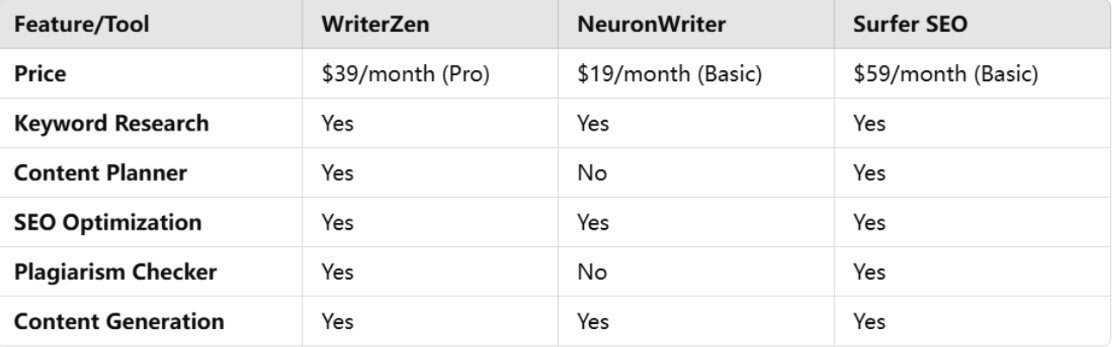
Here's a rundown of what you can find in each of these programs and the prices so that you have an idea of what to spend.
When it comes to features, WriterZen offers a solid value. NeuronWriter is cheaper, but it lacks content planning and plagiarism checks—features that can be important if you’re producing a lot of SEO content. On the other hand, Surfer SEO offers a more advanced audit system, but it’s a bit pricier.
If you’re focused on SEO content writing and want an affordable, all-in-one tool, WriterZen might be the way to go.
How to Save Money on SEO Writing Tools
AI content writing tools such as WriterZen, Surfer SEO, and NeuronWriter can assist you in producing quality SEO content, but their subscription costs can add up very fast. Luckily, there are a number of ways you can save money without compromising the quality of your content. Let's examine some of the best methods to save money without compromising the quality of your content.
1. Choose the Basic Plan
If you are a newcomer or don't need all the extra features, choosing a basic plan can be a real money-saver.
Pros:
- Less Costly: The basic plan is normally much cheaper than the premium version, which is extremely appropriate for individuals or small groups.
- Key Features: You still get access to key features like keyword research and content generation, which may be sufficient for moderately experienced users.
- No Exorbitant Payments: You do not have to pay outrageous fees if you don't need advanced features like content audits or comprehensive analytics, making the basic plan a suitable solution to incur minimal costs.
Cons:
- Limited Features: Basic plans usually curtail access to more advanced instruments or the total number of projects that you are able to execute.
- Fewer Resources: You will have fewer templates or fewer customer support options, which may be limiting for larger projects or long-term use.
The starter plan is a good option if you don't need all the functions but still want an instrument that can help you generate SEO content.
2. Look for Discounts or Promotions
All platforms offer special deals, either it's a one-time deal or a discount for first-time users.
Pros:
- Massive Savings: Student discounts or promotion offers can save you a lot of money on your subscription.
- Long-Term Discounts: Some tools offer discounts on annual subscriptions, which is cost-effective in the long term compared to monthly payments.
Cons:
- Short Availability: Deals are normally limited in time, so you have to be keen to grab them.
- Hidden Clauses: Some deals come with limitations or hidden fees, so make sure you read the terms and conditions before subscribing.
Promotions are a great way to get a better deal on your subscription if you’re willing to watch for offers and take advantage of discounts when they come up.
3. Share an Account with RemoteSpace——Why RemoteSpace is the Best Solution
Sharing an account is one of the best ways to lower your costs, and RemoteSpace makes this process smooth, safe, and secure.

Having an account in RemoteSpace is the most convenient option to save money if you work in groups or work together with other individuals. Let's find out why it's the most appropriate choice.
- Cost-Effective for Groups: RemoteSpace allows you to have a shared account for 5 users simultaneously, and it is best for sharing the cost among classmates, teammates, or co-workers.
- No Account Kicking: Unlike regular account sharing where you could get logged out if someone else is using the tool, RemoteSpace allows all the users to log in at the same time without any interference.
- Secure Sharing: RemoteSpace provides a safe way of sharing your WriterZen or any other AI tool account. You won't need to share your login credentials or compromise security.
- Ideal for Teams: If you’re working on a project with multiple writers, marketers, or students, RemoteSpace is an easy way to collaborate on SEO content while cutting down on the cost per person.
When working as part of a group or studying alongside someone else, it is very convenient to share accounts and do this securely thanks to RemoteSpace. It costs you much less compared to any other way of optimizing your subscription for maximum utilization.
How to Share Your WriterZen Account with RemoteSpace
If you’re interested in sharing your WriterZen account, RemoteSpace is the best tool to do it. Here’s how to set it up:
- Sign Up for RemoteSpace: Start by creating an account on RemoteSpace. The process is simple and quick.
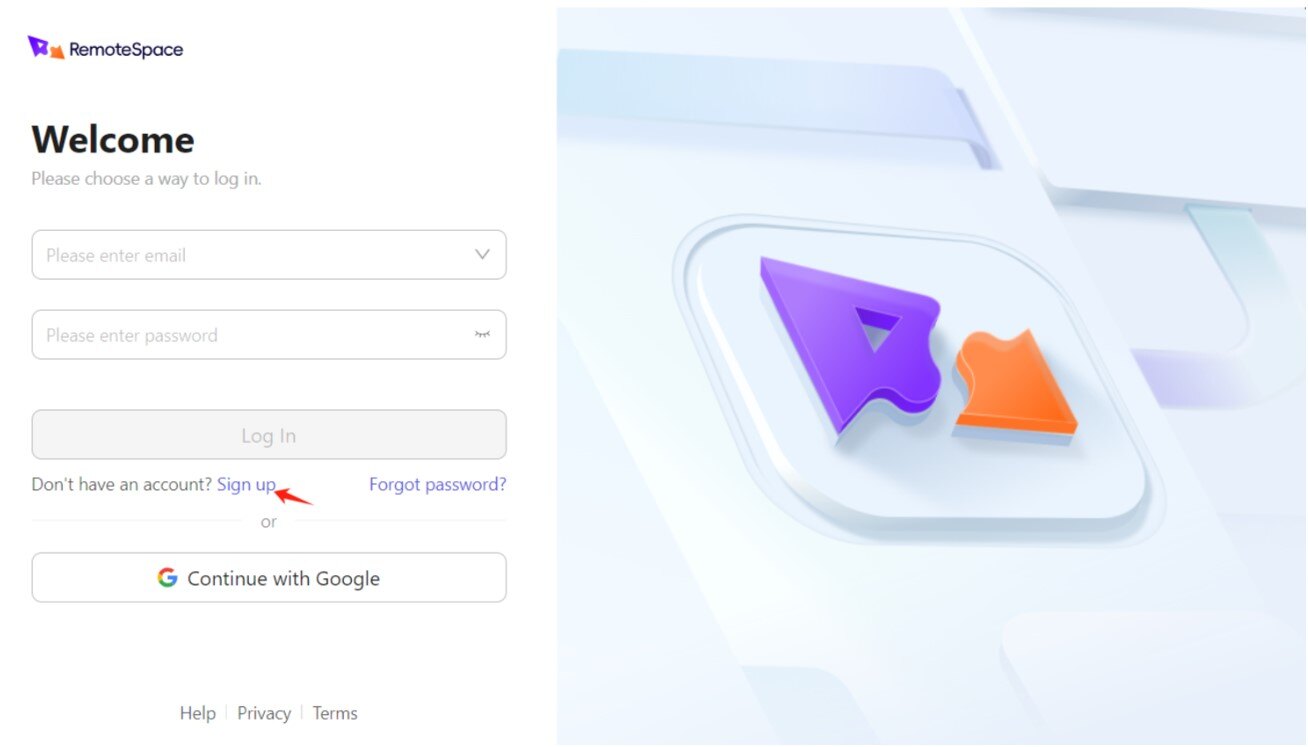
- Create Workspace: Onn the dashboard, create a workspace for WriterZen sharing.
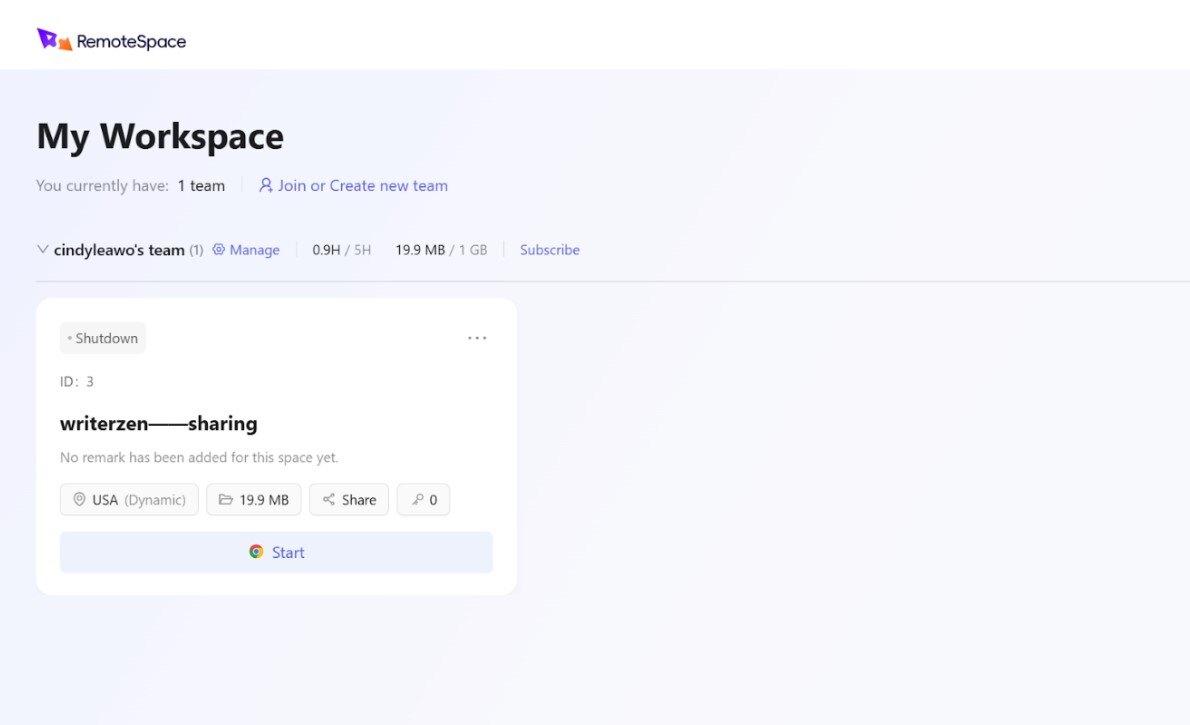
- Link Your WriterZen Account: Choose one of the 5 screens, login to your WriterZen account in RemoteSpace. This way, no one else knows your login credentials.
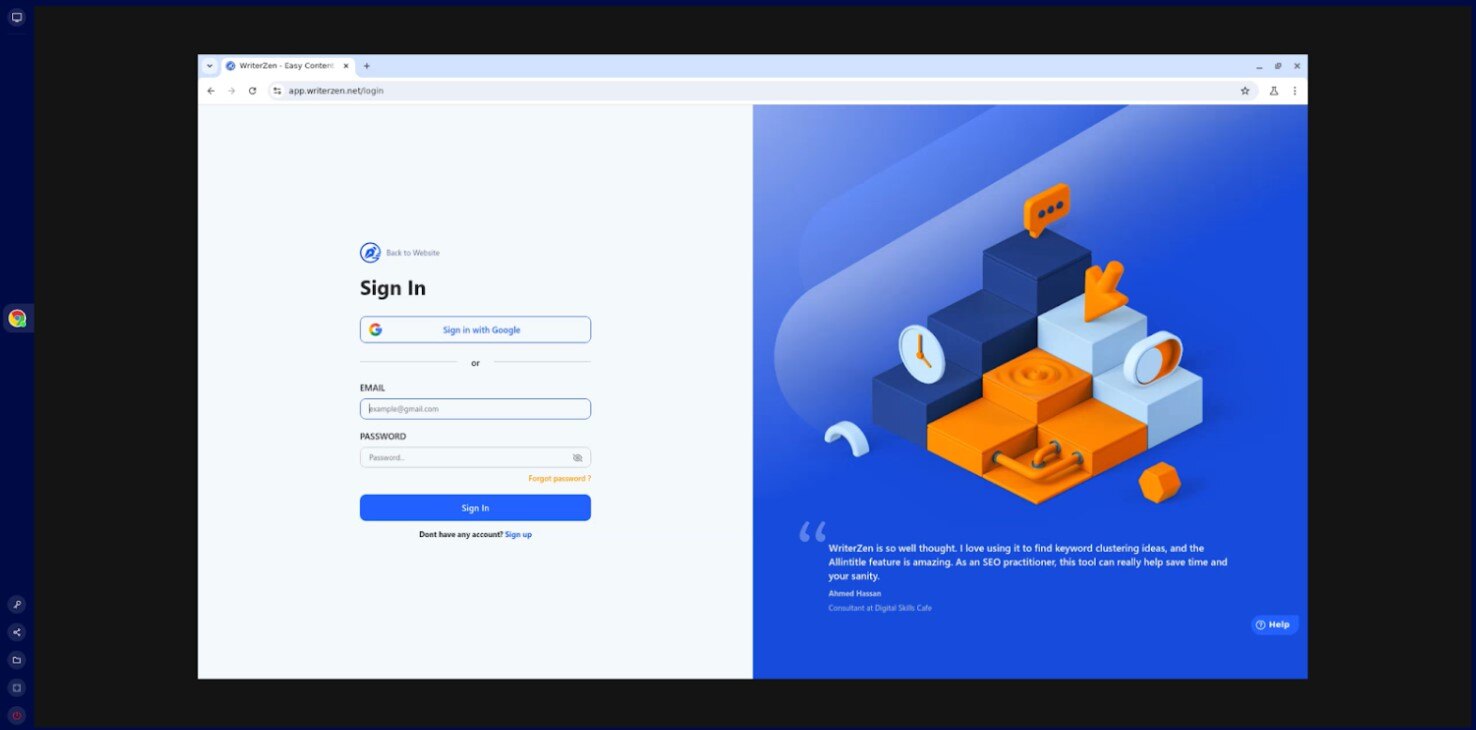
- Invite Other Writers: Invite a maximum of 4 other writers to share the account for co-sharing so all team members can enjoy using WriterZen. Any member can use it simultaneously without anyone being logged out.
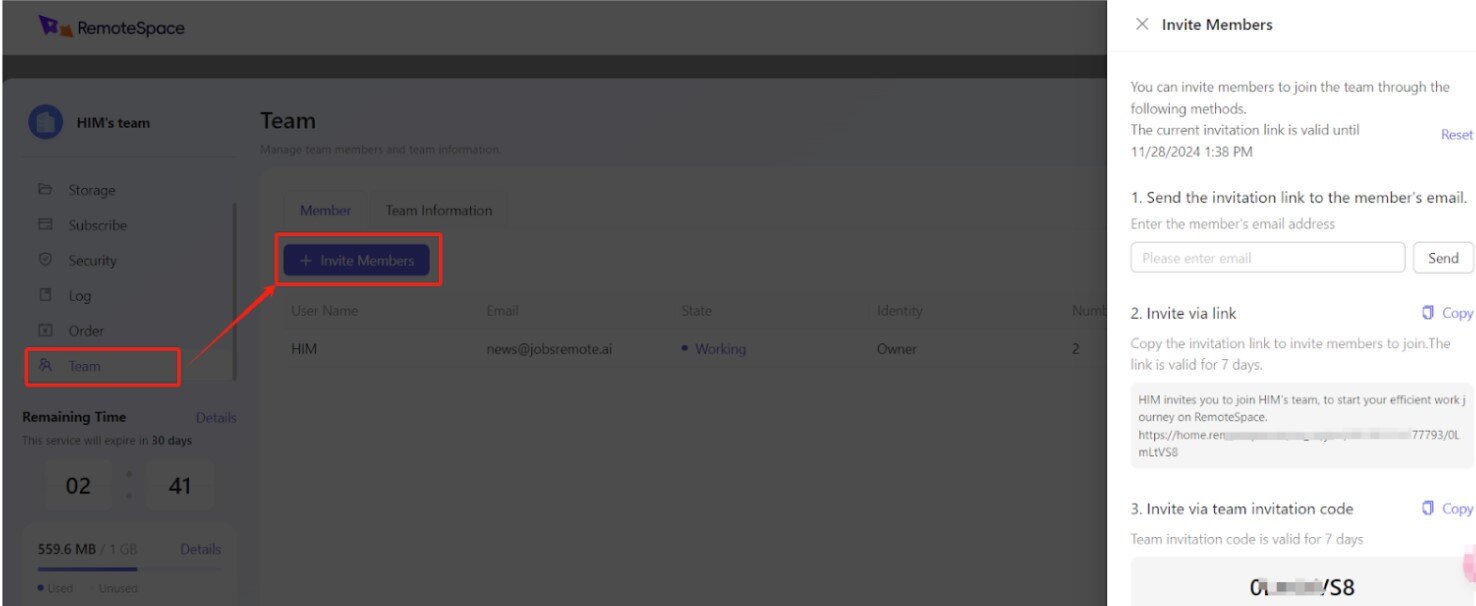
- Start Writing Together: All users gain access, and you can write SEO content together in real time. Great for teams or student groups of students working on projects together.
RemoteSpace's ability to support 5 users at the same time is revolutionary. It's the ultimate solution for saving money without losing out on any of the WriterZen has to provide.
Final Thoughts
WriterZen is a great way to create SEO content efficiently and fast. But it costs too much for most people. With the suggestions provided in this article—either by subscribing for a lower tier, searching for promotions, or sharing your account with RemoteSpace—you can optimize WriterZen to your advantage without breaking the bank.
If you’re ready to give it a try, RemoteSpace is a secure, affordable way to share your account and collaborate with others. Start using it today and enjoy all the benefits of WriterZen without the high cost!