What a DMARC Check Is and Why It Matters for Email Security
A DMARC check verifies whether a domain has a valid DMARC policy published in DNS and whether that policy is correctly configured to support modern email authentication. DMARC, short for Domain-based Message Authentication, Reporting, and Conformance, builds on SPF and DKIM to help receiving email servers determine whether a message claiming to come from your domain is legitimate.
A proper DMARC check typically includes a DMARC lookup of the domain’s DNS records, a review of the published DMARC record, and a configuration analysis to identify syntax errors, missing tags, weak policy settings, or reporting problems. Tools such as EasyDMARC, dmarcian, and MXToolbox often provide a DMARC Record Checker or DMARC diagnostic tool to simplify this process.
Why DMARC Is Critical for Domain Protection
Without a valid DMARC policy, attackers can send unauthorized email that appears to come from your organization. This enables phishing, spoofing, and executive impersonation attacks that damage trust, expose customers to fraud, and weaken brand protection.
A DMARC check matters because it confirms whether your domain owners have implemented policy enforcement correctly. It also helps improve email security, supports compliance expectations, and protects email deliverability by showing mailbox providers such as Google, Yahoo, and major ISPs that your domain follows recognized sender requirements.
What a DMARC Check Validates
A quality DMARC diagnostic tool evaluates several areas:
- Whether a DMARC record exists in DNS
- Whether the record is published as a valid TXT record
- Whether the record starts with v=*DMARC1*
- Whether the DMARC policy uses valid values such as p=*none*, p=*quarantine*, or p=*reject*
- Whether SPF and DKIM authentication checks align with the visible sender domain
- Whether reporting destinations are properly configured
In short, a DMARC check confirms that your domain’s email authentication framework is present, readable, and enforceable.
Understanding DMARC Records: SPF, DKIM, Alignment, and Policy Tags
A DMARC record is a DNS-based TXT Record published at the _dmarc hostname of a domain. For example, a DMARC record for example.com would be published at *_dmarc.example.com*.
A basic record might look like this:
v=*DMARC1*; p=*none*; rua=mailto:*dmarc*-reports@example.com; *ruf*=mailto:forensics@example.com; pct=100
This DMARC record tells receiving email servers how to handle messages that fail DMARC validation and where to send feedback through reporting.
SPF and DKIM Foundations
SPF, or Sender Policy Framework, allows domain owners to specify which mail servers are authorized to send email for a domain. During a DMARC lookup, the receiving server checks SPF results and compares the authenticated domain to the Header From address.
DKIM, or DomainKeys Identified Mail, uses cryptographic signatures to verify that a message was not modified in transit and that it was signed by an authorized domain. Together, SPF and DKIM form the foundation of DMARC-based email authentication.
SPF Alignment
For SPF to satisfy DMARC, the SPF-authenticated domain must align with the header-from domain. This may be the same domain or, depending on the alignment mode, a related organization domain.
DKIM Alignment
DKIM alignment works similarly. The domain in the DKIM signature must align with the visible From domain. DMARC supports strict or relaxed alignment using the *adkim* tag for DKIM and the *aspf* tag for SPF.
Key DMARC Policy Tags
The most important tag in a DMARC policy is p, which defines policy enforcement:
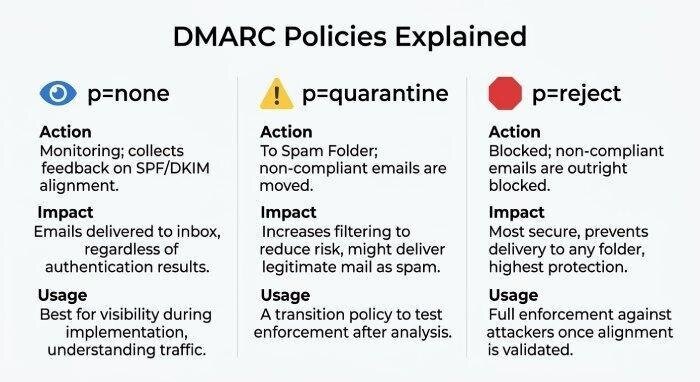
- p=*none*: Monitor only; do not affect delivery
- p=*quarantine*: Send failing messages to spam or junk
- p=*reject*: Block failing messages at the receiving gateway
Other important tags include:
- rua: Destination for aggregate reports
- *ruf*: Destination for forensic reports
- pct: The pct tag, used to apply policy to a percentage of traffic
- sp: Defines subdomain policy
- ri: Sets the reporting interval
- *adkim*: DKIM alignment mode
- *aspf*: SPF alignment mode
Reporting Formats
DMARC reporting may include aggregate XML reports and, where supported, forensic formats such as afrf or iodef. A valid report sending destination helps organizations analyze abuse, misconfigurations, and legitimate traffic patterns.
Step-by-Step Guide to Running a DMARC Check on Your Domain
Step 1: Identify the Domain Name to Test
Start with the exact domain name used in your outbound email’s From address. DMARC evaluates the visible From domain, not necessarily the return-path or sending server domain. For example, if your email uses billing@example.com, perform the DMARC lookup for example.com.
Step 2: Query DNS for the DMARC Record
Look up the TXT record at:
*_dmarc.example.com*
You can perform this DMARC lookup using command-line DNS tools or online services such as EasyDMARC, dmarcian, or MXToolbox. A DMARC Record Checker will retrieve the DNS entry and display the full DMARC record.
Manual DNS Lookup Example
You can use:
dig TXT *_dmarc.example.com*
or:
nslookup -type=TXT *_dmarc.example.com*
If DNS does not return a DMARC record, your domain has no published DMARC policy.
Step 3: Use a DMARC Record Checker
A DMARC Record Checker provides a clearer explanation than a raw DNS query. It can identify missing tags, invalid separators, duplicate records, and validation errors. Many tools also function as a broader DMARC diagnostic tool, reviewing SPF, DKIM, policy distribution, alignment, and reporting readiness.
Step 4: Review SPF, DKIM, and Alignment
After confirming the DMARC record exists, validate whether SPF and DKIM are configured correctly. Your SPF record should include all legitimate senders, such as an ESP, MSP, CRM platform, marketing automation provider, or internal mail infrastructure.
Also confirm that DKIM signing is active for major sending services. DMARC depends on alignment, so messages must pass SPF or DKIM and align with the Header From domain.

How to Interpret DMARC Check Results and Identify Common Errors
A DMARC check result should tell you whether your DMARC record is valid, whether your DNS configuration is readable, and whether your DMARC policy is enforceable. However, not all “valid” records are strong records.
Common DMARC Record Problems
Typical issues include:
- No DMARC record found in DNS
- Multiple DMARC records published for the same domain
- Incorrect hostname, such as publishing at the root instead of _dmarc
- Missing v=*DMARC1* tag
- Invalid policy value instead of authorized values like *none*, *quarantine*, or *reject*
- Broken rua or *ruf* reporting addresses
- SPF records that exceed DNS lookup limits
- DKIM not enabled for third-party senders
- Syntax errors caused by extra spaces, missing semicolons, or malformed mailto values
Understanding Policy Results
If your DMARC policy is p=*none*receiving servers only monitor failures. This is useful during deployment because it allows domain owners to collect aggregate reports before moving to stronger enforcement.
With p=*quarantine*messages that fail DMARC are typically delivered to spam. With p=*reject*, failing messages are rejected before inbox placement. Moving too quickly to reject can harm legitimate email if SPF, DKIM, or vendor authentication is incomplete.
Watch for Alignment Failures
A message may pass SPF or DKIM but still fail DMARC if alignment does not match the header-from domain. This is common with third-party senders that authenticate using their own domain instead of your organization domain.
Review Reporting Gaps
If rua is missing, you lose visibility into authentication results. If *ruf* is misconfigured, forensic reports may not arrive. Some providers limit forensic reporting for privacy reasons, so aggregate reports are usually the primary source of DMARC feedback.

Best Practices for Validating, Monitoring, and Strengthening Your DMARC Policy
Start with Monitoring Before Enforcement
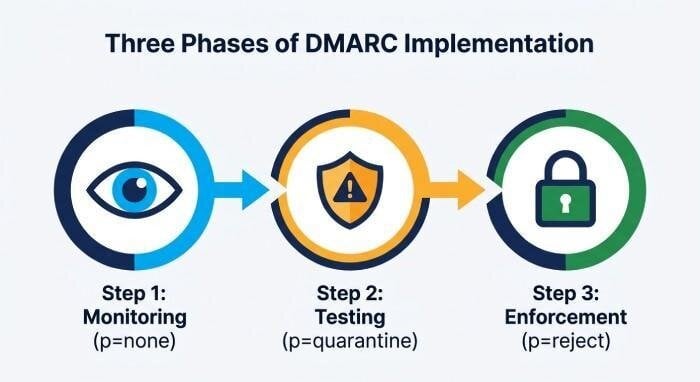
Begin with:
p=*none*
This allows you to run a DMARC check, collect reporting data, and confirm all legitimate senders are authenticated. During this phase, use a DMARC Record Checker and DMARC reporting platform to map every authorized source.
Once authentication checks are stable, progress to:
p=*quarantine*
Then, when failures are understood and legitimate senders are aligned, move toward:
p=*reject*
This phased approach reduces the risk of blocking valid mail while improving email security.
Validate Every Authorized Sender
Review all systems that send email on behalf of your domain, including:
- Corporate email platforms
- Marketing tools
- Help desk systems
- Billing platforms
- MSP-managed infrastructure
- ESP-based newsletters
- Transactional email services
Each sender should meet your SPF, DKIM, and DMARC sender requirements. This strengthens email authentication and prevents attackers from exploiting gaps.
Monitor Reports and Tune Policy
Use aggregate reports to identify unknown senders, forwarding behavior, SPF failures, DKIM failures, and alignment issues. A mature DMARC diagnostic tool can normalize XML reports and show trends by source, IP address, and authentication protocol.
Maintain DNS and Record Hygiene
Keep your DNS records clean and documented. Avoid excessive SPF includes, remove obsolete vendors, and test changes before publishing. Regular record testing helps detect broken TXT record formatting, expired DKIM selectors, and DMARC validation errors.
Apply Best Practices Across Subdomains
Define a clear subdomain policy with the sp tag if subdomains send mail differently from the root domain. If they do not send mail, use stricter controls to reduce spoofing risk. Consistent policy distribution across the organization improves brand protection and reduces impersonation opportunities.