

Players can get the Pineapple Glasses in Dress to Impress by clicking on the white pot with the Pineapple logo in the main playing area. They can also customize, change color, add prints, and make a whole lot of changes to the item.
Recommended Videos
In the Brazil overhaul update, the developers have added multiple secret items, including the Pineapple Glasses. This cute accessory is the perfect fit for the warm weather and enhances all of your summer outfits. So, if you are wondering how to get this secret item, here is a detailed guide.
How to obtain the Pineapple Glasses in Dress to Impress - Brazil Update
To answer the burning question, players can easily acquire the Pineapple Glasses by clicking on a white plant pot with the pineapple logo. This particular pot can be found hanging in the main lobby, next to the Skin Tones changing area. Simply use the Teleport button to spawn yourself inside a freeplay server and walk up to the white server to click on it and get the item.
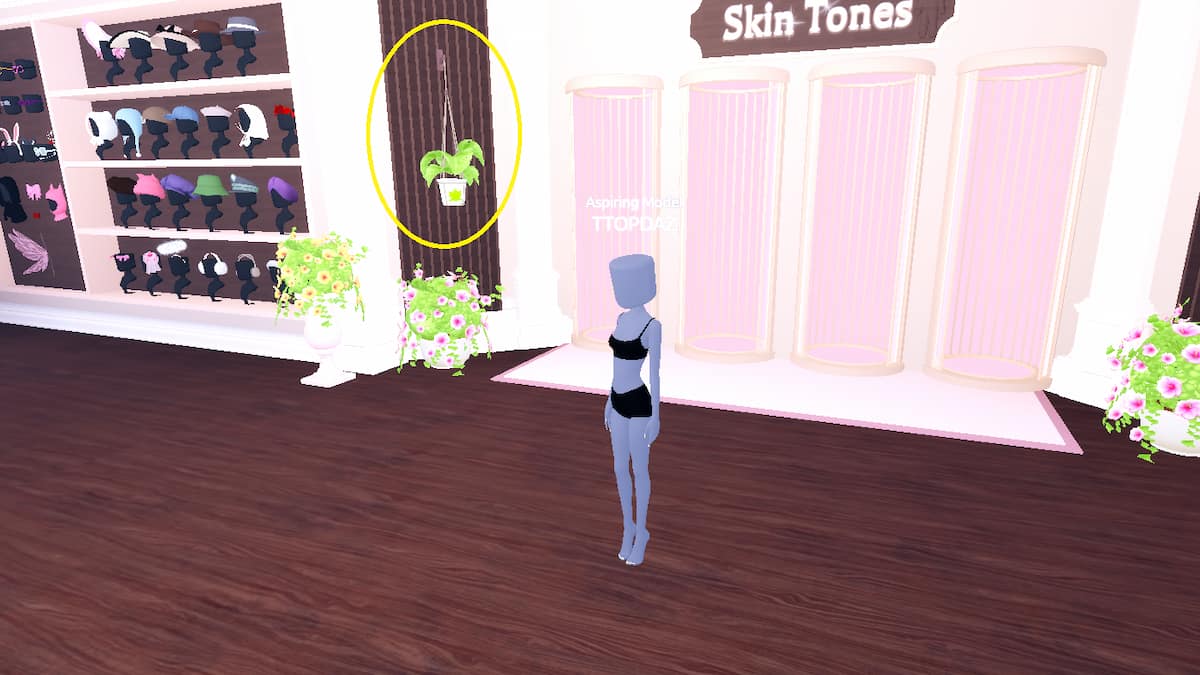
Remember, even after obtaining the item, it does not get permanently added to your wardrobe inventory. Meaning, you cannot find or equip the item in your inventory. Instead, you must click on the same white flower pot to equip and unequip the Pineapple Glass.
Can you customize the Pineapple Glass?
Yes, you can customize the Pineapple Glass to suit your wishes. After equipping the item, the customization menu will appear on the right-side color palette and patterns option. Pick a color and patterns that match your overall outfit. If you have unlocked the preview menu, use it to check how it looks with other costumes as well.
Dress to Impress Pineapple Glass FAQs
For more on DTI, check out Complete Dress to Impress (DTI) KATSEYE Quest Guide or All 5 Computer Locations in DTI - Flee The Facility Quest