Watching your favorite teams frag it out in the Call of Duty League isn’t just entertaining, it’s also one of the easiest ways to snag exclusive items you can use in Black Ops 7 and Warzone.
Call of Duty League 2026 is kicking off the season with a new batch of Twitch drops during the opening weekend, featuring a cool Dravec 45 weapon blueprint, new cosmetics, and other limited-time collectibles you won’t want to miss.
If you want to rack up every possible reward while enjoying the matches at CDL 2026, here’s a detailed guide to get you started.
Table of contents
All Call of Duty League 2026 Twitch drops and how to earn them
The CDL 2026 season offers a stack of rewards you can earn just by watching through the official Call of Duty esports channel on Twitch during opening weekend. Broadcast starts at 1:30pm CT / 11:30am PT / 2:30pm ET / 7:30pm GMT.
Here are all the free goodies you can snag each day, along with the watch time required:
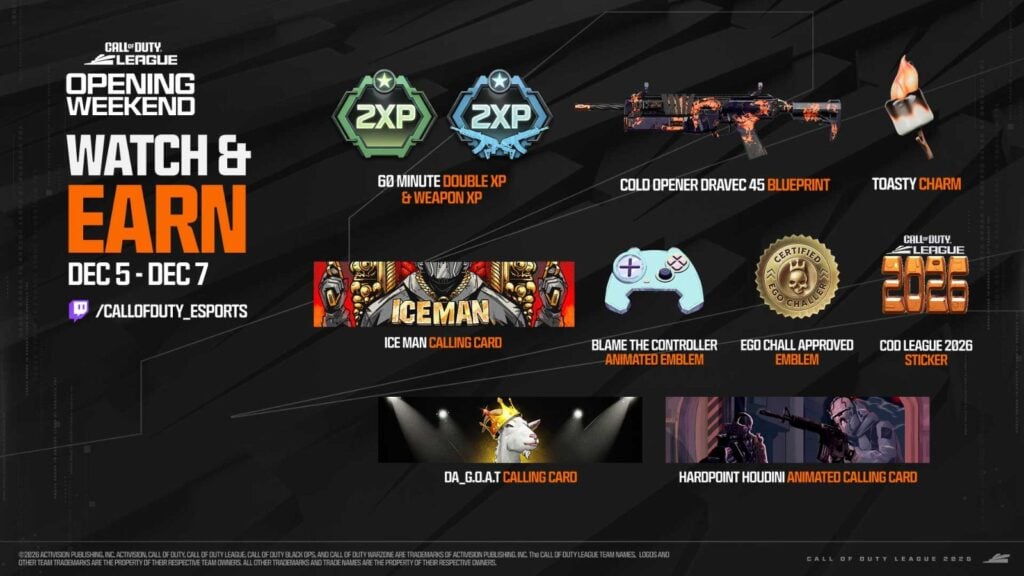
Day 1 – Dec. 5 (Friday)
| Reward | Watch Time Required |
|---|---|
| 1-hour double XP token | 1 hour |
| “Ice Man” calling card | 1 hour and 30 minutes |
| “Blame The Controller” animated emblem | 2 hours |
Day 2 – Dec. 6 (Saturday)
| Reward | Watch Time Required |
|---|---|
| 1-hour double weapon XP token | 1 hour |
| “Ego Chall Approved” emblem | 1 hour and 30 minutes |
| “DA_G.O.A.T.” calling card | 2 hours |
| “Toasty” charm | 2 hours and 30 minutes |
Day 3 – Dec. 7 (Sunday)
| Reward | Watch Time Required |
|---|---|
| 1-hour double XP token | 1 hour |
| “COD League 2026” sticker | 1 hour and 30 minutes |
| “Hardpoint Houdini” animated calling card | 2 hours |
| “Cold Opener” Dravec 45 weapon blueprint | 2 hours and 30 minutes |
How to claim CDL 2026 Twitch drops
Once you’ve earned a drop, claiming it is straightforward. Twitch will notify you when a reward becomes available, and you’ll see it in your Drops & Rewards Inventory. After claiming it, the item will automatically appear in your Call of Duty inventory, provided your Twitch and Activision accounts are linked beforehand.
Here’s a step-by-step guide to link your accounts and get you set up for CDL 2026 drops:
- Log in to your Activision account.
- Click on your Profile, and navigate to the Account Linking page to see the Linked Accounts.
- Find the Twitch option under the Social Networks section and click “Link Account.” You’ll be redirected to Twitch.
- Sign in to the Twitch account where you plan to watch CDL streams.
- Twitch will request permission to link with your Activision account. Approve the authorization.
You should now see Twitch listed as a successfully linked account in your Activision profile. You can also go to your Twitch Connections page under the Settings menu to make sure that Call of Duty is listed under connected apps.
Once the steps are complete, you’re officially eligible for all CDL 2026 Twitch drops. Just tune into the official CDL channel during match days, let the watch time stack up, and enjoy your exclusive items.
For more on the league, including team lineups, the full schedule, and format details, be sure to check out our complete CDL 2026 guide.