
As one of those players who’s weirdly loyal to their VALORANT nickname, would it be boring to admit I’ve been using the same one for over two years now? But if you’re someone who likes switching things up, or just needs to escape an unfortunate choice, I’m here to help you change your name in VALORANT.
Your VALORANT name is actually your Riot ID, which is a combination of a Game Name and a Tagline used universally across all Riot titles, including League of Legends, Legends of Runeterra, 2XKO, and more. So, you’ll technically be learning how to change your Riot ID through this guide.
Table of contents
In a nutshell
- You can change your Riot ID or VALORANT name for free once every 90 days.
- You can change your nickname from the Riot account management page.
- The combination of Game Name and Tagline must be unique.
- Don’t use inappropriate or offensive language in your VALORANT name.
VALORANT name change guide
VALORANT nicknames or Riot IDs can be alphanumeric and include special characters. To edit your own, follow these steps.
Step 1: Close the Riot Client app
You can’t change your Riot ID while you’re signed in to the Riot Client app. Make sure you log out of the account you intend to make changes to or exit the app from the system tray.
Step 2: Launch a browser of your choice and open your Riot Account page
Launch a browser and go to the official Riot Account management page. Sign in with your credentials if you aren’t logged in already.
Step 3: Change your Riot ID
In the account management page and under the Riot ID tab, you should see a Riot ID section with your current Game Name and Tagline. Click on the text box to edit the name and Tagline.
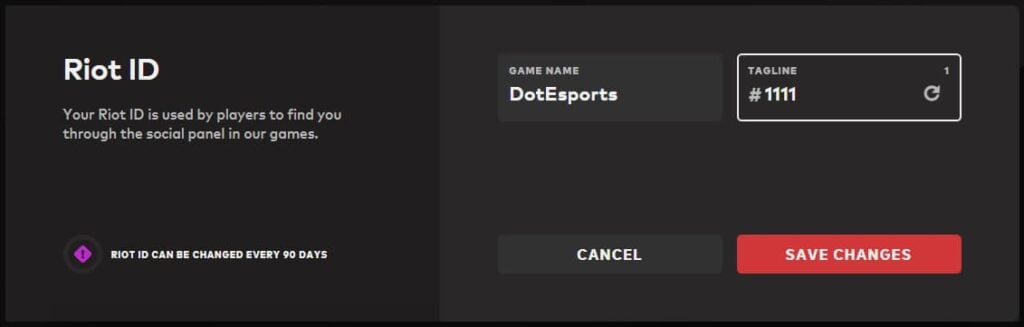
You can have a Tagline or Game Name of your choice as long as the combination of both is unique. If you’re not sure of what tag to choose or are unable to find a unique combination, you can click on the refresh button in that box to generate an available Tagline that lets you lock in your new Game Name.
Step 4: Time to get a new VALORANT name
Once you’re happy with your Game Name and Tagline, click on Save Changes. That’s it—you now have a new VALORANT name to show off to your buddies.
The change can take some time (usually a few minutes) to take effect. You can now log into the Riot Client app to check if your new name is live.
Rules for changing VALORANT name in 2025
If only we were allowed to change our VALORANT names as often as we wanted—but Riot makes that pretty much impossible, and for good reason.

Your VALORANT nickname or Riot ID can be changed for free and only once every three months (90 days). Riot doesn’t offer any paid routes to change your ID earlier than 90 days. So, while changing your Game Name and Tagline, make sure it’s what you really want.
Until Nov. 20, 2023, you could change your Riot ID for VALORANT and other games once every 30 days. But with Riot reworking its system, you now get a free change once every 90 days.
If you’re wondering why there isn’t a paid route, well, Riot did try bringing a system where changing VALORANT names would be free only once a year. Players would have to pay a fee if they wanted to change their names more frequently. Naturally, it was way too unfairly designed, causing massive backlash and leading to Riot backtracking on its decision.
At the time of writing, there’s no other way—paid or free—to change your Riot ID outside of the free change offered every 90 days. But there’s an exception: if your Riot ID is attracting negative attention and you don’t have a free name change in your bank, you can submit a player ticket to Riot Support requesting a change.
What your VALORANT name or Riot ID shouldn’t look like
Now that you know the limit to changing your VALORANT name, it’s important you know the rules before choosing one. Riot may flag your Riot ID for inappropriate or offensive language, and even charge your account in cases of repeat offenses.
To avoid such inconvenience, here’s what you should steer clear of:
- Names that suggest hate speech, slurs, or profanity, either implicitly or explicitly.
- Names that invoke or refer to any historical, ethical, or political contexts.
- Names that contain insults, grotesque imagery, and strong vulgarity.
But if you are considering choosing your Riot ID out of our list of cringe-worthy but safe VALORANT nicknames, go ahead—no one will stop you.
FAQs
-
Q1: Can my VALORANT name have special characters?
Yes, you can add special characters—even those beyond your keyboard’s scope—to your Riot ID. Check out our comprehensive guide on how to easily add the goofiest special characters to your VALORANT name.
-
Q2: Does changing VALORANT name cost money?
No, VALORANT names can be changed for free every 90 days. There’s no way to pay and change your Riot ID before 90 days.
-
Q3: Will changing my VALORANT name affect other Riot titles?
Yes. It’s basically your Riot ID, which shows up as your in-game nickname in all Riot IPs, including League of Legends, VALORANT, Legends of Runterra, 2XKO, and more. So, if you change your name for one of these games, it’ll reflect in every Riot game you play.
-
Q4: Can I change my Riot account username?
No, you can’t change your username after your account is created. Your Riot username is different from the Riot ID or VALORANT name—it’s the credential you use to log into the Riot Client and is only visible to you.