If you haven’t updated Google Chrome recently, now would be the time to do so as Google has released an emergency security update to patch a zero-day flaw in its browser.
As reported by BleepingComputer, the search giant has revealed in a new security advisory that the zero-day flaw (tracked as CVE-2023-2033) is currently being exploited in the wild. This means that hackers are already leveraging this flaw in their attacks which is why you should update your browser right now.
The latest Chrome update is now rolling out to desktop users, and it will come to the mobile version of the browser in the coming days or weeks. Right now though, Chrome version 112.0.5616.121 fixes this zero-day vulnerability on Windows, Mac and Linux.
No details yet
Although Google has now patched this high-severity zero-day vulnerability, the company is still being tight-lipped about how hackers are leveraging it in their attacks. Like Apple did with its recent emergency security update for iPhone, iPad and Mac, the search giant hasn’t disclosed any details yet to give Chrome users more time to update their browsers.
This zero-day is a confusion weakness in the Chrome V8 JavaScript engine and it was reported by Google’s Threat Analysis Group (TAG) which is tasked with protecting its customers from state-sponsored attacks targeting high-value individuals like journalists and politicians.
While ordinary users likely won’t be the first target of attacks leveraging a zero-day like this one, hackers could widen the scope of their attacks to go after even more people. This is one of the reasons why Google hasn’t said exactly how they’re exploiting the flaw yet.
Type confusion flaws allow an attacker to trigger browser crashes by exploiting them through reading or writing memory out of buffer bounds. However, they can also be exploited to run arbitrary code on vulnerable devices.
How to keep your browser protected from hackers
When it comes to staying safe from cyberattacks exploiting zero-day flaws in your browser, the most important thing you can do is to install the latest updates when they become available.
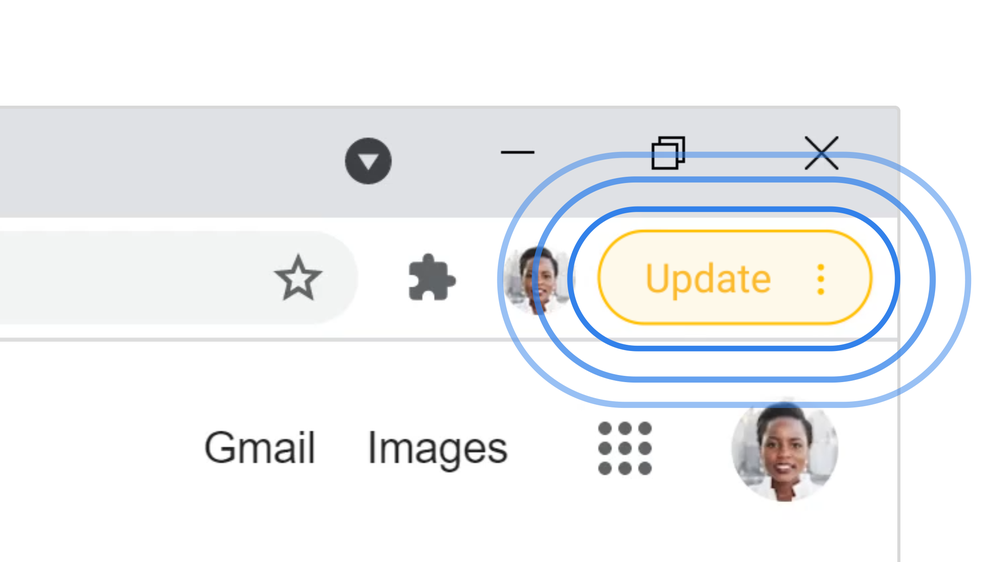
If you haven’t installed these updates yet, you’ll see a bubble next to your profile picture in Chrome that’s color-coded based on when the update became available. The bubble turns green for a 2-day old update, orange for a 4-day old update and red when an update was released at least a week ago.
Clicking on the bubble will download the latest version of Chrome and it will be installed the next time you relaunch your browser. However, you can manually update Chrome by clicking on the three dots next to your profile picture, clicking on Help and then About Google Chrome. This takes you to the browser’s settings page where you can check to see if you’re running the latest version of Chrome.
Keeping your browser up to date is important but so too is protecting your computer from malware and other viruses. This is why you want to install the best antivirus software on your PC or the best Mac antivirus software on your Apple computer.
We’ll likely hear more about this zero-day flaw once Google is confident that enough Chrome users have updated to the latest version of its browser.