What you need to know
- You can now share full system audio, not just sound from a single tab you're presenting, in a Google Meet call.
- The feature is disabled by default, so you have to toggle "Also share system audio" every single time you present.
- The feature works on macOS 14.02+ and Windows 11 with Chrome 142 or newer.
Sharing audio in Google Meet should be easy. You start a meeting, share your presentation, and everyone hears what you want them to. Until now, though, it hasn’t always worked that way.
For a long time, sharing audio during a presentation was oddly limited. You could show your whole screen or a specific app, but if your audio wasn’t in the same tab you’re presenting, your audience couldn’t hear it. This has been a common problem for anyone wanting to present more than just slides.
That’s now changing with the rollout of proper system audio sharing in Google Meet. Instead of locking audio sharing to a specific tab, Meet now lets you share sound from your entire device when presenting a window or in full-screen mode.
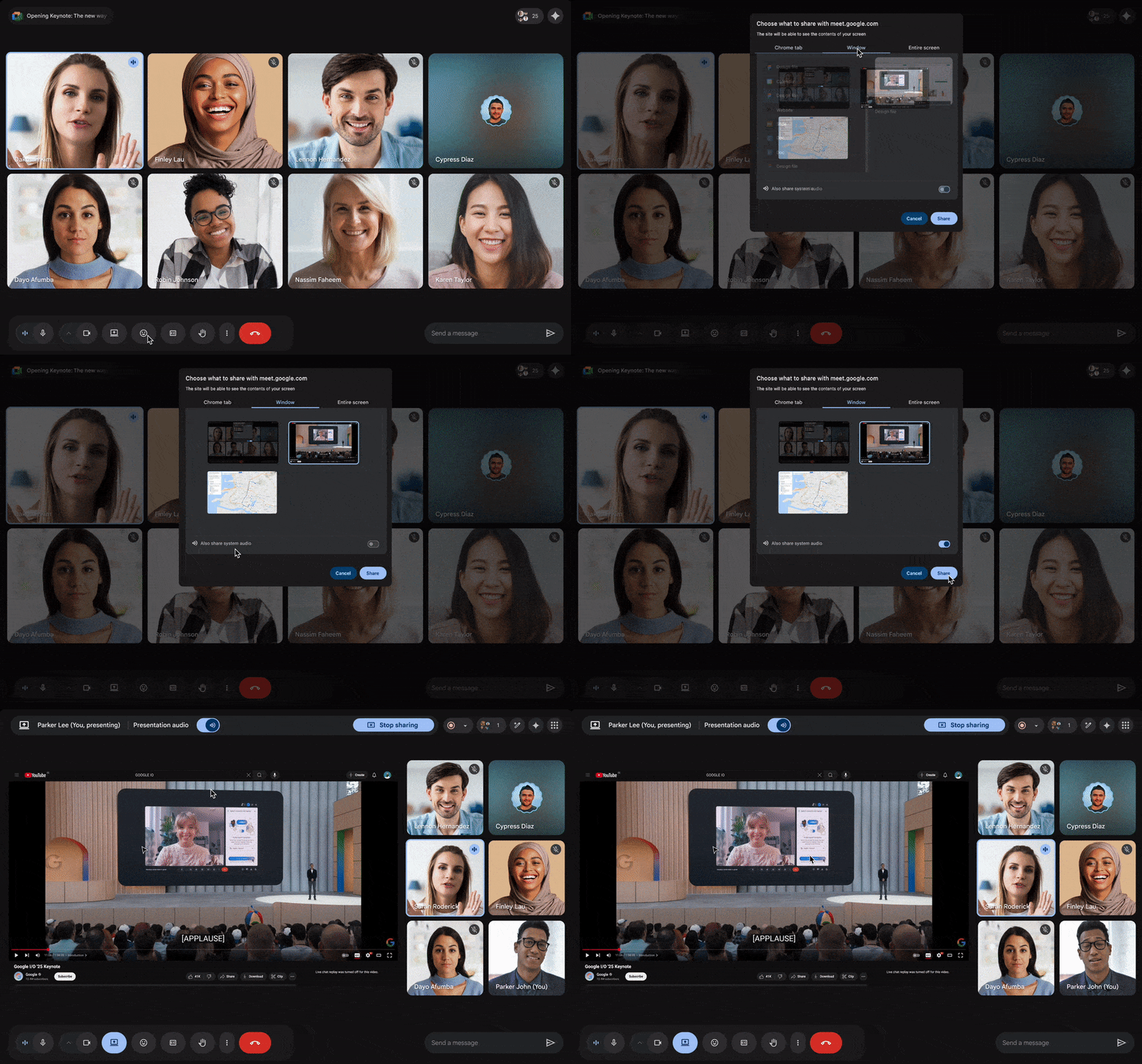
When you click Present, you’ll see a new option to include device audio with your visuals. If you turn it on, everyone in the meeting will hear whatever your computer plays.
Check your specs
The feature is currently available on macOS 14.02 or later and Windows 11, and it requires Chrome version 142 or later. It’s also disabled by default, which means you’ll need to toggle it on each time you present.
That extra step is minor, but it’s worth remembering if you’re mid-meeting and wondering why your audio still isn’t coming through.
Google also notes that users with adaptive audio setups may still be limited to sharing sound from Chrome tabs only, which suggests this rollout is still evolving.
The feature is rolling out now for Rapid Release domains, and it should be more widely available in early 2026. If you rely on presentations with more than just slides and talking, this update is worth a look.