After a lot of rumors and hints, Google’s Gemini 3 finally dropped this week, bringing huge competition to ChatGPT. This state-of-the-art AI model has brought huge improvements across a variety of Google tools, including the Gemini chatbot itself. But one of the most interesting changes is in Google search.
Head over to the AI mode found in Google Search, and you’ll find some new changes to make searching smarter than ever.
“Gemini 3 brings incredible reasoning power to Search because it’s built to grasp unprecedented depth and nuance for your hardest questions,” Elizabeth Hamon Reid, VP of Engineering for Google Search, said, announcing the news.
“It also unlocks new generative UI experiences so you can get dynamic visual layouts with interactive tools and simulations — generated specifically for you.”
So, what does that all look like in practice?
How to use AI mode in Google

AI mode is a fairly new feature for Google, rolling out over the past couple of months. However, it is very simple to use.
On your desktop, head to Google Search and you'll see an AI mode button at the end of the search bar. Clicking this will put you into the mode, where you can search in the same way that you would on Google, but with some AI-powered assistance.
AI mode can also be found at the top of Google when looking through search results.
AI mode improvements
For now, Gemini 3’s rollout in search is limited. The update is only available for Google AI Pro and Ultra subscribers in the U.S. However, Google will soon roll this out to everyone in the U.S., and paid subscribers will have higher usage limits.
Users will also gain access to a ‘Thinking’ setting on AI mode. Through this, Gemini 3 is able to tackle more complicated questions, learning to respond to your intent and the nuance of your request.
This will be music to the ears of those who felt like Google’s AI mode and overview were lacking in understanding, often missing obvious nuance in a question.
Using Gemini 3’s advanced reasoning, Google search is getting a major upgrade to its query fan-out technique. This essentially means Google AI mode is delving into more sources, bringing you information from a far wider array of places.
In the coming weeks, Google will also be enhancing its automatic model selection. This means Google AI mode will assess your query and utilize the best model for the complexity. More powerful models will be used for challenging tasks, whilst quicker ones will pick up easier requests.
Generative UI
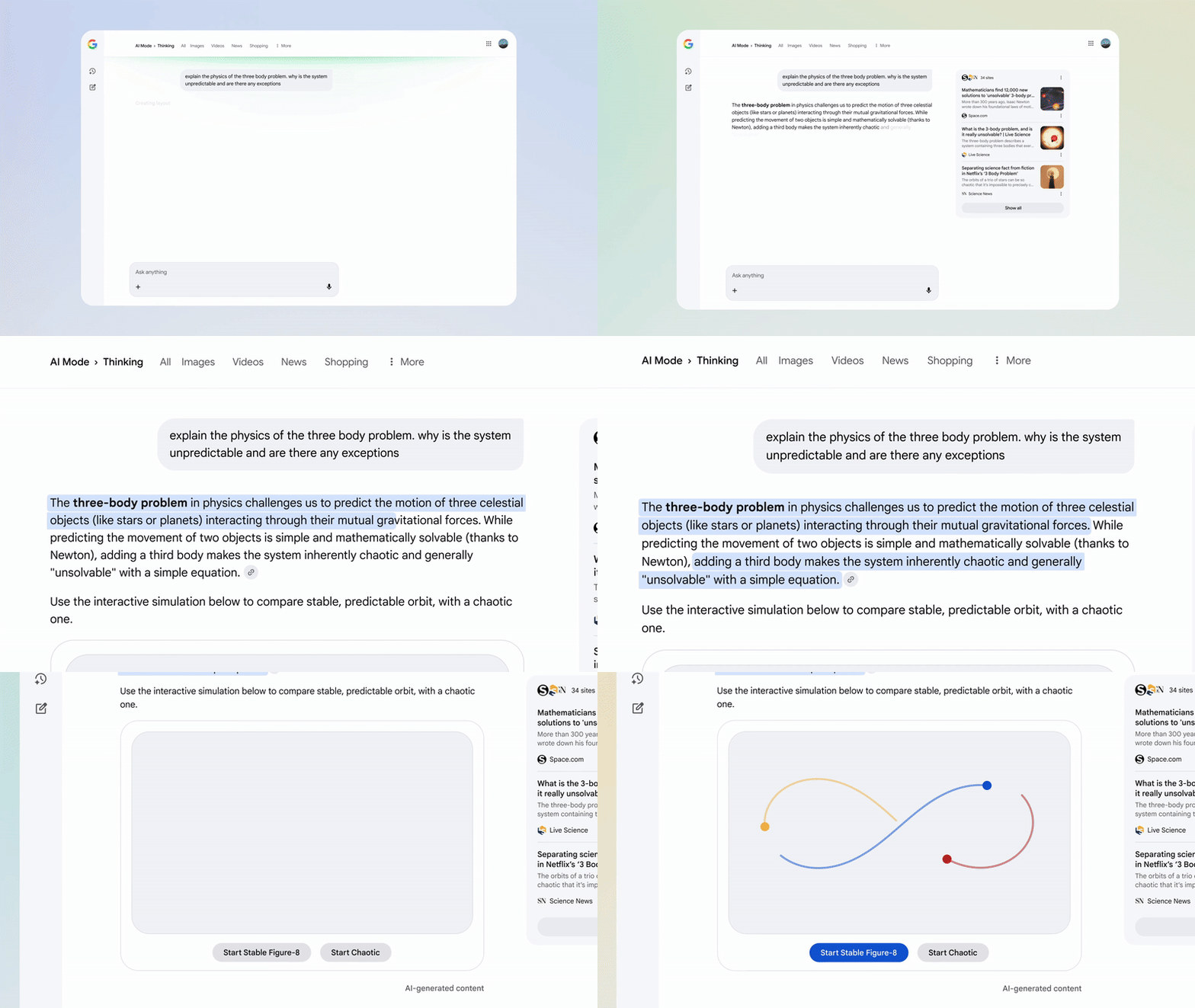
Advancements in AI mode are exciting, but it's the rollout of Google’s new generative UI features that are more unique.
Google will now be able to use its agentic coding abilities to create clever visual layouts, including interactive tools and simulations.
For example, if you ask Google to explain a complicated scientific theory, it can provide a worded answer, along with an interactive game that lets you explore the theory yourself.
If you ask Google to explain a complicated scientific theory, it can provide a worded answer, along with an interactive game that lets you explore the theory yourself.
Google will scan your request and automatically apply this feature when it seems relevant. Another example Google gives is the addition of a mortgage calculator when you ask questions relevant to buying a house.
Some version of this has been available for years with Google, but in a much more simplified form. For example, when you ask about currency conversion, Google will often provide a calculator, or asking for flights can bring up an interactive data selector.
The goal here, Google states, is to provide further tools when they can better explain a concept, utilising generative AI to make something new each time.

Follow Tom's Guide on Google News and add us as a preferred source to get our up-to-date news, analysis, and reviews in your feeds.