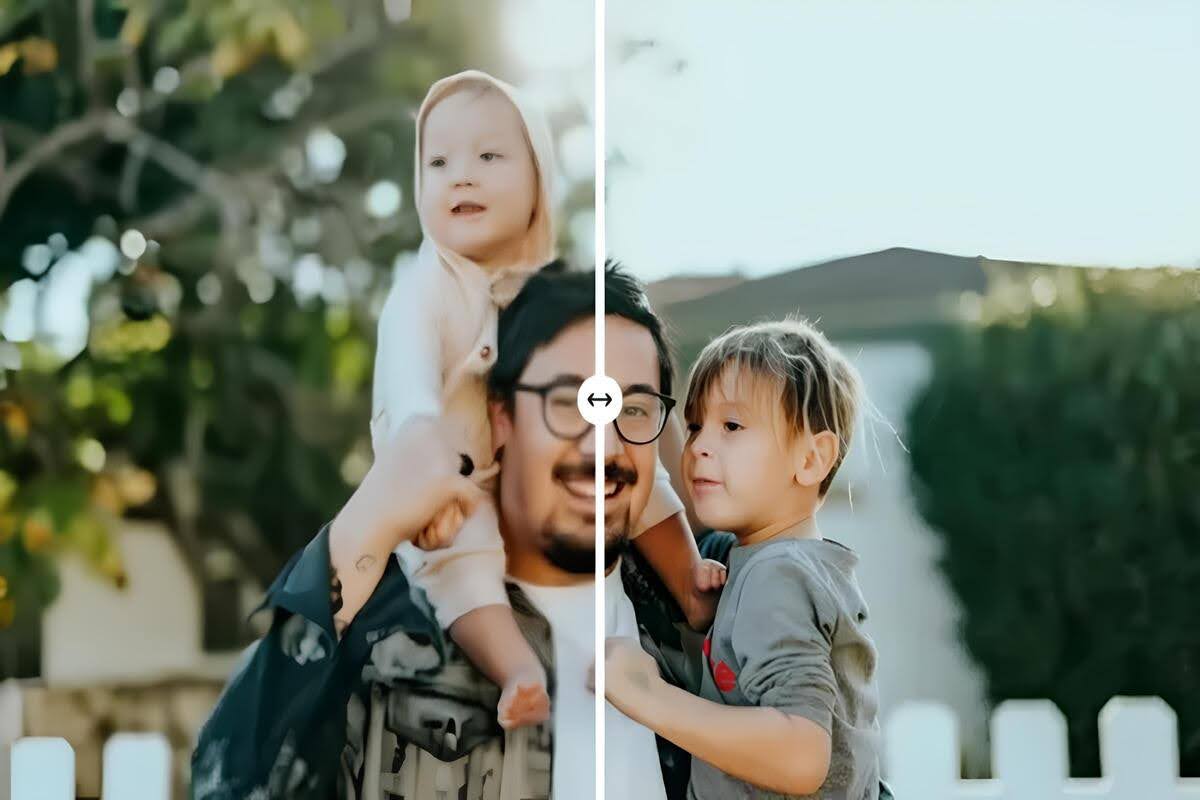
Photography is a creative art, but harsh lighting can easily ruin even the best shots if not handled properly. Strong sunlight, indoor lighting, or reflective surfaces can create extreme contrasts that overwhelm camera sensors. Bright areas often appear overexposed while shadows become dark and devoid of detail, reducing the visual quality of a photo. AI Photo Enhancer provides a smart and efficient solution to automatically correct these issues and restore balance to your images.
It works by analyzing every pixel and identifying areas that need adjustment. It automatically applies corrections to exposure, color, shadows, and highlights without requiring manual intervention. This saves photographers hours of time while producing consistent results. By using the tool, both professional and amateur photographers can enhance harshly lit photos quickly, ensuring that every image reaches its full potential.
Understanding Harsh Lighting
Harsh lighting occurs when there is a significant difference between the brightest and darkest areas of a scene. Direct sunlight, reflective surfaces, and artificial spotlights can all contribute to this effect. This uneven lighting often creates overexposed areas that lack detail and deep shadows that obscure important elements of the photo. The result is an image that looks unnatural and visually jarring, which can be challenging to correct manually.
Cameras struggle to replicate how the human eye perceives such extreme lighting conditions. While our eyes can dynamically adjust to both shadows and highlights simultaneously, camera sensors have a limited dynamic range. As a result, highlights can be blown out, and shadows can turn completely black, erasing critical details. Understanding this limitation is the first step to effectively enhancing harshly lit photos with AI Photo Enhancer.
Why Photos Suffer?
Photos captured under harsh lighting conditions often appear flat or distorted due to the imbalance of exposure. Overexposed highlights can wash out textures, while underexposed shadows can hide essential details, making the subject unclear. Even slight color distortions caused by strong lighting can affect the overall mood and realism of an image. This makes it difficult to achieve professional-looking photos without post-processing adjustments.
Harsh lighting also impacts color accuracy across the image, often resulting in washed-out or unnatural hues. Skin tones may appear odd, shadows can introduce noise, and bright areas can reflect unwanted glare. These problems are difficult to fix manually without significant editing skills. AI Photo Enhancer automatically detects and corrects these issues, restoring proper exposure, color balance, and detail, and ensuring the photo appears lifelike and visually appealing.
Enhance Harshly Lighting Photos
1. Exposure Correction
Exposure correction is one of the primary functions of AI Photo Enhancer. It balances the brightness across the image by identifying areas that are too dark or too bright. Dark areas are carefully brightened while highlights are reduced to prevent overexposure. This ensures the photo maintains a natural appearance, with all details visible and the overall lighting harmonized.
2. Shadow Recovery
Shadows often obscure crucial details in photographs, making subjects appear flat or incomplete. It intelligently lifts shadowed areas without affecting well-lit sections. This process reveals hidden textures and details, enhancing the overall depth of the image. By recovering shadows, the tool ensures that every part of the photo is clear, balanced, and visually engaging.
3. Highlight Reduction
Overexposed highlights can erase important elements from a photograph and draw attention away from the subject. AI Photo Enhancer selectively reduces these bright areas while maintaining natural illumination in the scene. This helps restore detail to reflective surfaces, skies, and light-colored objects. The result is a balanced image where highlights no longer dominate, making the overall composition more pleasing to the eye.
4. Color Correction
Harsh lighting often causes colors to appear washed out or distorted, which reduces realism. AI Photo Enhancer automatically restores natural hues and ensures consistent color balance across the photo. Skin tones, landscapes, and objects regain their true colors, making the image more vibrant and lifelike. This feature eliminates the need for tedious manual adjustments, delivering professional results in seconds.
5. Contrast Adjustment
Contrast adjustment improves the distinction between light and dark areas, enhancing the visual depth of the photo. The tool carefully adjusts contrast to highlight textures and important features. It ensures the image appears dynamic without introducing harsh lines or artificial tones. Proper contrast adjustment adds dimension and clarity while preserving the natural feel of the photo.
6. Detail Enhancement
Even after exposure and color corrections, some textures may appear soft or slightly blurred due to harsh lighting. It sharpens these areas selectively to restore fine details. This process enhances edges, patterns, and textures, making every element of the image crisp and clear. Detail enhancement ensures that the final photo looks professional and visually appealing, capturing the true essence of the scene.
Easy-to-Use AI Photo Enhancer
AI Photo Enhancer is designed for simplicity, making advanced photo correction accessible to everyone. Users can upload a photo and apply automated enhancements without needing complex software or technical skills. The tool provides instant previews and one-click adjustments, allowing for fast and effective photo enhancement. This ease of use ensures that even beginners can achieve professional-looking results.
The tool is compatible with desktops, smartphones, and online platforms, making it accessible anywhere. Its automated processes handle exposure, shadow recovery, highlight reduction, color correction, and detail enhancement in seconds. Whether for casual photos or professional work, it saves time while delivering consistently improved images that are visually striking.
AIEnhancer: Real-World Application
AIEnhancer is a versatile tool designed to help photographers fix harsh lighting issues efficiently. Travel photographers often face strong sunlight or reflective surfaces that create blown-out highlights and deep shadows. The tool automatically recovers shadow details, reduces overexposed areas, and corrects colors for a natural and visually appealing photo. Landscapes, cityscapes, and portraits retain clarity and depth without requiring manual adjustments.
Businesses also benefit from AIEnhancer, particularly for product photography in e-commerce and marketing. Accurate colors, consistent lighting, and sharp details are crucial for attracting customers online. It not only enhances visual quality but can also manage image files efficiently, performing tasks similar to a mb to kb converter. This ensures optimized images for websites and social media while maintaining excellent detail and clarity.
Conclusion
Harsh lighting no longer needs to compromise the quality of your photos, thanks to AI Photo Enhancer. It corrects exposure, restores shadow details, reduces highlights, and improves color accuracy automatically. Additionally, it enhances contrast and sharpens fine details to produce professional-quality images.
The tool is accessible, efficient, and easy to use for anyone, from hobbyists to professional photographers. Enhancing harshly lit photos is now faster, more reliable, and highly effective. With the tool, every photo can reach its full visual potential effortlessly and consistently.