
This week: I've been playing a mixture of Dave the Diver and Clair Obscur: Expedition 33 to unwind after work.
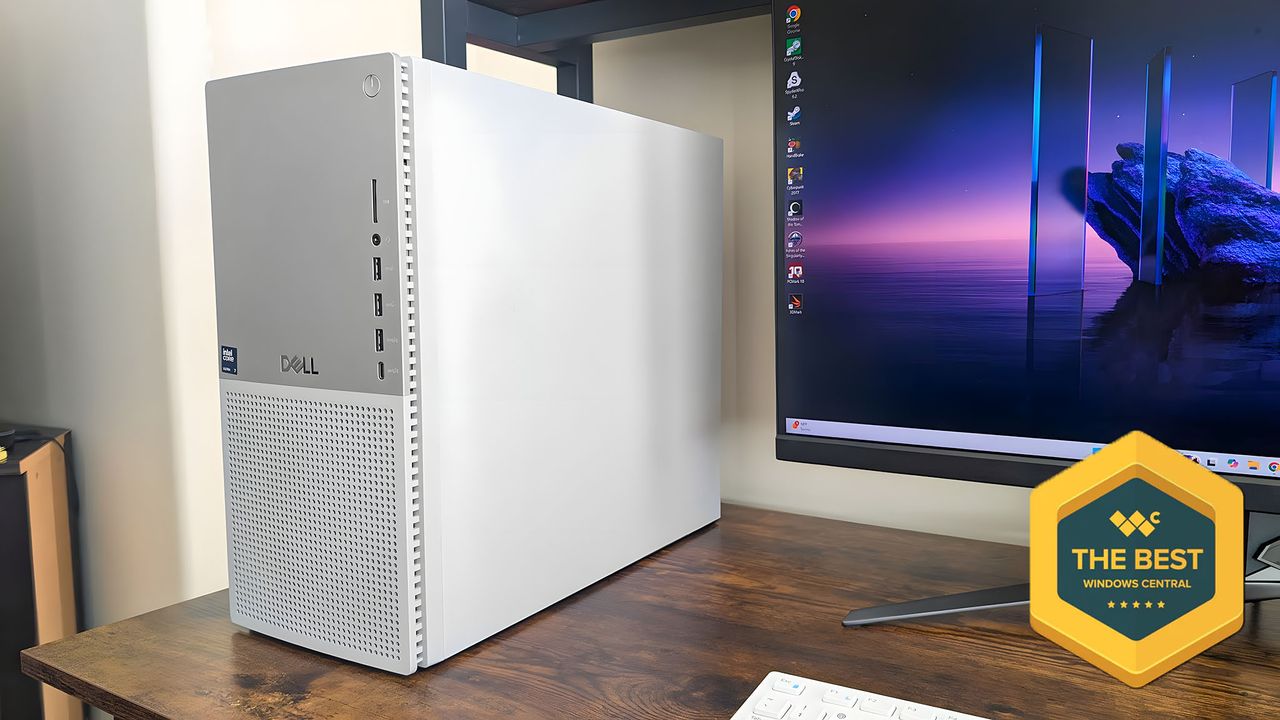
It might look like a basic PC, but Dell's flagship desktop aims to cater to everyone with its sleek and compact chassis that happens to be packed with some of the most powerful internals you can get in a computer today.
I spent a few weeks using the Dell Tower Plus (EBT2250) as my primary computer to ascertain if it's worth the lofty price tag attached to it.
My time with it allowed me to see that it really does offer best-in-class performance, respectable thermal management, plenty of configuration options, and upgrade potential to appease even the most hardcore PC enthusiasts.
Our recommended Dell Tower Plus Desktop (EBT2250) configuration:
This review was made possible by a review unit provided by Dell. The company did not see the contents of the review before publishing.
Dell Tower Plus (EBT2250): Pricing and availability
Design ⭐⭐⭐⭐⭐
The Dell Tower Plus is a premium tower PC through and through, so you'd usually expect a high price tag to accompany its high-end components.
• Price: $1,699.99 at Best Buy
• CPU: Intel Core Ultra 7-265K
• GPU: NVIDIA GeForce RTX 5070
• Memory: 32GB DDR5
• Storage: 1TB SSD
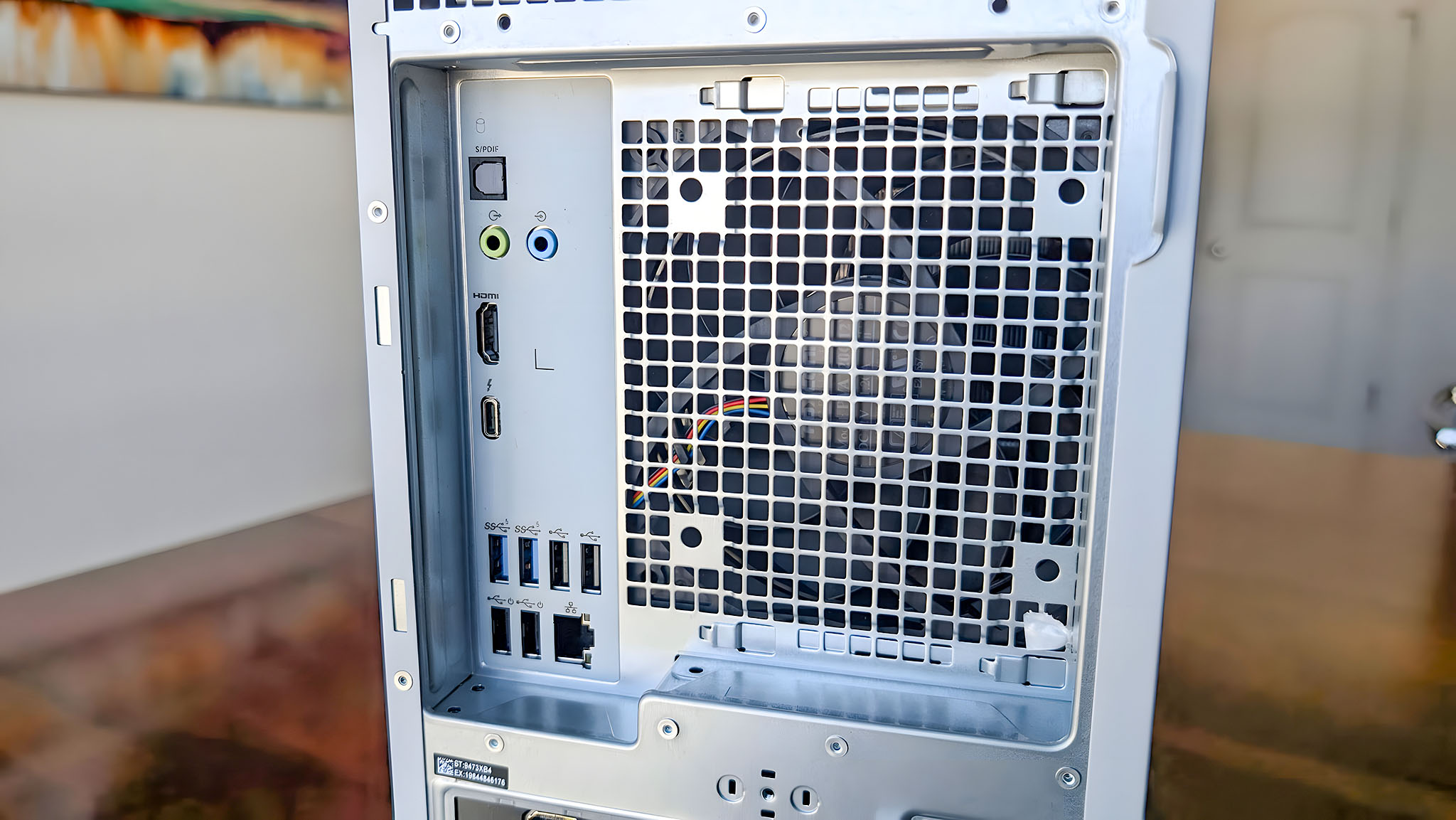
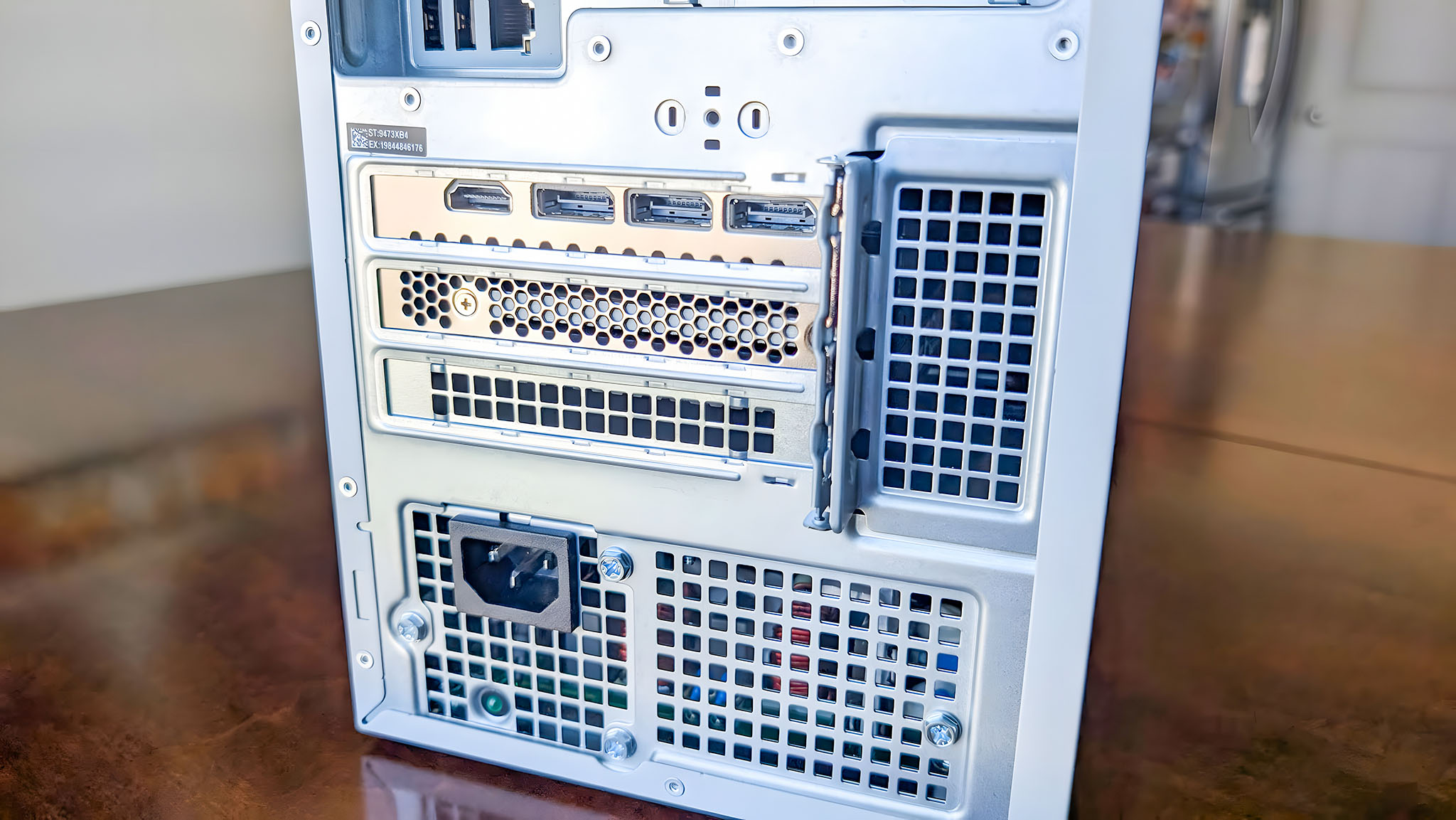
• Ports: Front ports: 3x USB 3.2 Type-A Gen 1, USB 3.2 Type-C Gen 2, Headset jack, SD card slot | Rear Ports: 4x USB 2.0 Type-A, 2x USB 3.2 Type-A Gen 1, Thunderbolt 4 (includes 4K video output), HDMI (includes 4K video output), RJ45 Ethernet Port, 2.5GbE, 2x Stereo Audio (Line In / Line Out), S/PDIF Optical, Kensington lock slot
• Connectivity: Wi-Fi 7 2x2 BE, Bluetooth
• Dimensions: 14.68 x 6.81 x 16.80 inches (372.90 x 173.00 x 426.90 mm)
• Weight: Starting at 19.00 lb (8.62 kg)
Being a Dell computer, it's available all over the world and can be purchased directly from Dell, Amazon, Best Buy, and other major tech retailers. Just note that certain configurations are only available at specific stores.
Dell's flagship Tower Plus desktop starts at $699.99 at Dell, with an Intel Core Ultra 5 225, Intel UHD Graphics, 16GB of RAM, and a 512GB SSD. If you max out every option, you can quickly raise the Dell Tower Plus Desktop to a hefty $3,389.99 at Dell, but you're obviously getting a far more capable PC with more power, memory, storage, and features.
The Tower Plus I specifically tested features an Intel Core Ultra processor with integrated Intel UHD Graphics, a discrete NVIDIA GeForce RTX 5070, 32GB DDR5 RAM, and 1TB SSD. It's a powerful beast. It sells for $2,238.99, but it was on sale for $1,988.99 at Dell at the time of writing.
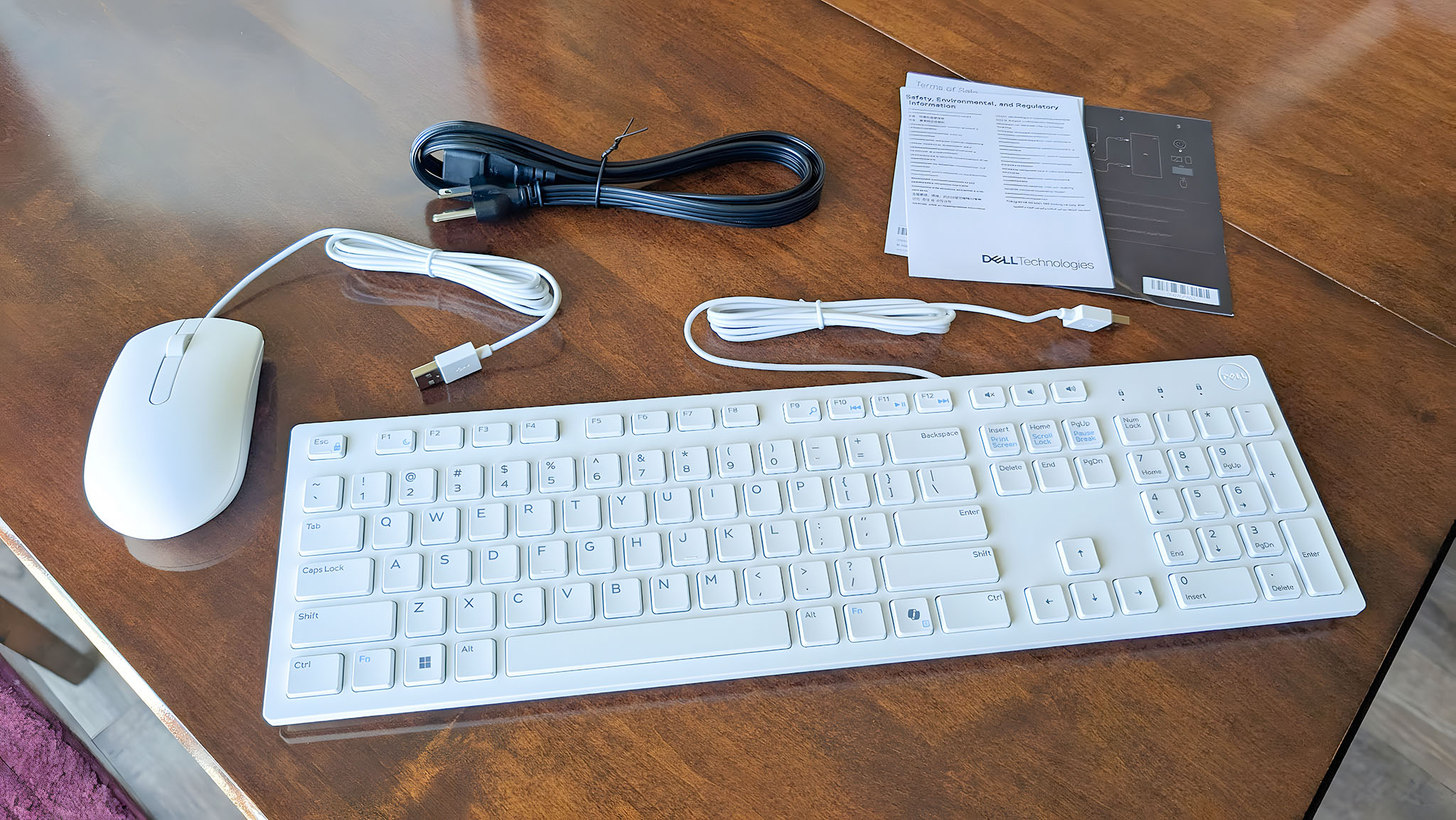
What's in the box? — You get the Dell Tower Plus, a chunky power cable, a few manuals, and Dell's entry-level wired keyboard and mouse. If you'd like, you can pay more to get the Dell Pro Keyboard KM5211W and a nicer Dell Wired Mouse when purchasing from Dell's website.
That said, you might be better off going with one of the best PC keyboards or best PC mice alongside your new PC, as the optional keyboard simply does not do the Dell Tower Plus Desktop justice.
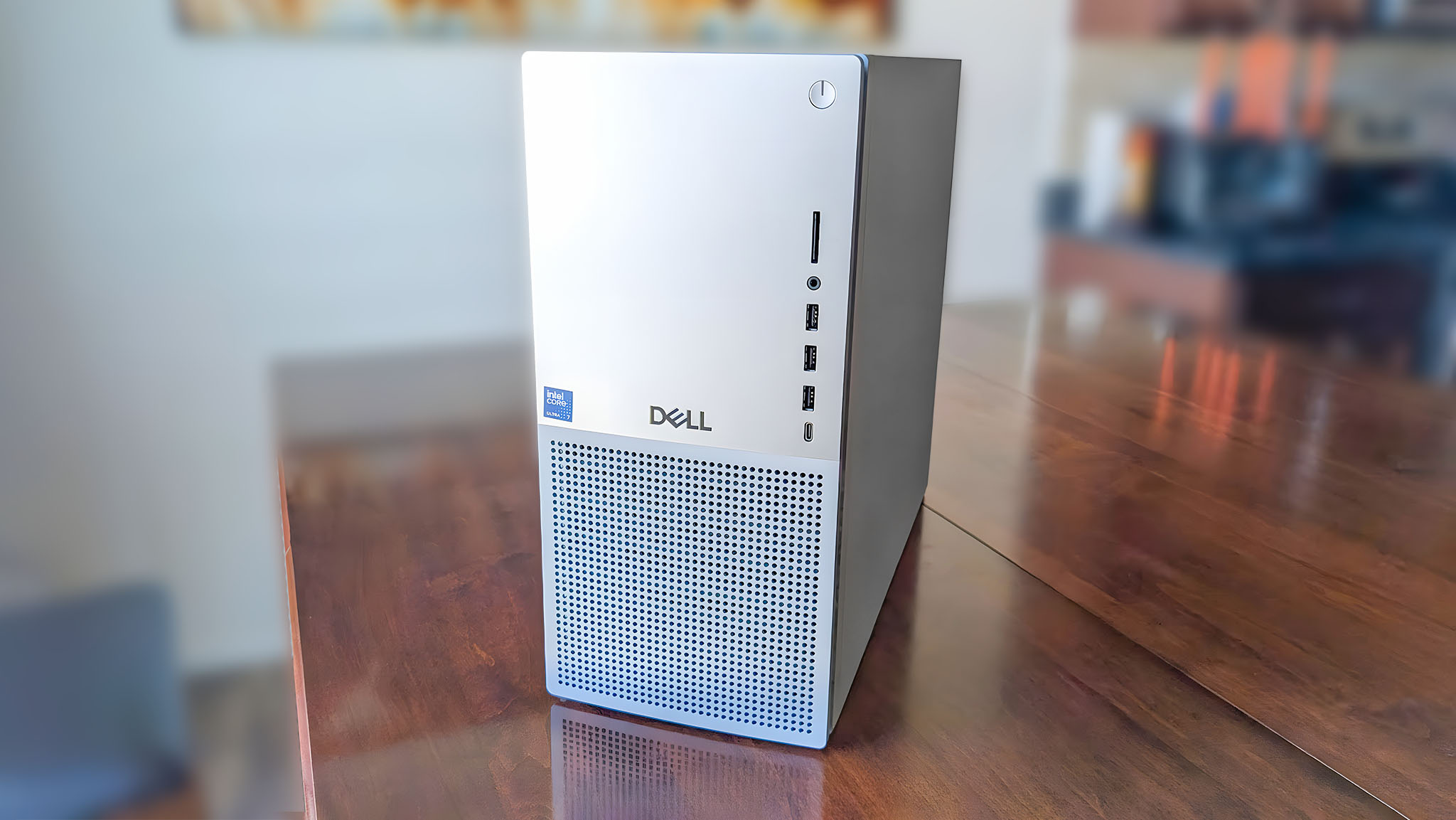
The Dell Tower Plus has a very unassuming chassis and puts me in mind of 90s PC cases, but its mostly metal casing exudes quality when you really take a moment to look at it.
Unlike many other desktops on its premium level, this one doesn't have colorful RGB lighting or an edgy sci-fi design. As someone who doesn't really care for the "gamer" aesthetic, this is a major plus.
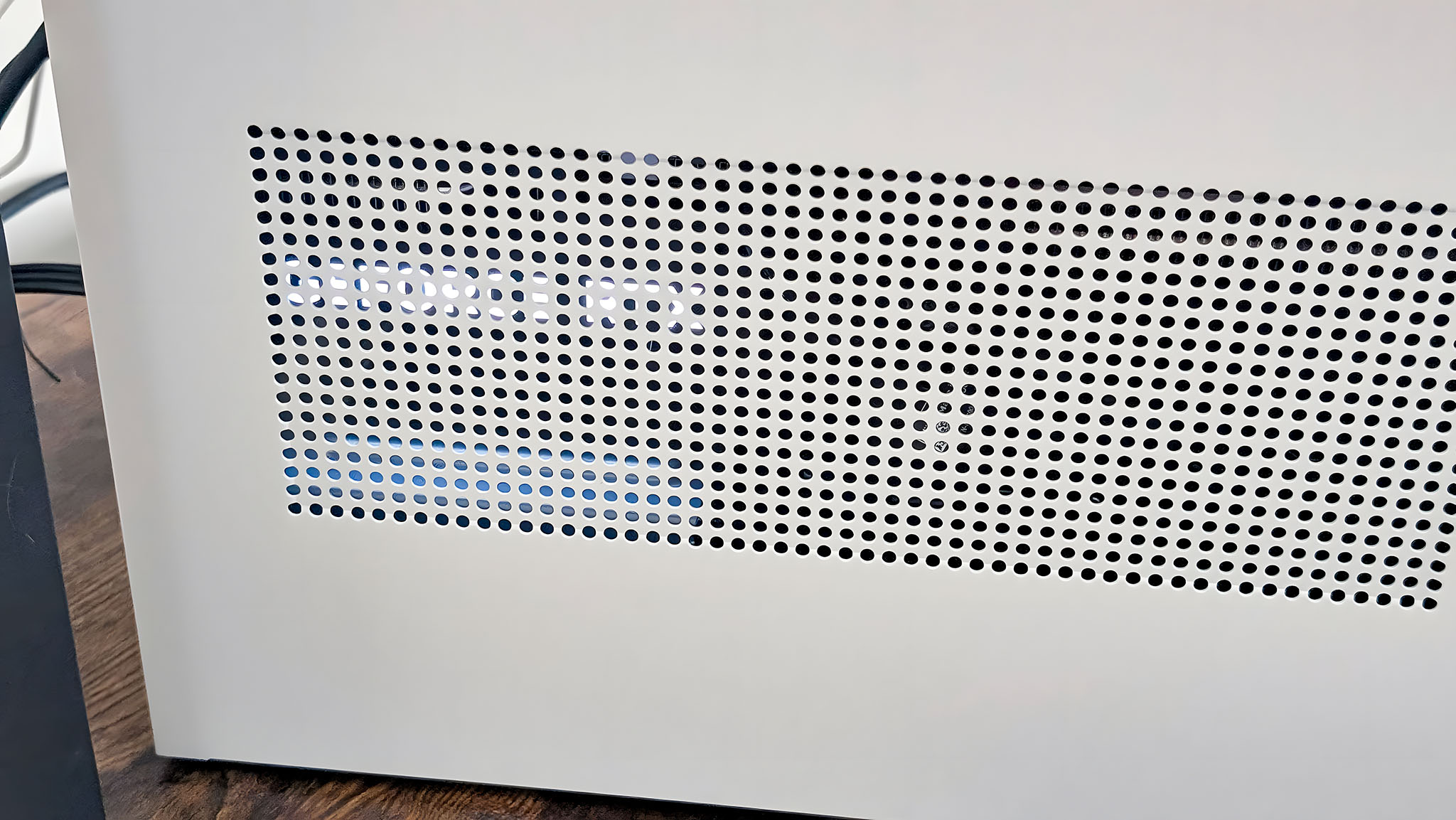
However, it is worth noting that the "GeForce RTX" on the GPU lights up bright white when the PC is on and shines through the vents on the casing's side. Because of this, I chose to place the Tower Plus on the left of my monitor so the bright lighting didn't shine at me when I used the computer.
The build quality is fantastic, with no glaring gaps or separations between the chassis panels.
Otherwise, the build quality is fantastic, with no glaring gaps or separations between the chassis panels. The Dell Tower Plus Desktop's feet also do an amazing job of gripping onto surfaces, ensuring there's no sliding around on my desk.
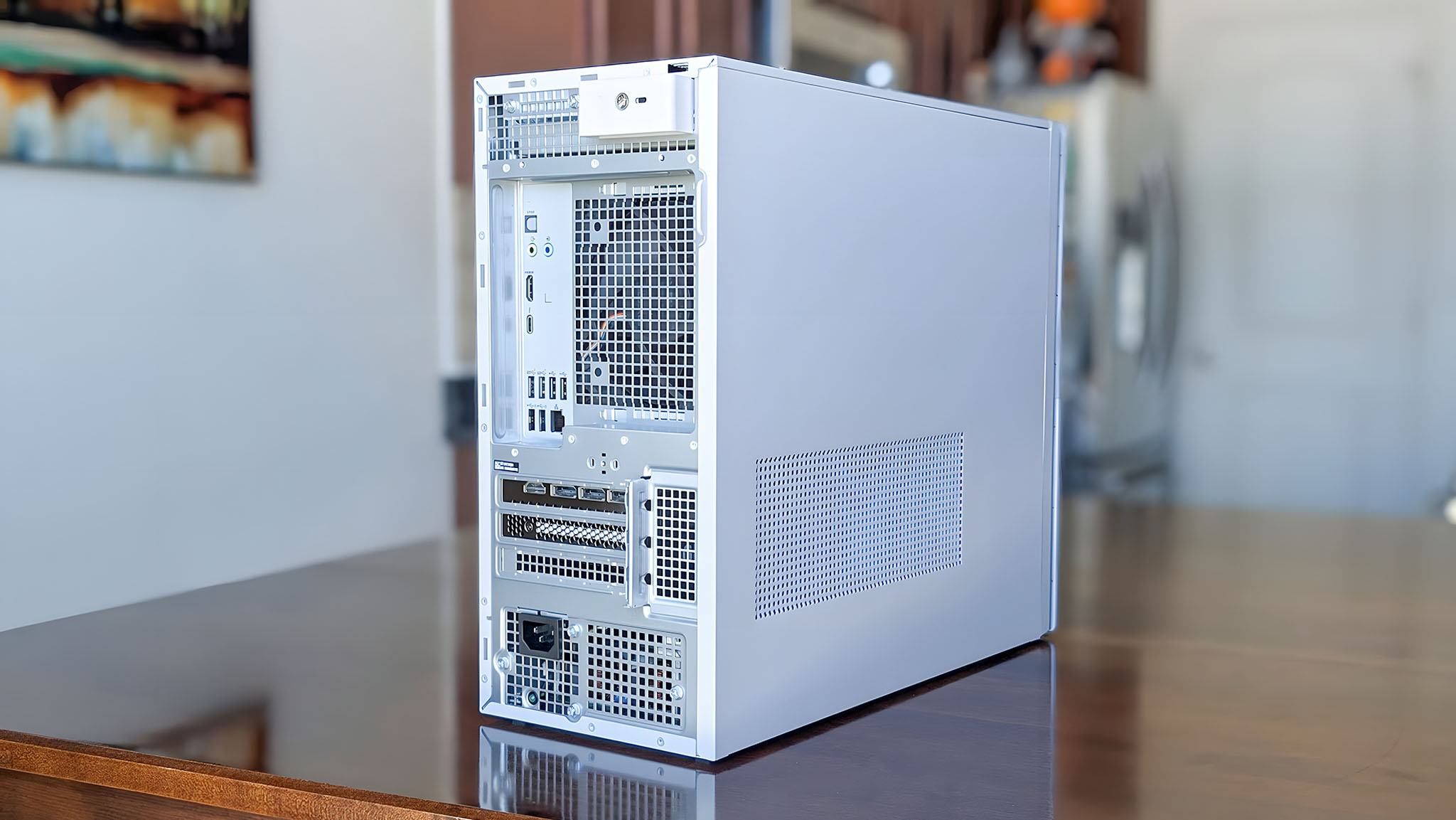
A healthy range of ports greets me on the front and back of the device, ensuring that I have enough connections to plug my various accessories and monitors in, as desired.
All in all, this is a phenomenal PC tower that pushes convenience and usability rather than a flashy design.
Performance ⭐⭐⭐⭐⭐
As a creative individual, I spend many hours working in Photoshop and other programs, so fast and steady performance is important to me. Dell's Tower Plus, with its Intel Core Ultra 7 265K processor and RTX 5070 discrete graphics card, impressed me at every turn.
For example, some of the editing tools and filters I regularly use can take several seconds or even minutes to process on some PCs, but I was able to do these same tasks either instantaneously or within just a few seconds on the Dell Tower Plus. It was so convenient.
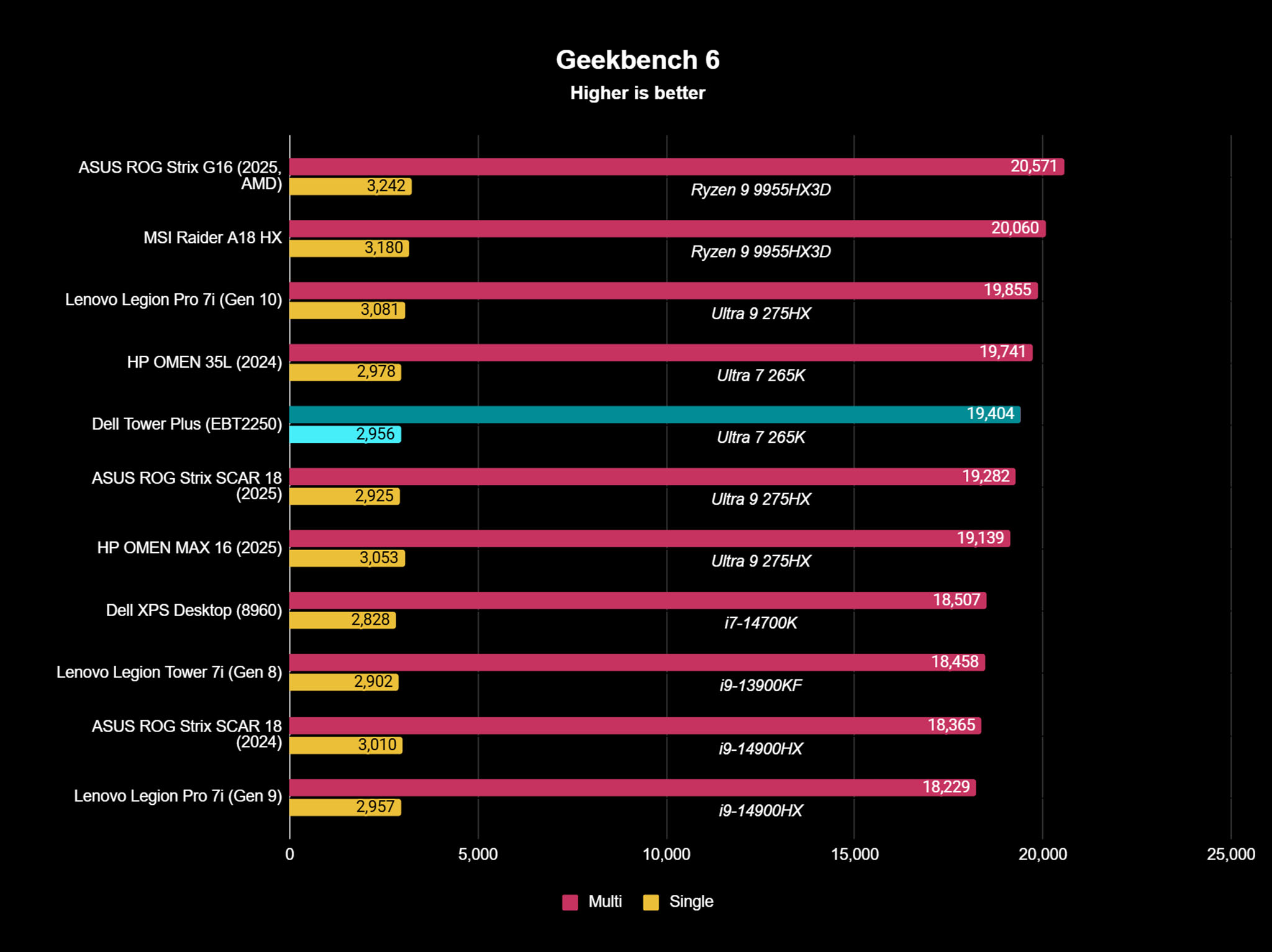
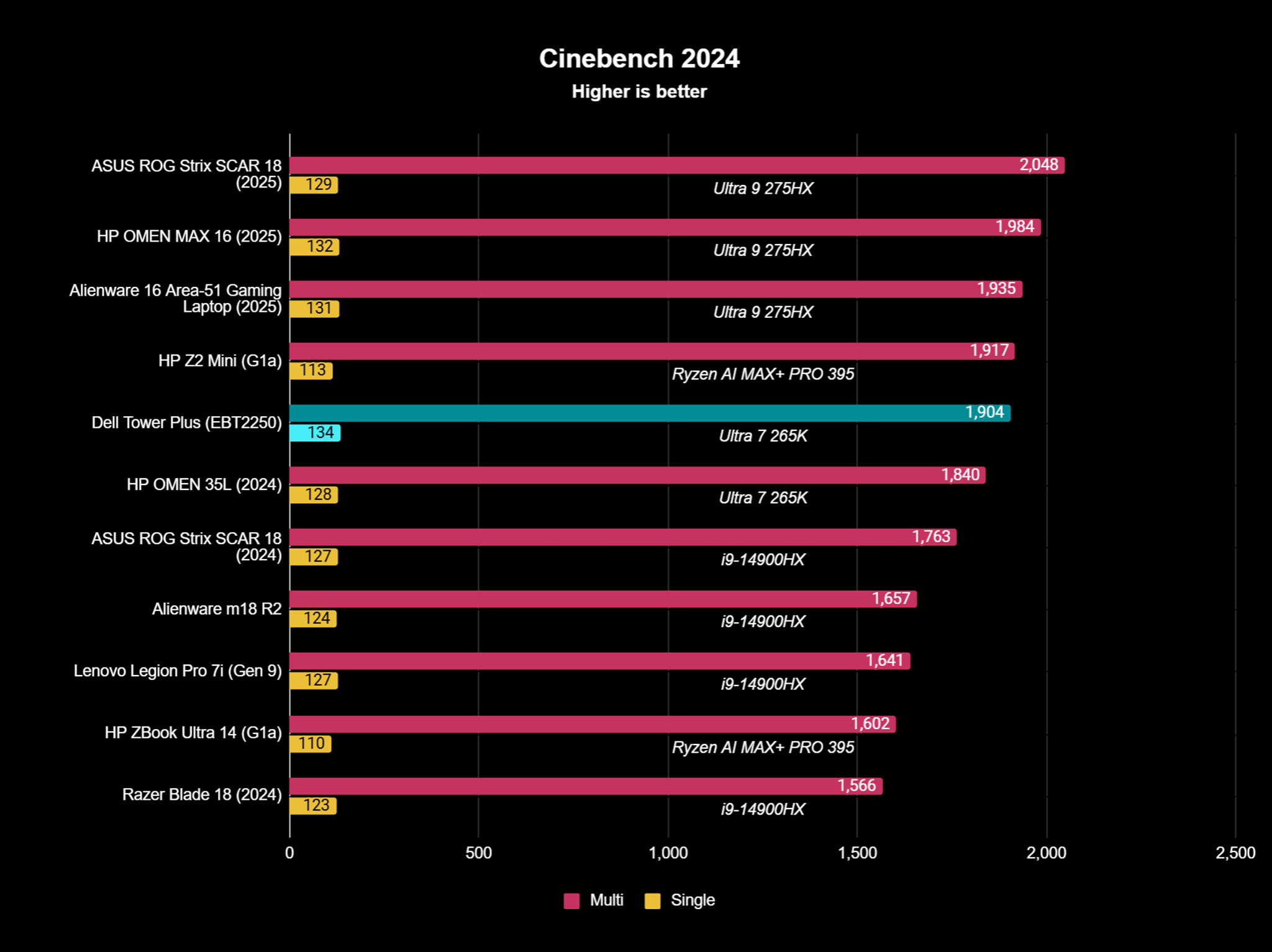
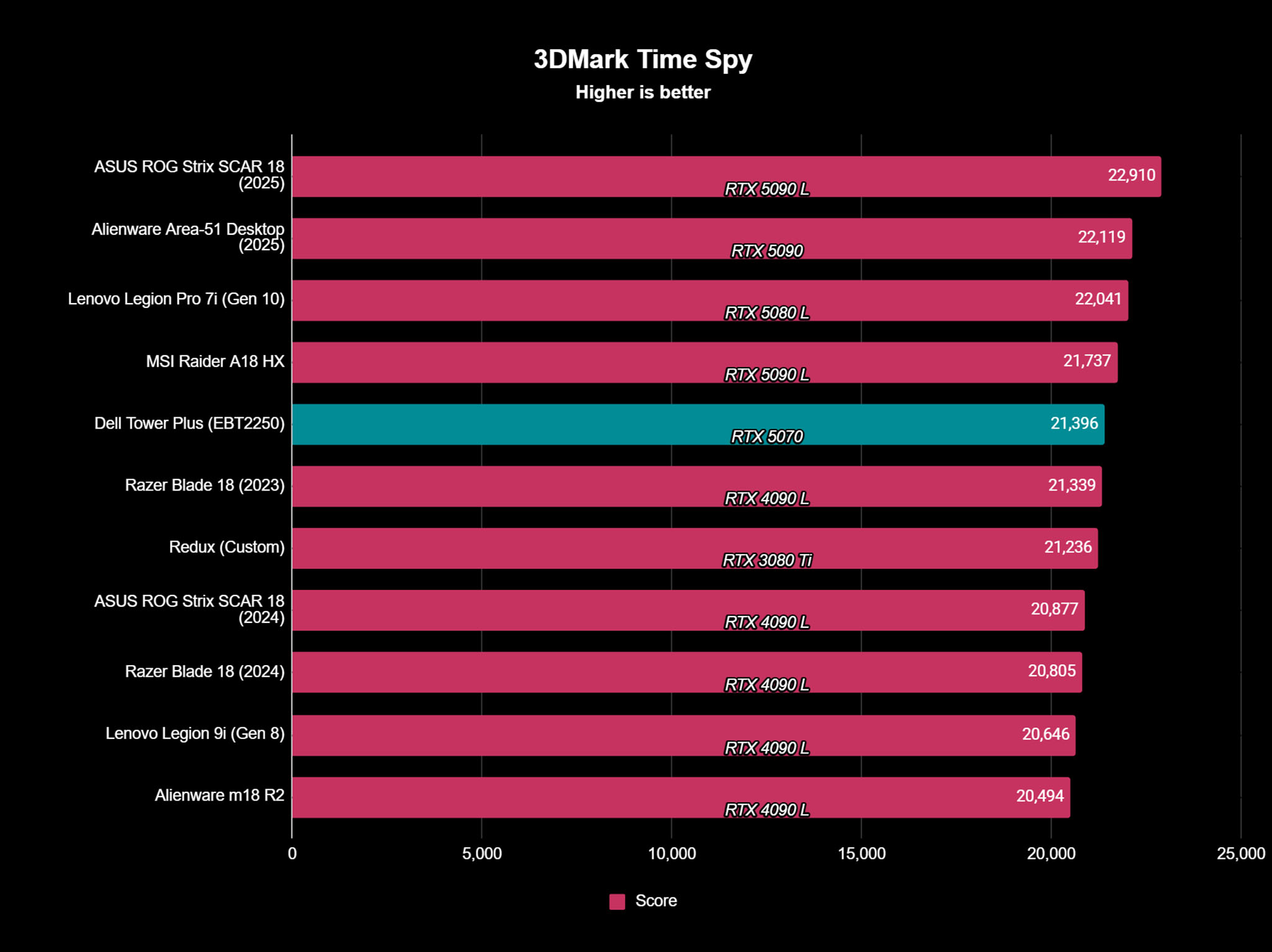
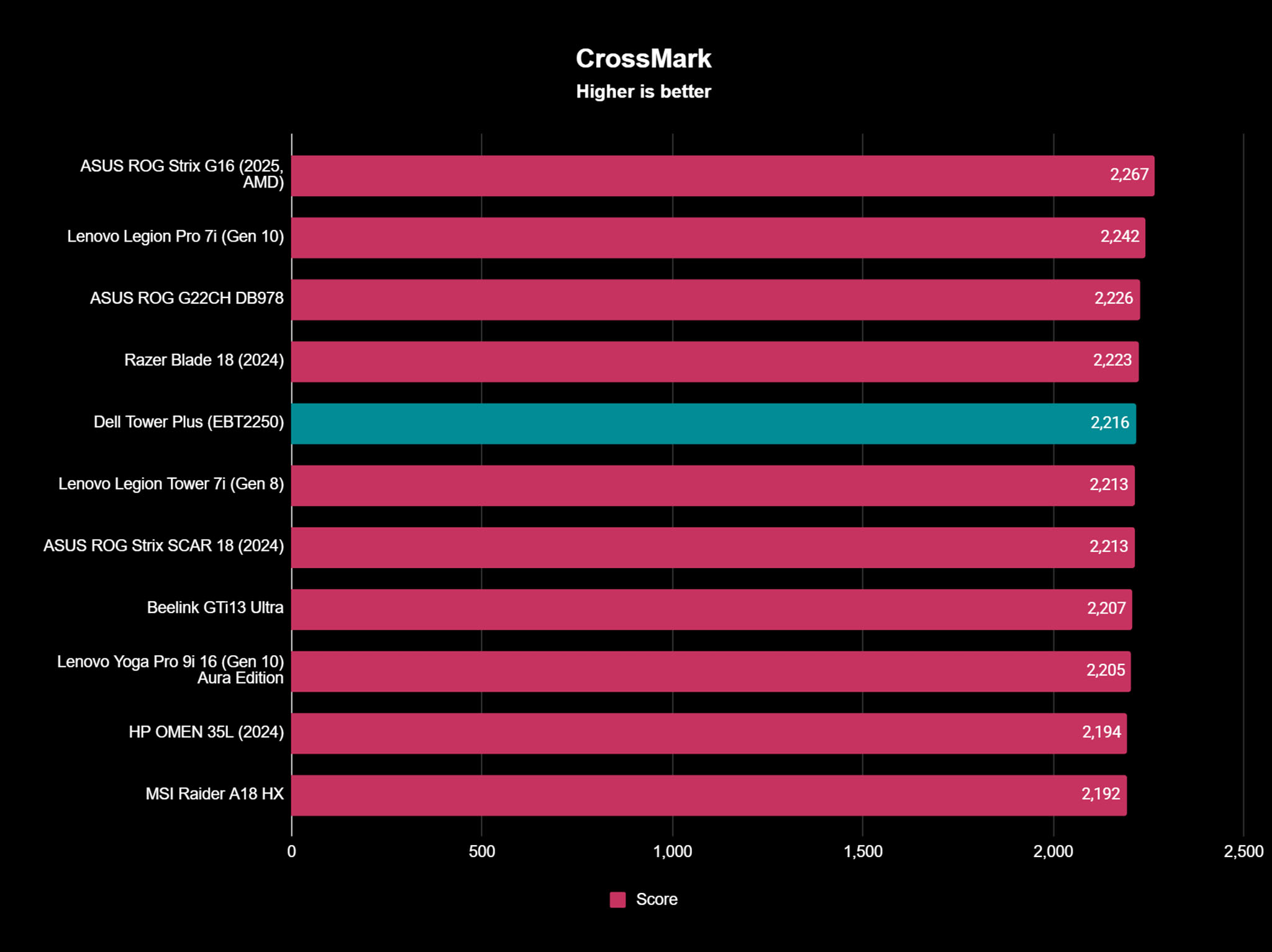
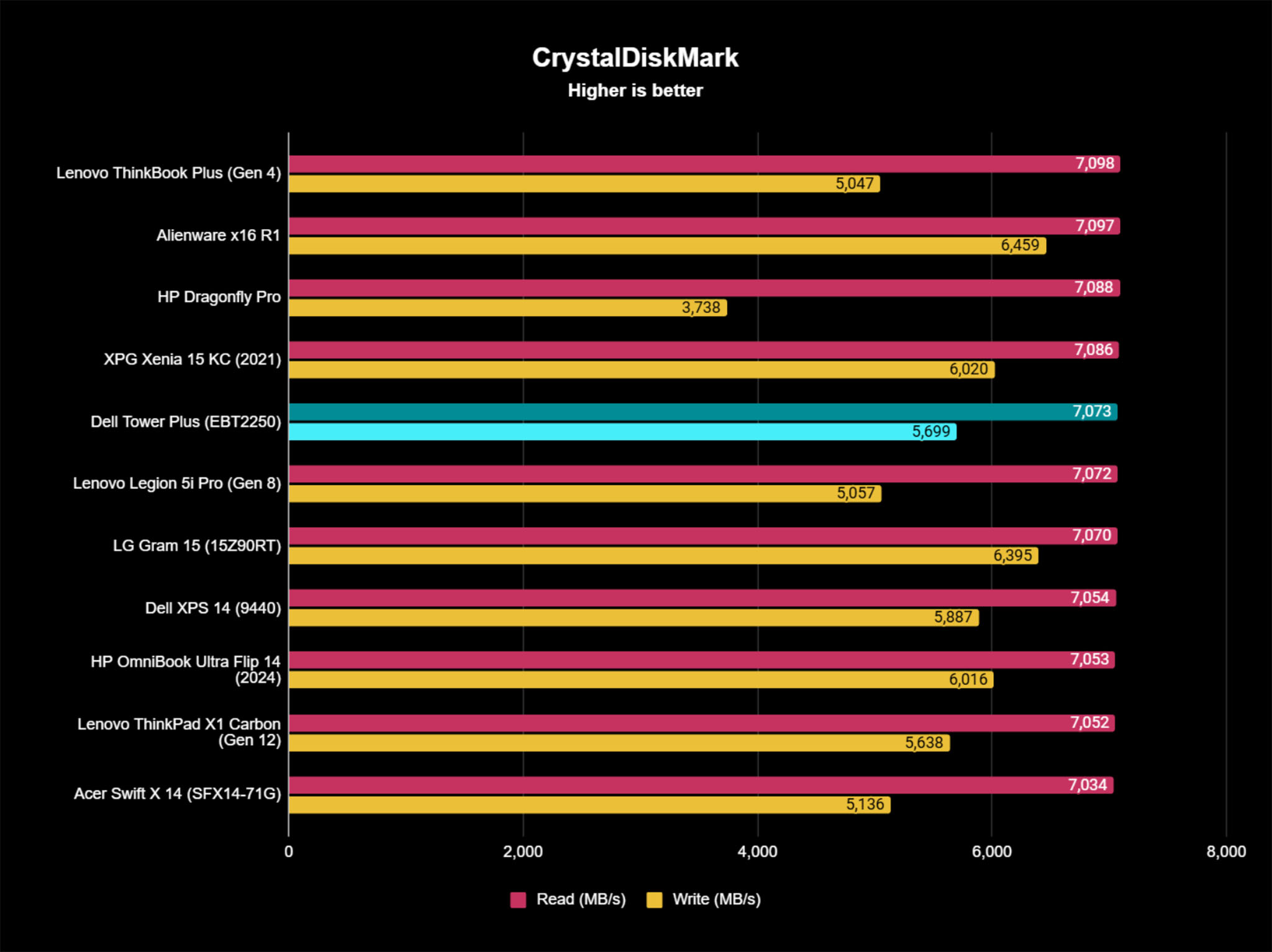
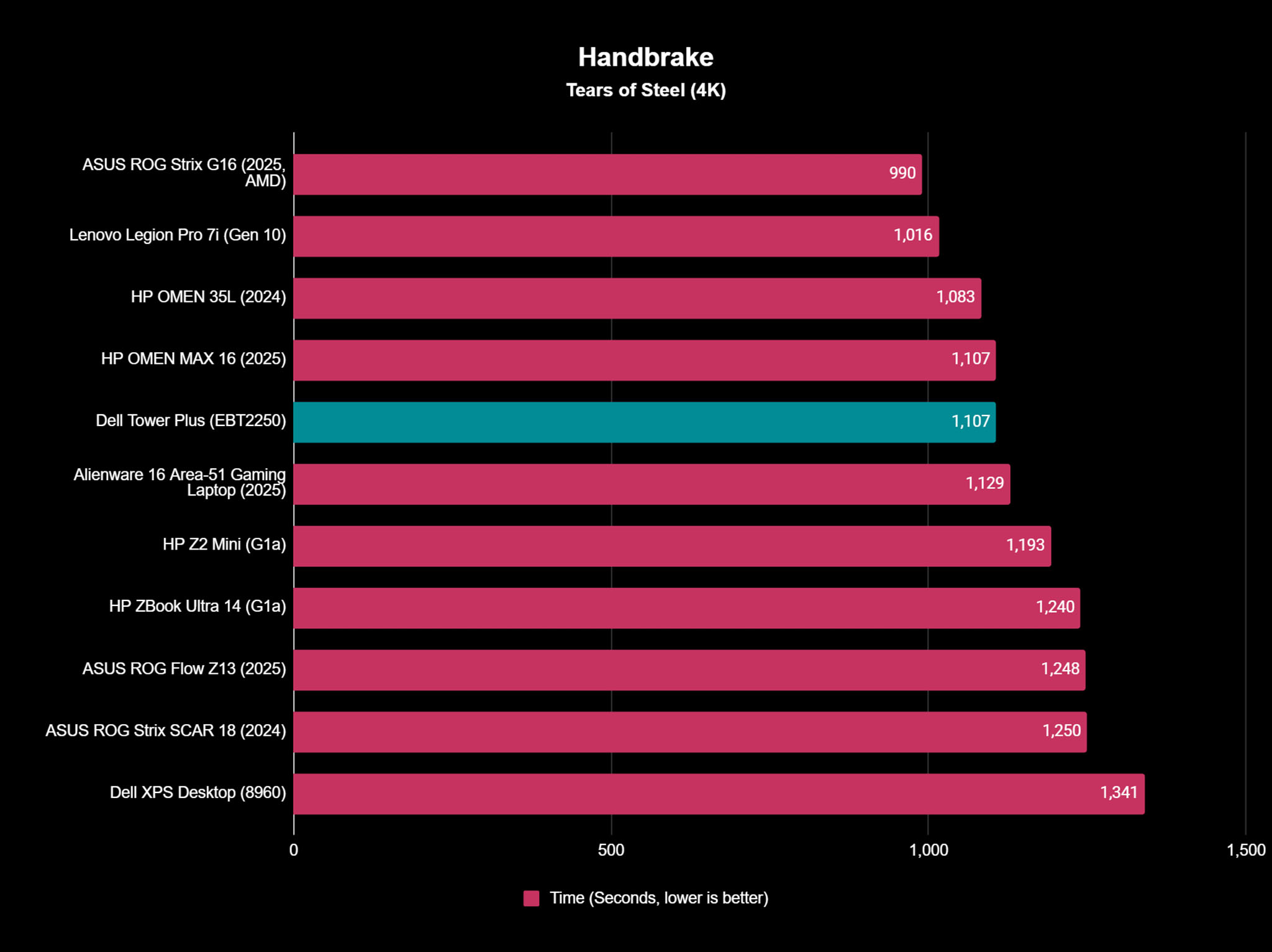
I also ran the Dell Tower Plus through several benchmark tests, and even though it isn't the most intense configuration Dell offers, it still excelled and got some of the highest scores of any PCs that Windows Central has ever tested.
The PCIe 5.0 SSD leads to very fast transfer speeds that kept up with any work I was doing. I was even able to transcode a 4K copy of Tears of Steel in just 18 minutes. Some PCs take 45 minutes or more to do the same thing.
This configuration can also easily keep up with the latest AAA gaming, even if this isn't a gaming PC that's specifically been optimized for digital adventures.
The Advanced CPU air cooling combined with dual fan design keeps the Dell Tower Plus cool and performant even during stress tests or when running more intensive programs.
Dell's flagship tower PC is so silent that I could barely hear it running at all, even when gaming or running some benchmarks.
Actually, most of the time, Dell's flagship tower PC is so silent that I could barely hear it running at all, even when gaming or running some benchmarks.
I was able to get the fans to turn up and hit a peak of 65.5 dB when running the most intensive programs; however, these fans only ever came on for small bursts of time and did an excellent job keeping the system cool.
Upgradeability ⭐⭐⭐⭐
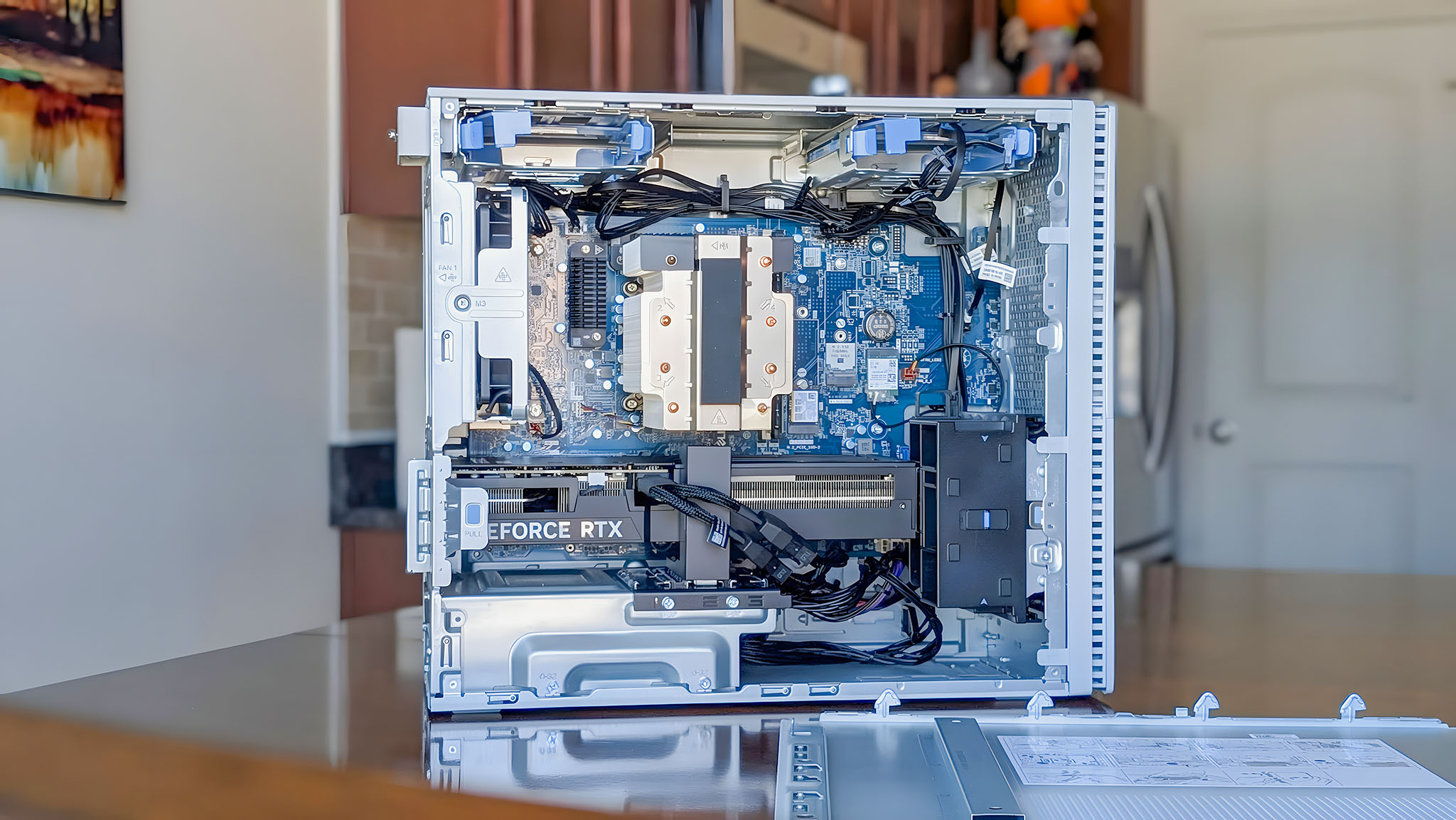
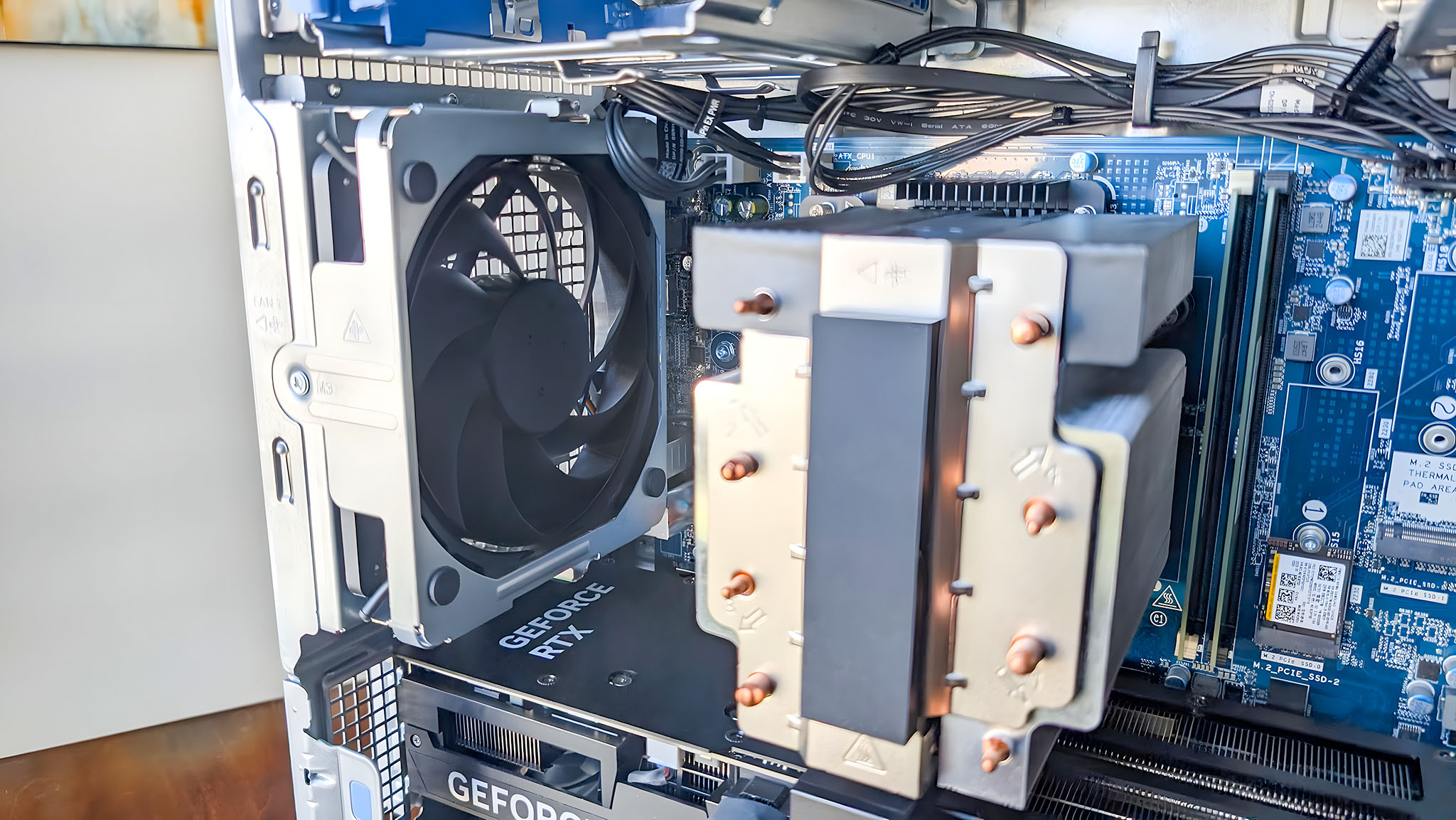
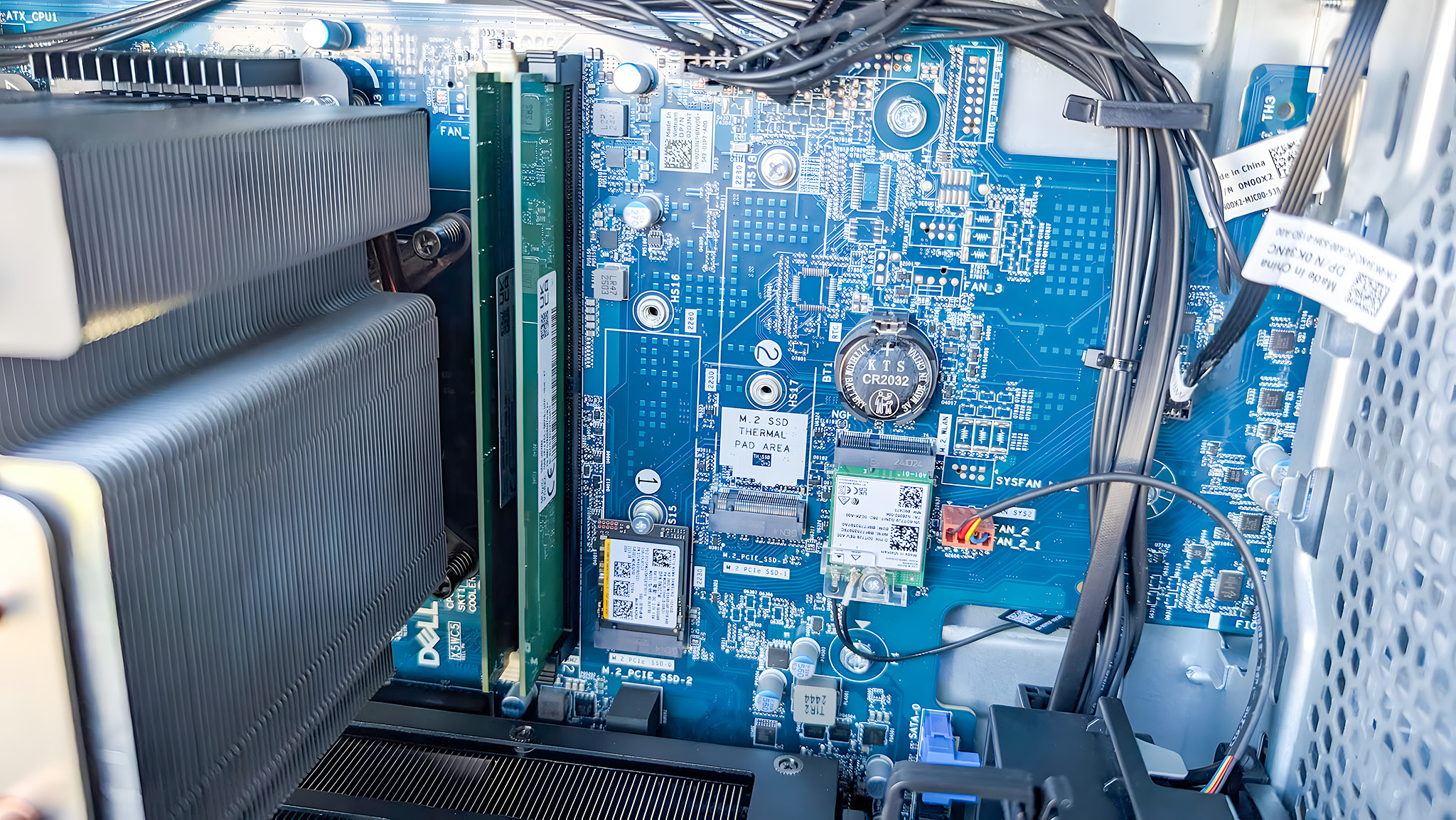
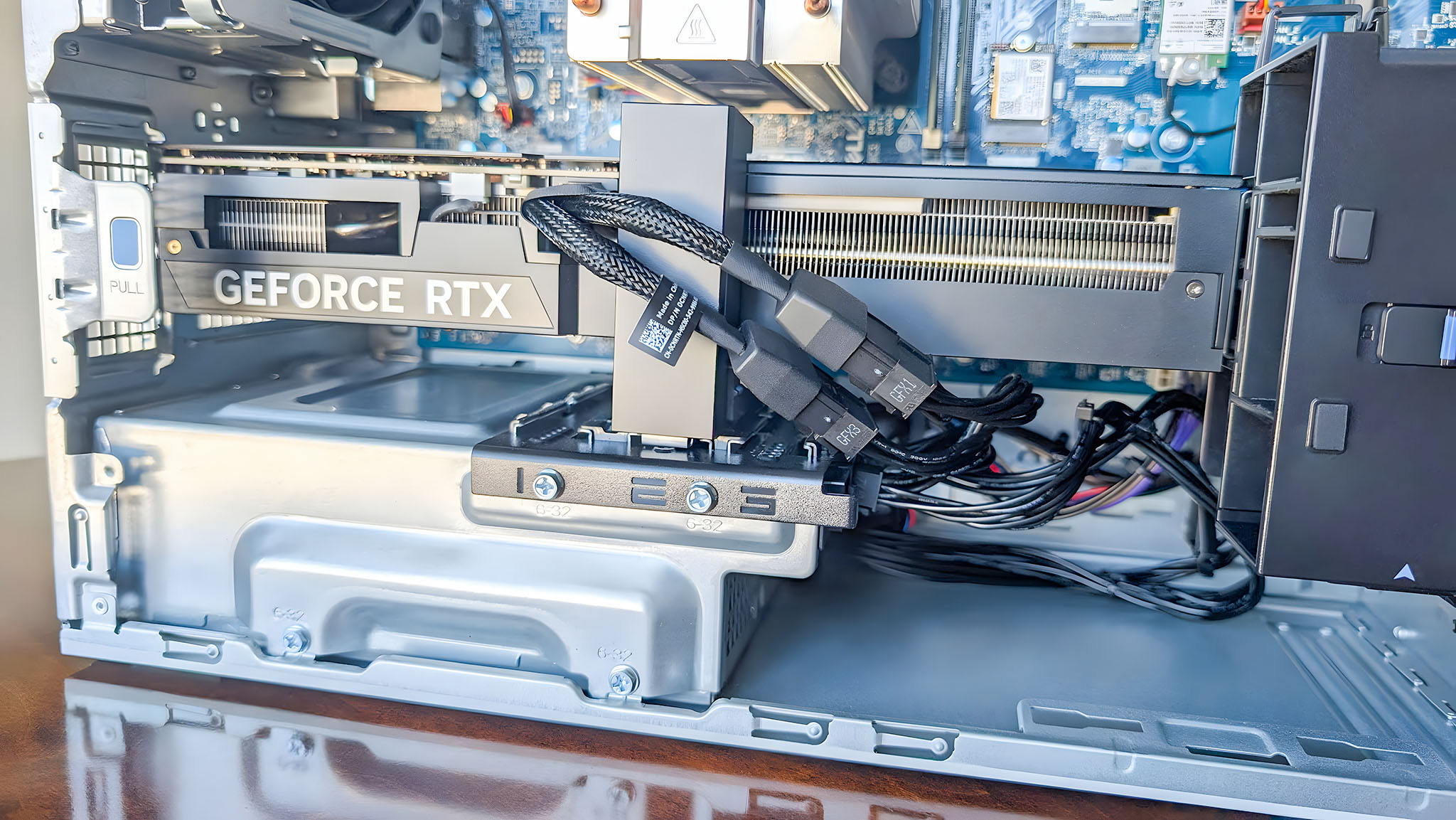
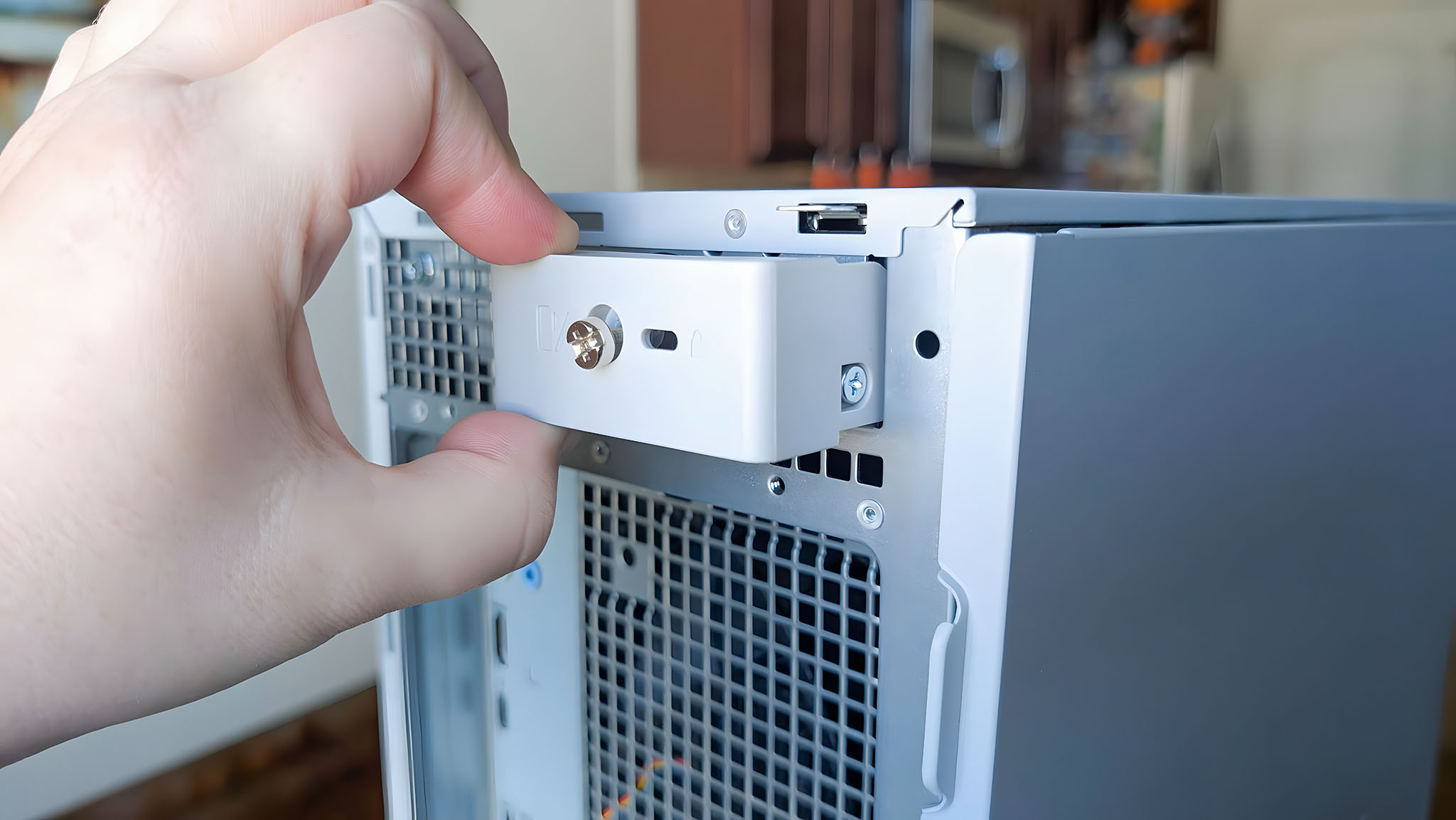
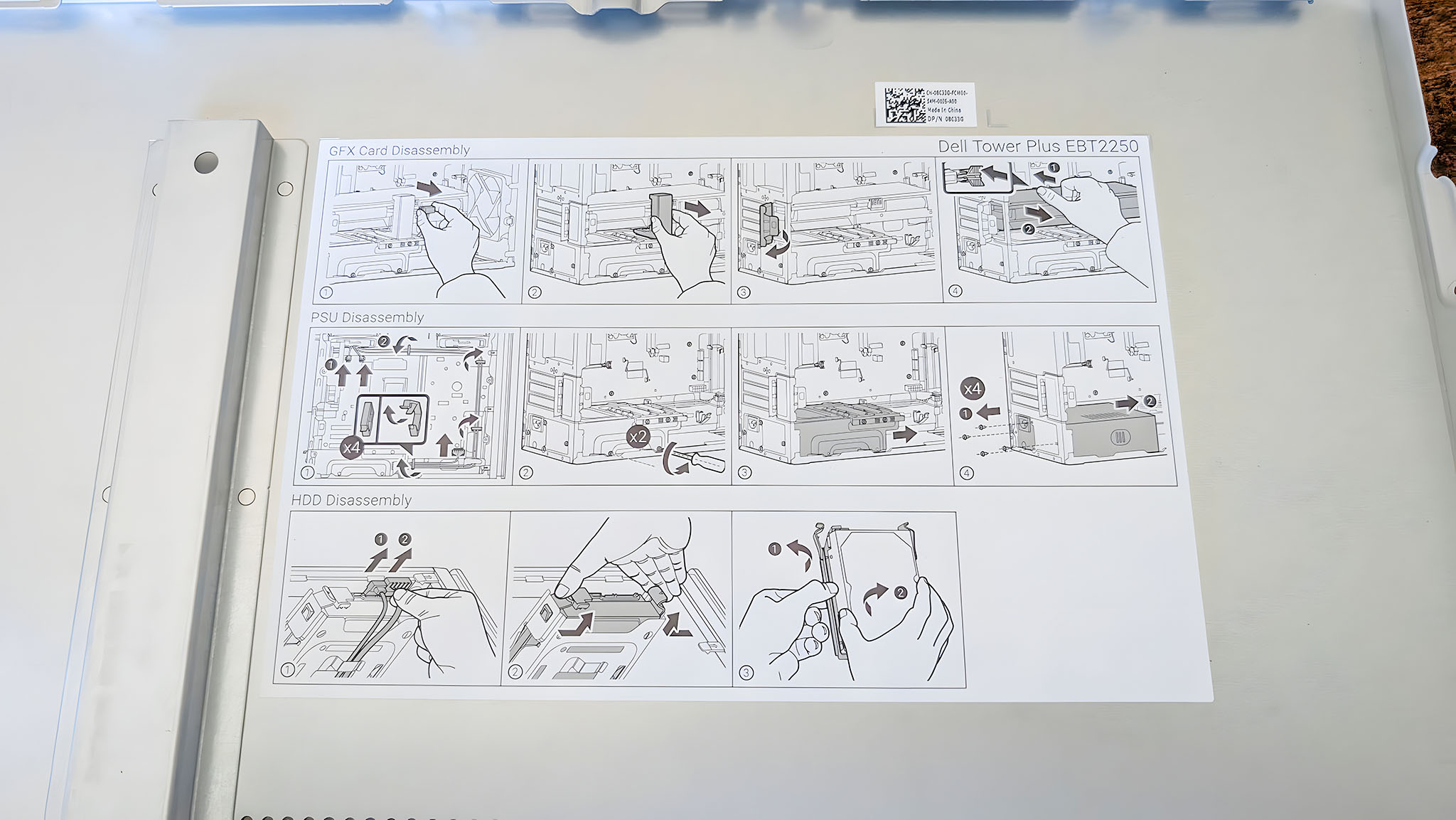
Dell did a fair job ensuring the Dell Tower Plus Desktop is easily accessible and upgradeable.
To remove the side panel, all I have to do is unscrew the screw at the back of the case and then pull on the locking mechanism. This causes the side panel to pop out.
Helpful illustrated instructions on the interior panel explain how to correctly remove different parts if you do want to upgrade anything.
The internal layout is very similar to the 2024 XPS 8960 Desktop, with everything being easily reachable.
Inside are two massive fans (one pulling cool air directly onto the massive RTX GPU and another pushing the hot air out of the back of the device) and an Advanced CPU air cooling system for the Intel CPU.
Only having two fans may concern some potential buyers, but as I noted in the performance section, this desktop doesn't struggle to keep its components cool. These fans are big and loud when they're needed, but otherwise remain quiet.
Near the top, you'll find two HDD slots, and there are also two SSD slots (one used, one available in my case) between the two RAM slots and the Wi-Fi card for your storage needs.
The power supply is at the bottom, with the Dell Tower Plus Desktop supporting up to 1,000W. The layout makes sense, and nothing is annoying to access.
Software experience ⭐⭐⭐⭐
As you'd expect, this desktop came with Windows 11, which runs very well on the Dell Tower Plus Desktop (as it should, considering this hardware).
Unfortunately, McAfee Antivirus and Web Advisor come installed, but you don't have to use these if you don't want to.
Aside from that, Dell does bake in a few different apps and programs onto the Tower Plus Desktop. Unfortunately, McAfee Antivirus and Web Advisor come installed, but you don't have to use these if you don't want to.
There are also other Dell apps like Dell Optimizer and SupportAssist onboard, as well as standard Intel apps like Command Center. Finally, there's Dolby Access OEM, which can help fine-tune any speakers you plug into the desktop.
None of this is too egregious, and most (if not all) can be uninstalled should you wish to free up some space. Some of them are useful, like SupportAssist and Dell Update, which can help keep you updated with all the latest drivers.
Dell Tower Plus (EBT2250): Should you buy it?
✅ You should buy it if ...
- You need a powerful, premium desktop PC for creative work, extreme productivity, and/or gaming
- You want a simple, understated design that's still high quality
- You'd like an upgradable desktop that also offers plenty of ports
- You're willing to pay a premium for a high-end, pre-built desktop with the latest internals
❌ You should not buy it if ...
- You're looking for the best possible value
- You want a flashy design with RGB lighting
- You want a pure gaming PC packed with gaming-specific features
While not vastly different from the previous XPS Dell Desktop, the new Dell Tower Plus (EBT2250) is a fantastic machine that is even more powerful and just as convenient as its predecessor.
Don't let the simple casing confuse you; this is a tiger with a demure design that excels at office productivity, creative work, gaming, and everything else you can throw at it.
As long as you're willing to pay the price for it, it's a phenomenal choice whether you want to use it for work, school, or personal projects.

Follow Windows Central on Google News to keep our latest news, insights, and features at the top of your feeds!