
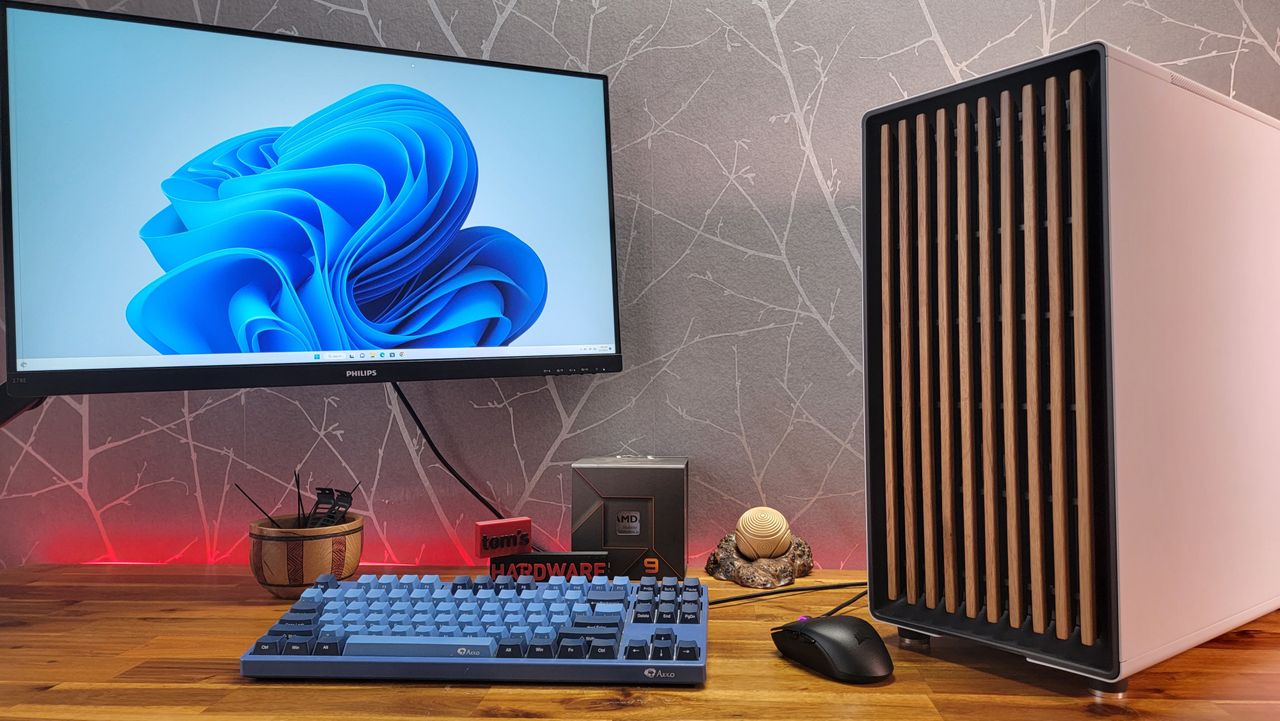
Many of us feel the constant urge to upgrade our PC, but getting new PC parts has been increasingly challenging lately. Whether it's due to limited launch availability, scalping of components, or the current AI boom causing memory shortages, it feels like there's always a factor preventing a purchase or upgrade at a reasonable price. The positive outlook is that not all worthwhile upgrades need to focus solely on performance. You can upgrade your monitor, peripherals like gaming keyboards, gaming mouse, speakers, or gaming chair. But one of the best and affordable ways to get your upgrade fix while feeling like you've got a new PC is to put your existing system in a new PC case.
A PC case generally lasts through more than one build, so it’s critical when choosing a new chassis that you consider what parts you have and future upgrades to larger, potentially more power-hungry components as prices drop. And while you’re changing cases, it’s a great time to reapply your thermal paste (if necessary) and do any other cheap or useful maintenance, such as blowing the dust off components. You can even upgrade your cooler; our best CPU coolers list can help you do so on the cheap, while you're at it.
Good airflow aside, a primary motivator for purchasing a new PC case is aesthetics. Modern case designs offer far more variety than a simple black box, significantly enhancing the look of your entire setup. Since cases are typically kept for a long time, choosing one you enjoy looking at is important.
In recent years, we’ve seen wood accents in cases, like the popular Fractal Design North (which made our best PC cases list), and more standard designs, like ‘fish tank’ style cases, and the increasing popularity of rear-connect-compatible chassis for the spate of back-connect motherboards we’ve seen. Are you into old-school styling? There are cases like that too, including the Thermaltake Retro 260/360 TG and Silverstone’s FLP01 and FLP02 that exude 80s and 90s PC vibes.
Fractal Design North
The Fractal Design North offers a refreshing take on the modern PC case, pairing strong airflow with a distinctive wood-slat front panel that stands apart from RGB-heavy designs. Built with Fractal’s renowned quality, it delivers both style and performance in a clean, refined form. Its intentionally minimalist look makes it an ideal choice for builders who want a powerful system that blends seamlessly into a living room or workspace rather than standing out.
Pros
- Exceptional thermal performance
- Solid 3.5-inch drive support
- Gorgeous design
- PWM fans
- Movable fan hub
- Side fan bracket is included
- Fair price
Cons
- Noisy
Upgrading your PC case can also be a practical way to boost performance by significantly improving internal airflow and lowering component temperatures. Perhaps your current chassis was sufficient for a lower-power setup, but since you upgraded your system—before the recent surge in AI-related component prices—it’s now showing its limitations with more power-hungry components. Better airflow generally translates into lower temperatures for your CPU and GPU. As our case reviews demonstrate, this heat reduction is the reason for improved metrics, allowing for higher core boost clocks/speeds.
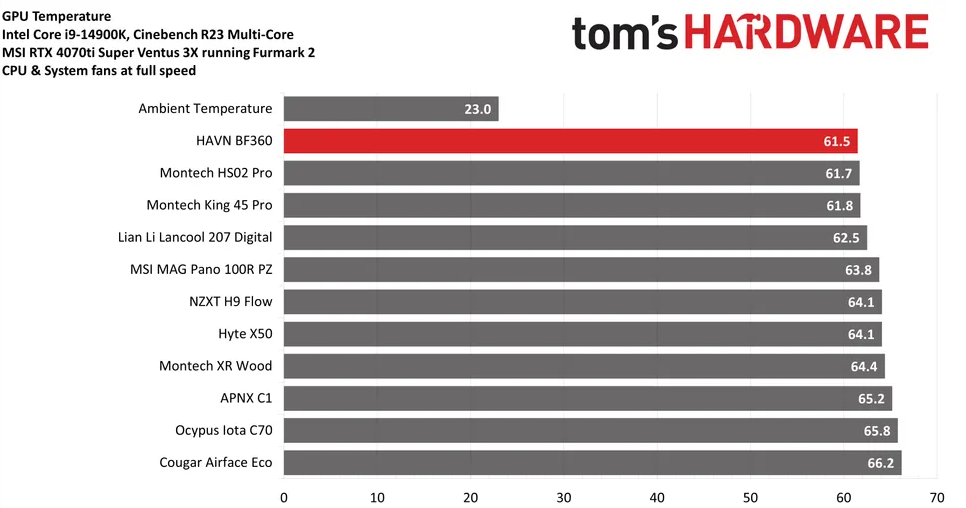
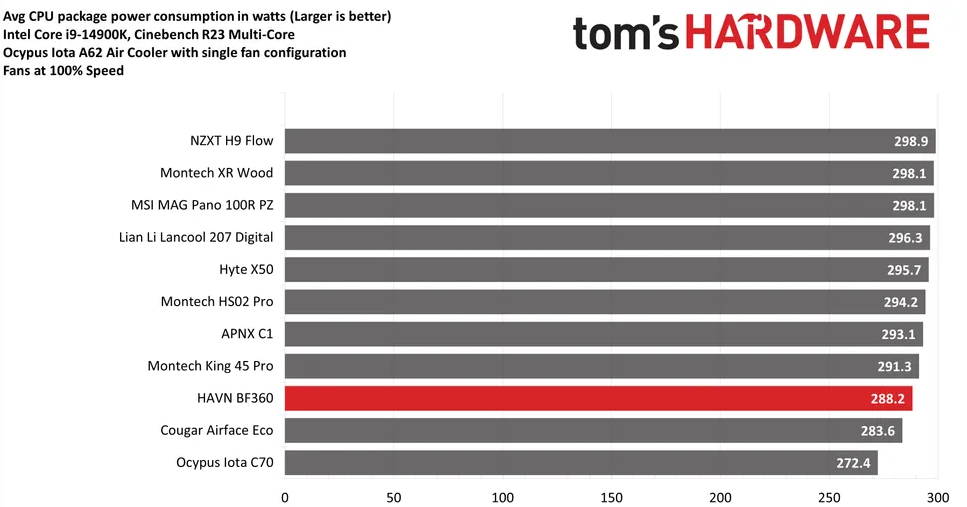
Increasing airflow isn't only about performance, either. There’s also the matter of keeping things quiet. With high-airflow cases, you may be able to run your fans slower, reducing noise while maintaining the same level of cooling. For example, the NZXT H7 Flow we reviewed has solid airflow and is also relatively quiet.
NZXT H7 Flow
The NZXT H7 Flow (2024) is a streamlined mid-tower case focused on strong airflow and modern cooling needs. With a mesh front panel, expanded fan support, and a redesigned interior for improved thermals, it’s built to handle today’s high-performance hardware. While the design update is subtle, the H7 Flow (2024) remains a solid, well-built choice for builders who want reliable cooling in a clean NZXT aesthetic.
Pros
- Super easy to build in
- Room for 10 fans
- Lots of room for cables
Cons
- No dust filters
- Design feels a bit boring
Modern cases also feature updated connectivity on the front I/O panel. That case you bought just a couple of years ago may not have enough ports for your usage patterns and only have USB Type-A ports, lacking today’s now common Type-C port. Port type is one thing, and port speeds are another. Many cases from years back support only USB 2.0 (480 Mbps), whereas modern chassis front IO panels support up to USB 3.2 Gen 2x2 (20 Gbps - Type-C) and USB 3.2 Gen 2 (10 Gbps). For my work, I transfer quite a few images and other files from system to system, and time is money. Even if it isn’t for work, getting data off an external drive or USB stick to the faster internal storage is a tangible upgrade. Less waiting means more playing.
Cases like the Fractal Design North (also on our best case list), Meshify 3 XL, Terra, MSI’s MAG PANO 100R/110R, and the Asus A31 Plus, to name a few, all include a fast Type-C port and faster Type-A ports compared to older chassis. Just make sure your motherboard has an internal USB-C header to plug that front-panel port into.
MSI MAG Pano 100R PZ
MSI’s MAG Pano 100R PZ is a nice-looking wrap-around case that includes support for vertical GPUs, back-connect motherboards, and supports eight PCIe expansion slots. The pre-installed fans work well with this case, so there’s really little reason to consider third-party fans. If this case interests you, it is available for $159.99 on Amazon as of this writing.
Pros
- Great thermal performance with pre-installed fans
- Lots of space for large components
- Supports back-connect motherboards
- Eight PCIe expansion slots supported
- Four slots supported for vertical GPUs (many cases only support three)
Cons
- Noise-normalized CPU-only performance could be better
- No GPU riser cable included
A new PC case or peripherals can inject fresh excitement into your current setup, offering a cool new look while you wait for better prices on parts like storage, RAM, or a video card. It's a great option if you have some extra cash but aren't ready for a completely new system or you want to wait until the prices for RAM, storage, and GPUs gets back to some semblance of normal – whenever that might be. For our top recommendations, check out our guide to the best PC cases.

Follow Tom's Hardware on Google News, or add us as a preferred source, to get our latest news, analysis, & reviews in your feeds.