
Home alarm and security systems are smarter than ever, with high-resolution cameras, wireless control units, smartphone apps and – in some cases – 24/7 professional monitoring that can call the emergency services on your behalf. There’s even a home alarm system with a smoke canister to force burglars out.
No matter the type or size of property you live in, from a city centre studio flat to a large family home, there’s a smart alarm system for you. Often, these systems can be scaled up to fit your needs – starting as a simple kit before growing to protect every room, door and window of your home – even the garden, gate, drive and outbuildings.
These systems include components, such as security cameras and video doorbells, plus motorised door locks, motion detectors, door and window sensors, sirens, floodlights and much more besides. They connect to the internet and are controlled by a keypad, fob, smartphone or smartwatch. Some systems also integrate with smart home platforms like Apple Home, Alexa and Google Home, with support for voice control.
A number of the systems have solar-powered cameras for year-round battery life, while others offer integrated 4G to stay connected if your broadband goes down.
From simple, battery-powered DIY alarms you can install yourself, to comprehensive systems with professional installation and 24/7 monitoring, this guide includes some of the best alarms to protect your home.
Leading names in home security include Ring, Yale, Eufy, Verisure and our current top pick, SimpliSafe. Each offers a mix of devices such as motion detectors, door sensors, sirens, keypads, video doorbells and security cameras, letting you build a system that suits your home and budget.
The main difference between them relates to subscriptions and professional monitoring. Some companies, like SimpliSafe and Verisure, run response centres staffed by security experts. They are notified when an alarm is triggered and can check your system remotely, contact you, and even alert the emergency services and dispatch a private security guard if needed. Professional monitoring like this comes as part of a monthly subscription. Some systems charge a fee for cloud storage, while others work with no ongoing costs at all.
Best home security systems at a glance:
System |
Best for |
Professional monitoring |
Backup battery power |
Cellular backup |
Wifi connection |
SimpliSafe |
Best home security system overall |
Yes, with subscription |
Yes |
Yes, with subscription |
Yes, Ethernet optional |
Verisure |
Best for professional monitoring |
Yes, with monthly fee |
Yes |
Yes |
Yes, but primarily Ethernet |
Ring alarm |
Best for cameras |
No, not in the UK |
Yes |
Yes, with subscription |
No, Ethernet only |
Eufy security |
Best subscription-free security alarm system |
No, not in the UK |
No |
No |
No, Ethernet only |
TP-Link Tapo |
Best for smart home builders |
No |
No |
No |
Yes, plus Ethernet |
Yale smart alarm |
Best for covering the basics |
Yes, with subscription |
Yes |
Yes, with subscription | Yes, Ethernet optional |
How we tested
I installed and used each of the alarm systems in my own home for at least a week. During that time, I assessed how smooth the installation process was, how well the companion smartphone application worked, and whether the system works with smart home platforms like Amazon Alexa, Apple HomeKit and Google Home.
I then used each alarm system as if it were my own. Fitted to the doors and windows of my home, I monitored how quickly they responded to entry and exit, and assessed the loudness of their sirens. I also paid close attention to how much configurability each offered, what other products could be added to expand the system and, of course, what their various subscription services offer. SimpliSafe
I also tested how well the security systems work when away from home and, where available, how they interact with other smart home products, such as Philips Hue lighting.
Save 40% with our exclusive voucher code

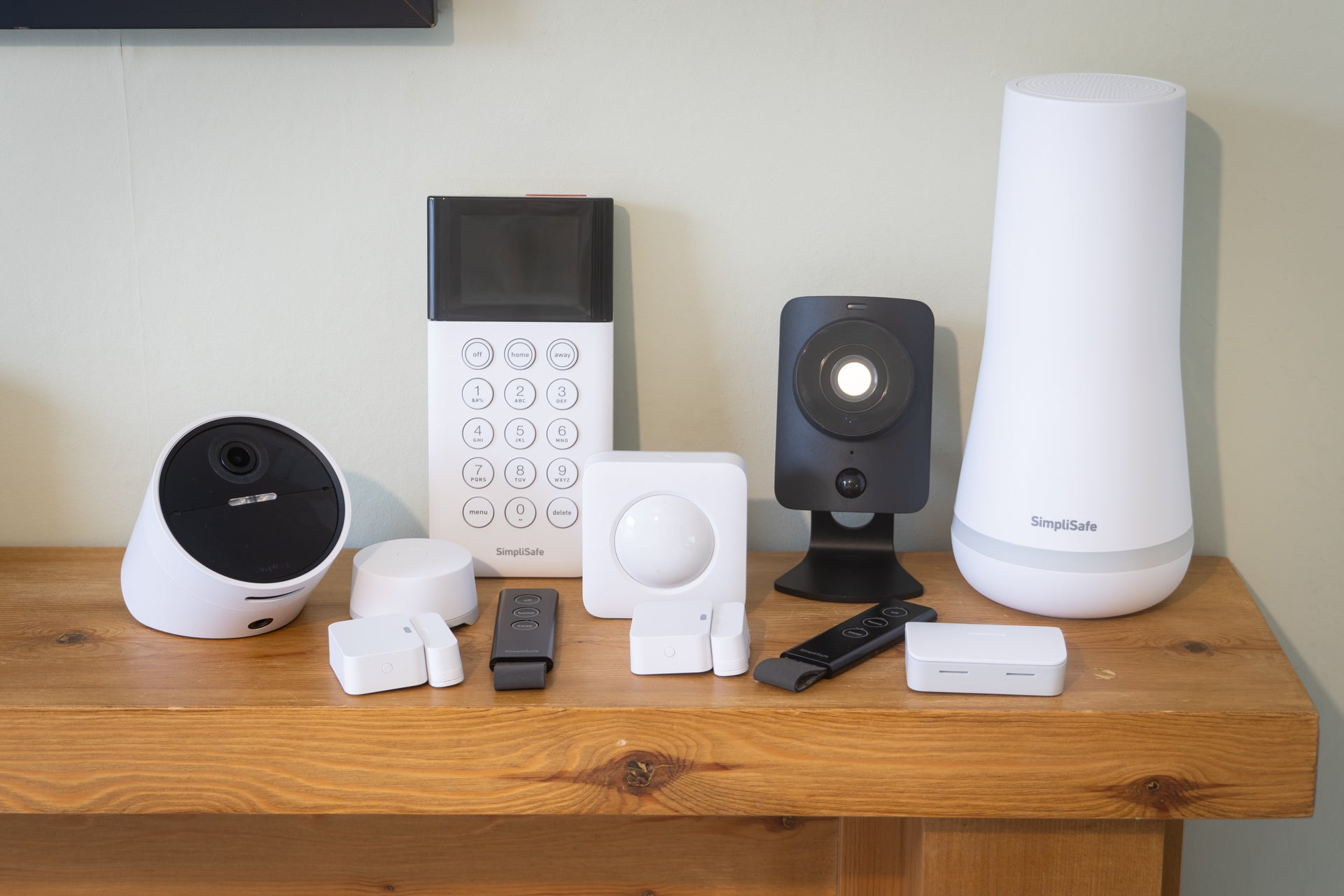
You can save 40 per cent on a SimpliSafe home security system and get a free bell box with this discount code, exclusive to The Independent’s readers. SimpliSafe kits range in size, depending on your needs and the size of your property.
SimpliSafe
Rating: 4.5/5
Best: Overall
Wifi: Yes, Ethernet optional
Cellular backup: Yes
Battery backup: Yes (24 hours)
Base station range: 150 metres
Sensor/accessory limit: 100
Base station dimensions: 21cm x 10.2cm x 10.2cm
Outdoor siren: Sold separately
Professional monitoring: Yes, subscription required
Why we love it
- Easy to set up
- Lots of accessories available
- Live monitoring with emergency response
Take note
- Some hardware feels dated
- Little functionality without subscription
- Ongoing costs
SimpliSafe is a home security system that puts simplicity first. In a world where some security kits require an understanding of smart home systems and voice assistants, this is a refreshing change.
SimpliSafe has created a middle ground for itself, somewhere between the more expandable offerings of Ring and Eufy, while being smarter and more connected than traditional home alarms from Yale. I can see this approach appealing to homeowners (and renters) who want a very simple setup process, while avoiding the extra functionality and inherent complexity of more feature-packed systems.
This approach can make the SimpliSafe kit look and feel slightly dated, with the keypad especially resembling something from a decade or two ago. It doesn’t even have a colour display, let alone a touchscreen.
But, again, I can see the appeal here. It’s a product reminiscent of a traditional home alarm system, but which is fully wireless, connected to the internet and (with the right subscription) includes professional monitoring and police response – something rivals like Ring do not offer in the UK.
Cameras
SimpliSafe’s small security camera range includes one for inside your home and one for outside, plus the video doorbell pro. Adding extra cameras to your system is optional, but all SimpliSafe’s kit bundles come with at least one camera.
Newer SimpliSafe cameras launched in 2025, but these are still far simpler than many rivals, like those from Ring and Eufy. This is good for buyers who want a plug-and-play security system that can be installed quickly and simply, but the cameras’ lack of features might leave other buyers wanting more. The latest indoor and outdoor cameras from SimpliSafe record at Full HD resolution, and both have a microphone and speaker for two-way audio, plus the mains-powered indoor cameras have a physical lens cover for extra privacy when it isn’t in use.
The second-generation outdoor camera, pictured below, has a few new tricks up its sleeve. There are more microphones now, with four in total for improved audio, and a new, larger speaker too.

The new speaker is louder too, with a siren now measured at 90dB compared to 80dB for the previous model. Also new is facial recognition, which helps to cut down on false-positive reports by only sounding the alarm when a stranger is spotted. The biggest upgrade is unlocked when you pay for SimpliSafe’s professional monitoring service, as agents responding to your alarm can now view a live video feed from the outdoor camera, and use it to challenge trespassers or potential burglars before the situation escalates.
Although lacking some features offered by rivals – for example, parcel detection, motorised movement, 4K video and an integrated solar panel – the key to SimpliSafe’s cameras is how they can be used to verify an emergency situation. If a burglar triggers your alarm, an agent (with your prior permission) can view a live feed from the camera and inform the emergency services.

Monitoring
Constant professional monitoring is SimpliSafe’s most valuable feature. If the alarm is triggered, SimpliSafe’s call centre is alerted. They then call you to check if the alarm is genuine, and can even use your security cameras to assess the situation and call the emergency services if required. If an incident cannot be verified over the phone or through your cameras, SimpliSafe will dispatch an agent to visit your home.
SimpliSafe will also get in touch with you (or call your emergency contacts if you don’t answer) when smoke is detected, or when your system’s water leak and high/low temperature sensors are triggered.
Subscription cost
Subscriptions start at £15.99 for SimpliSafe’s Pro Plan. This is a self-monitoring system, where you’ll be alerted by the app if there’s a break-in, fire or water leak, and your emergency contacts will be phoned.
The next tier is called Pro Premium and costs £27.99 a month. This includes professional monitoring, as outlined in the previous section, where an agent responds and calls the emergency services.
Read the full SimpliSafe review
Buy now £160, Simplisafe.co.uk
Verisure
Rating: 4/5
Best: Alarm with professional monitoring
Wifi: Yes
Cellular backup: Yes
Sensor/accessory limit: Not stated. Scaleable
Base station dimensions: 105 x 174 x 32 mm
Outdoor siren: No
Professional monitoring: Yes
Why we love it
- Pro monitoring with emergency service calling
- Professional installation
- Lifetime hardware guarantee and support
- Ease of use
Take note
- Opaque pricing
- Limited smartness
- Some app bugs
- Subscription mandatory
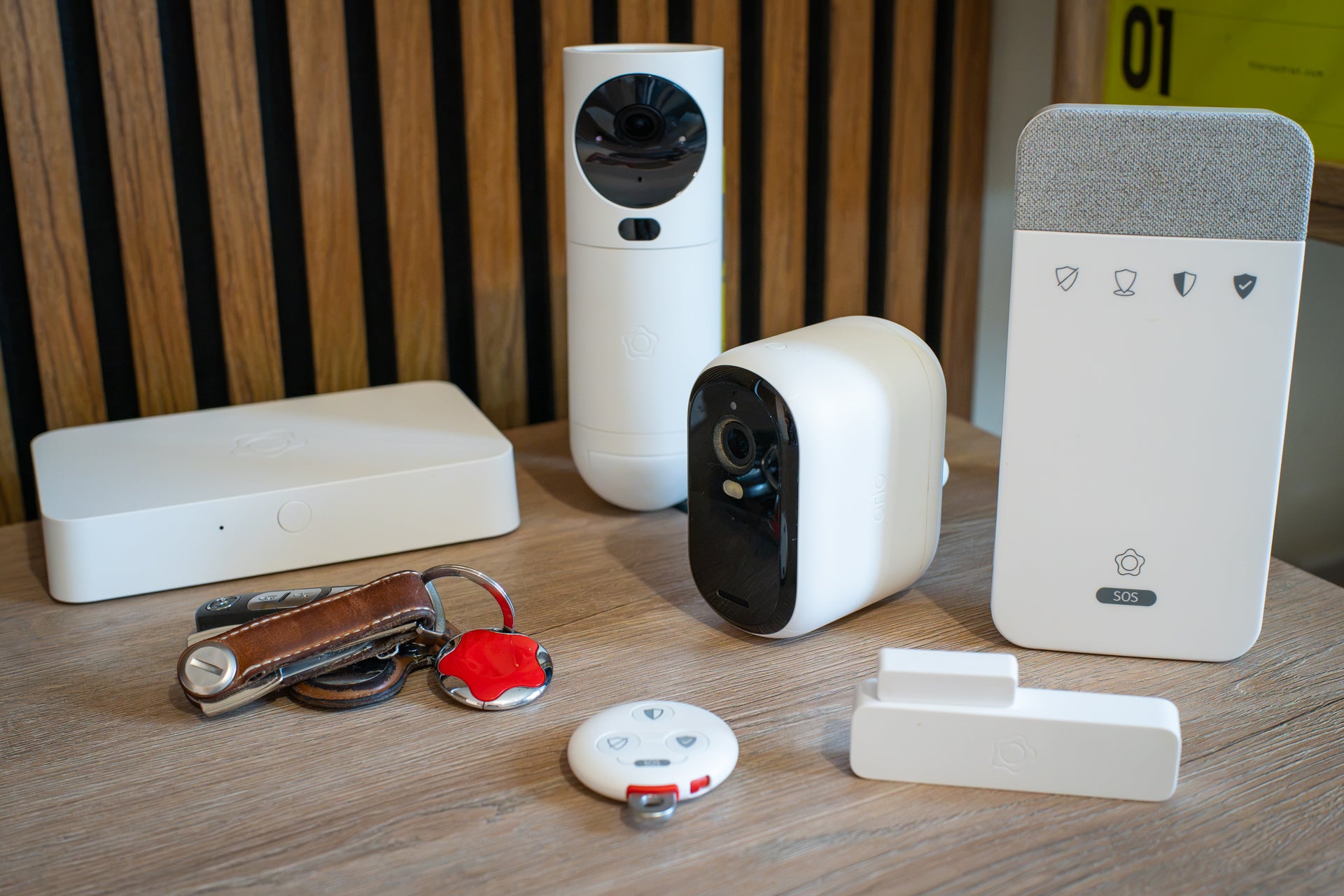
Verisure is a big name in home security, thanks to its expansive alarm systems and professional monitoring. Unlike many other systems, every Verisure installation includes access to a call centre, where agents respond to triggered alarms, attempt to make contact with the customer, assess the situation, and even call the emergency services if required. Verisure can also dispatch a third-party agent to the scene, and even deploy a smoke canister designed to block an intruder’s vision and force them out of your home.
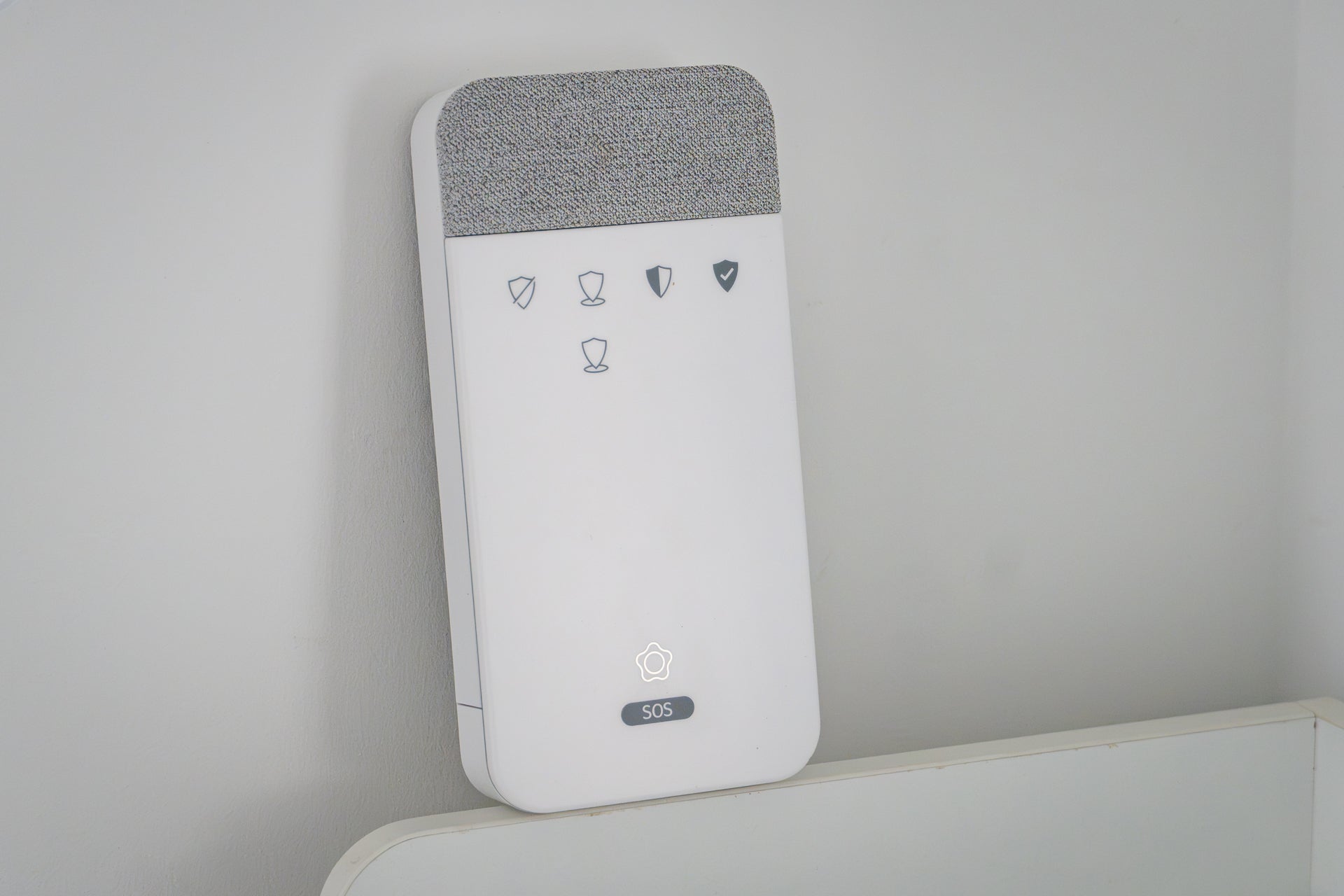
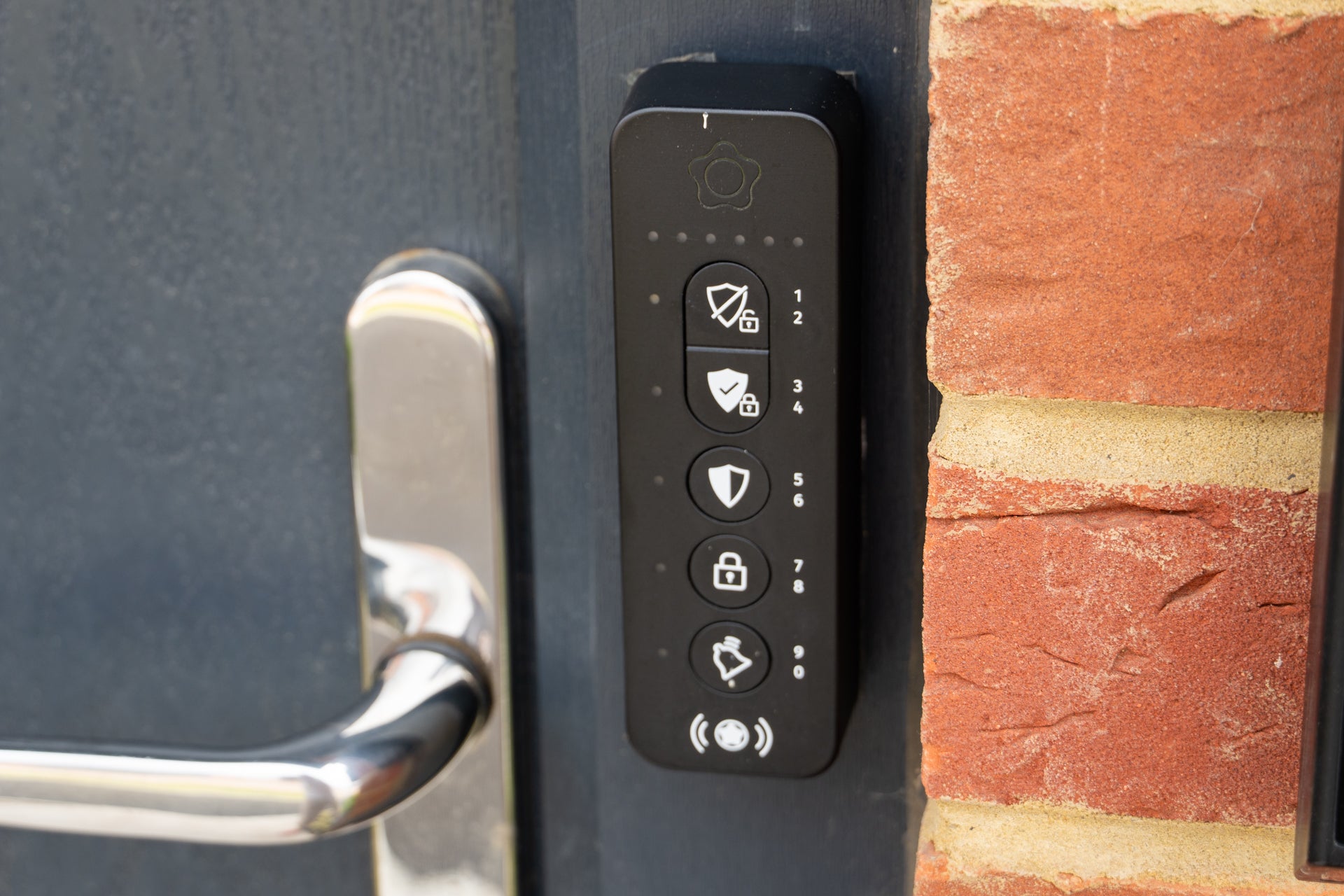
During my three-month trial of Verisure, I found the system mostly reliable and easy to use. The hardware seems well-made, and the system responded promptly when armed, disarmed and triggered. The SVK unit is particularly good, since all it takes to arm is a press of a button and a tap of the included key fob. This is how you arm/disarm via the new LockGuard door lock, too. Just press a button, tap the fob, and the entire system responds.
The Verisure app is less good, with little in the way of customisation compared to other systems and, during my trial, a couple of bugs too. It works fine, but if you’re used to a DIY alarm system, you’ll quickly notice how few features there are. That said, checking on your system and remotely arming/disarming (or using Verisure’s new motorised smart door lock) works well.
Cameras
Verisure systems use a combination of its own interior camera, plus indoor and outdoor cameras (and a video doorbell) from Arlo. The former is called the GuardVision Photo Detector. This is installed high up in the corner of a room and combines a motion detector with a camera. The battery-powered camera primarily captures still images when triggered, but can also be set to stream video to the My Verisure app. When the alarm is triggered, Verisure’s response team can remotely access the camera to assess the situation.
Instead of being security cameras for you to fine-tune with custom detection zones, adjust the night vision capabilities and stream to your phone to check in on the dog, the GuardVision is a set-it-and-forget-it device installed by a professional and generally only used when an emergency is detected and Verisure’s monitoring service swings into action.
Verisure’s partnership with Arlo sees the latter produce additional cameras for indoor and outdoor surveillance. When the alarm is triggered, Verisure’s response centre can view the live video feed of these Arlo cameras. However, the Arlo cameras don’t integrate well with the Verisure system at the customer level. It isn’t possible to arm the Arlo cameras when arming the Verisure system, for example, and motion detected by an Arlo camera doesn’t trigger the Verisure alarm.
Monitoring
Monitoring is where Verisure steps ahead of much of its competition. Every Verisure system is professionally installed after a consultation to determine exactly what’s required for your home, your needs from an alarm system, and your budget. As a result, prices vary considerably – more on that below.
When a Verisure alarm system is triggered, the company’s response centre is notified. Within a minute, a security expert from that response centre makes contact with you through the wall-mounted SVK unit (pictured above). They’ll quickly say why they’re calling and check that you’re okay. If all is well – perhaps you triggered the alarm by mistake – you can say your pre-defined codeword and Verisure will turn off the alarm and end the call.
If you’re unresponsive, don’t say your codeword, or if the security expert thinks there’s a problem, they can use your alarm system to assess the situation. If a live situation, such as a burglary, is taking place, they can call the emergency services on your behalf and dispatch a private security guard to the scene if necessary. They can even deploy Verisure’s ZeroVision non-toxic smoke system to help force an intruder out.
Subscription
This is not a DIY system, so professional installation is required. Verisure employees assess your property to decide what hardware is needed, then install the system for you. At a minimum, this includes a base station that connects to the internet, a wireless keypad called the SVK, which you use to control the system and speak to Verisure agents, an indoor GuardVision camera, key fobs for controlling the system, and a door/window contact and shock sensor.
Larger systems include multiples of these, plus the option for an outdoor camera, a video doorbell, a motorised door lock and the aforementioned ZeroVision smoke screen.
Unlike most other alarm systems tested by The Independent, Verisure is very protective of its prices, and does not state any publicly. After much back-and-forth, the company said its prices start at £399 for installation, plus £37.90 per month for a 12-month contract. This increases for larger systems, such as the one tested here, but, frustratingly, Verisure refused to say how much the system I tested for three months might cost.
Naturally, this makes it difficult to fairly review Verisure and compare it with rivals – including SimpliSafe, which also offers professional monitoring with emergency service dispatch, for a lower price.
Helpfully, as well as installation and 24/7 monitoring, Verisure’s subscription includes a hardware warranty and covers any maintenance your system might need. Verisure’s customer service is also very good, and often responds in just a few seconds via a WhatsApp chat initiated via the My Verisure app. They are also available by phone if you prefer. A quarterly system check is carried out automatically and emailed to you, outlining how Verisure remotely tested every component of your system and confirmed it’s all working correctly. Any faults are identified and fixed, either remotely or by a visit from an engineer if required.
It’s a fully-fledged service that works well, gives enormous peace-of-mind and is ideally suited to homeowners who want a hands-off, DIY-free approach to security and surveillance.
Buy now £399, Verisure
Ring alarm pack
Rating: 4/5
Best: For cameras
Wifi: No, Ethernet only
Cellular backup: Yes (subscription required)
Battery backup: Yes, 24 hours
Base station range: Up to 76m
Sensor/accessory limit: 100
Base station dimensions: 17cm x 17cm x 4cm
Outdoor siren: Sold separately
Professional monitoring: No (not in UK)
Why we love it
- Simple setup
- Great interaction with other Ring products
- Battery and cellular backup
Take note
- No live monitoring (in UK)
- Cannot call emergency services (in UK)
- Limited functionality without subscription
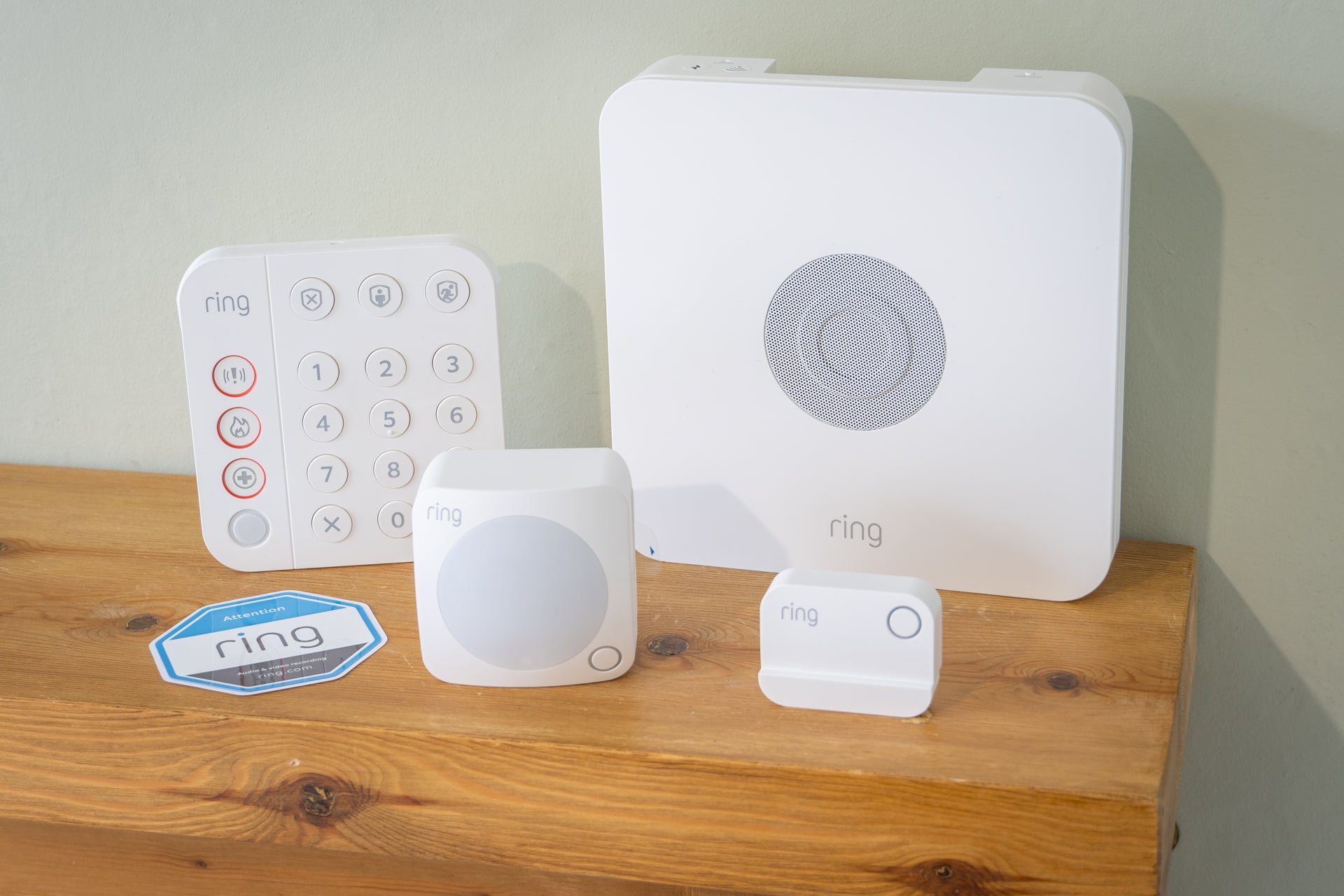
Ring is among the biggest names in smart home security, and for good reason. The Amazon-owned brand has built a solid reputation with its video doorbells and security cameras, which I rate highly. But the company also sells the Ring alarm pack, which uses the same smartphone app and taps into the same subscription services available to owners of Ring doorbells and cameras.
In its simplest state, the alarm includes a base station with integrated siren, a wireless keypad, a motion detector and a door/window sensor. The system uses Z-Wave wireless technology and can be expanded to include up to 100 devices. There’s both battery and cellular backup, so the base station will keep working if your internet goes down, and can run off its own battery for up to 24 hours if there’s a power cut.
However, this cellular backup is one of the many features of this kit that requires a subscription. More on that below.
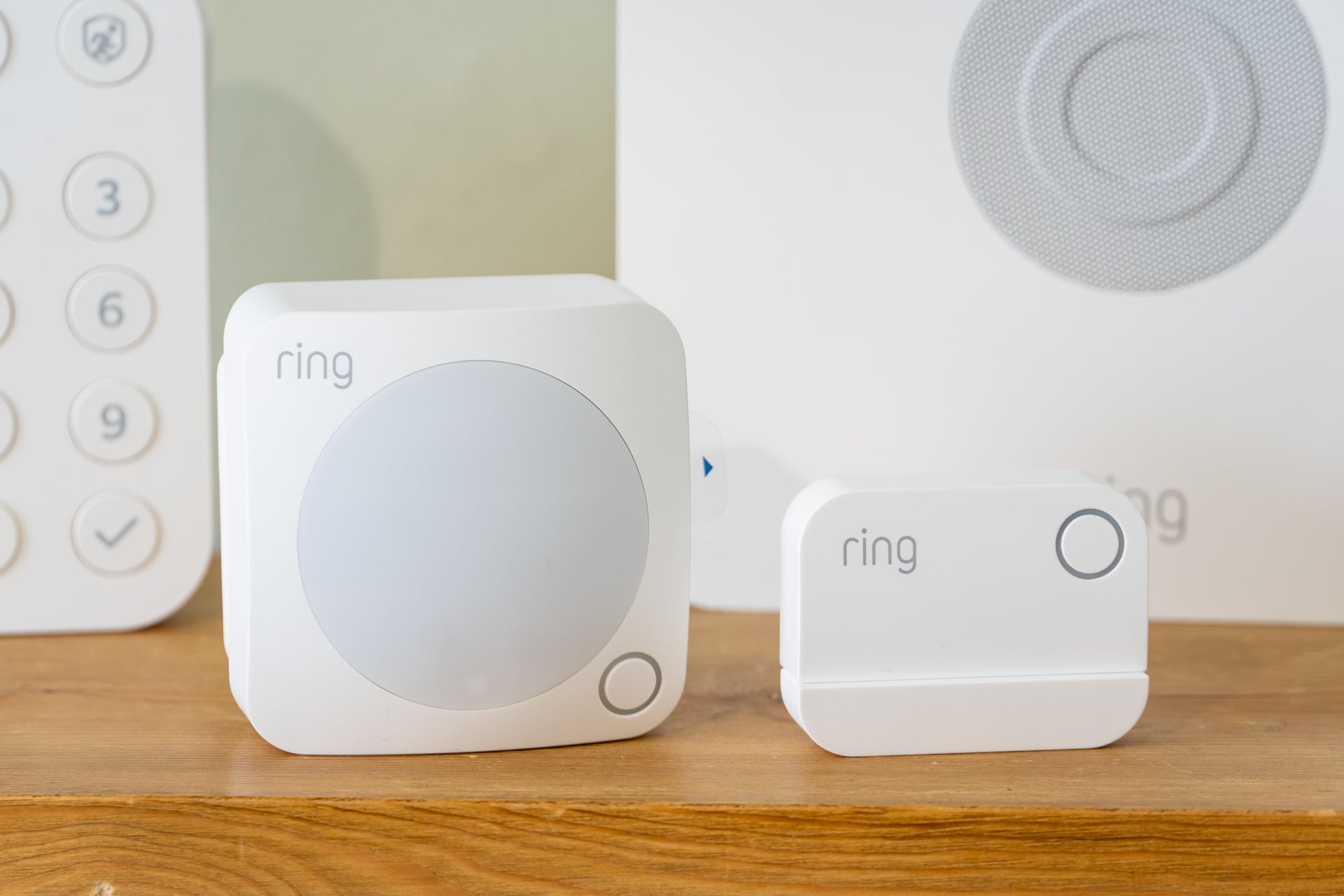
Although it lacks proper monitoring, Ring Alarm is still a great system – especially for anyone who already owns a Ring product, like one of its video doorbells. Adding this kit is the obvious next step for upping your home security game, and the extra functionality makes Ring’s subscription feel like better value for money than when it’s used only with a doorbell.
Cameras
Ring sells a wide range of indoor and outdoor security cameras, all of which work with the same app as the Ring Alarm system. Prices start at under £50 and run up to £200 for the more advanced models. Some are solar-powered for unlimited power, and some have integrated spotlights too.
The smartest models, like the Ring outdoor camera pro, use radar and satellite imagery to accurately track the movement of visitors (or trespassers) across your garden or driveway. Some have colour night vision for more detailed low-light footage, and others can even save video from the moments before movement was first detected – all features SimpliSafe’s cameras miss out on.
That said, none of Ring’s doorbells or cameras have local video storage. Instead, you have to have video recordings saved to the cloud by paying for a Ring subscription.
Monitoring
Despite being available in the US, Ring does not offer professional monitoring in the UK. Instead, it operates a system called Alarm Calls where, if the alarm is triggered, your pre-defined list of emergency contacts will be called, one after another, until one answers. They are then given an automated message from Ring, stating that your alarm has been triggered, as well as what caused it (such as a door being opened, or motion spotted in the kitchen), and when.
No human is involved in this, and there’s no direct way of calling the emergency services. That said, it works well and serves as a useful way of alerting your emergency contacts at times when you can’t see a notification on the Ring app, or your phone is switched off.
Subscription
Ring has two tiers of alarm subscription. The first is called Standard and costs £7.99 a month or £79.99 for a year. This adds cellular backup, so the alarm keeps working if your wifi goes out and enables cloud storage for your Ring video doorbell and security cameras.
The Premium tier costs £15.99 a month or £159.99 a year and, while this doesn’t add any more features to the alarm system, it unlocks the option for 24/7 recording for compatible Ring cameras.
Read the full Ring alarm pack review
Buy now £219, Ring.com
Eufy Security home alarm kit
Rating: 4.5/5
Best: Subscription-free system
Wifi: No, Ethernet only
Cellular backup: No
Battery backup: No
Base station range: 90 metres
Sensor/accessory limit: 50
Base station dimensions: 8.5cm x 13cm x 8.5cm
Outdoor siren: Sold separately
Professional monitoring: No
Why we love it
- Great value
- Easy to set up and configure
- Expandable with cameras, doorbells and more
Take note
- No battery or cellular backup
- Some occasional connectivity issues
- No professional monitoring in the UK
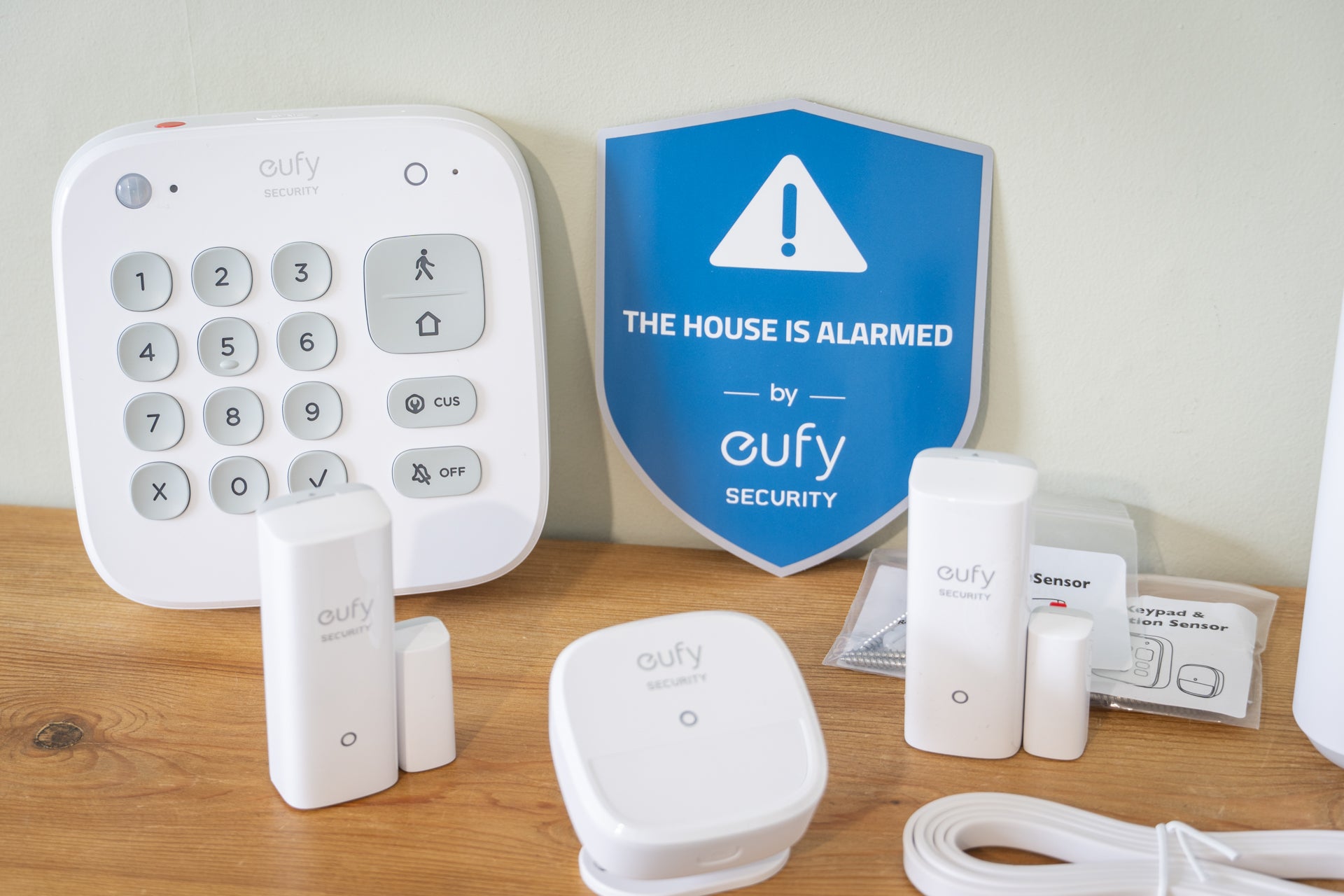
Eufy is currently my favourite subscription-free home security system. Also known for its impressive robotic vacuum cleaners and mops, Eufy offers a wide range of security devices, from cameras and video doorbells to motion detectors, sirens, and a five-piece home alarm kit. I especially like how Eufy offers local video storage by default, with footage saved on the cameras (and video doorbells) themselves, instead of charging an ongoing fee for cloud storage.
What’s more, I like how the Eufy S380 HomeBase can act as a central storage hub. It has 16 GB of internal storage, but can be expanded to 16 TB, putting all of your recordings in one place and removing the risk of files being lost due to an external camera being damaged or stolen. The Home Base also works as a burglar alarm and doorbell chime, and the latest model adds AI-powered facial recognition to compatible cameras, like the latest Eufy S4. The alarm kit includes door and window sensors too, plus a motion detector and a wall-mountable keypad.
I’ve also tested the Eufy smart display E10, which is a simple touchscreen that shows recent activity spotted by your connected cameras and doorbell. It also doubles as a doorbell chime and can be used to view a live feed from several cameras at once. It’s portable too, so it can be taken to different rooms or mounted on a wall. On my desk, it acts as a handy doorbell intercom while my smartphone is switched to silent.
Eufy’s app works well, although I have encountered the occasional bug – such as an inability to rename devices for a few weeks until a fix arrived – and it sometimes takes a moment to connect to each camera. But it’s otherwise a good app with lots of options for customising exactly how each element of your security system works. There are a few adverts in there, for other Eufy products, but since there’s no subscription fee, I’m willing to let that slide.
Cameras
Eufy’s alarm system works on its own, but adding a video doorbell and a couple of cameras is a logical next step. The setup I use at home includes the E340 video doorbell, which has a second camera for recording parcels left on the doorstep, a pair of Eufy S3 Pro cameras monitoring the garden and drive, and the S120 Solar Wall Light Cam. This combines a solar panel, battery, camera and light into one simple unit, which I use to illuminate where I keep our bins and provide a second view of our parked cars.
These all work very well, although the integrated solar panels of the S3 Pro and S120 mean you need to think carefully about where to install them, since the angle of the solar panel can’t be adjusted independently of the camera. This is solved by the newer Eufy S4, which has a fully adjustable and detachable solar panel, plus a camera with motorised panning and tilting for a comprehensive view.
Monitoring
Eufy does not offer any form of professional monitoring service. Instead, you are notified by the app when motion is detected and/or the alarm is triggered.
Subscription
There’s no requirement to pay a subscription, since Eufy cameras and doorbells store footage locally, either on the device itself or on the company’s HomeBase hub. Cloud storage is available as an optional extra, priced from £3.99 a month for one camera or £12.99 for multiple cameras.
Read the full Eufy home alarm review
Buy now £159, Eufy.com
Blink outdoor camera and doorbell kit
Rating: 4/5
Best: Budget camera system
Wifi: Yes
Cellular backup: No
Battery backup: N/A
Base station range: 120 metres
Camera limit: 10 per module, 100 total
Base station dimensions: 8.1cm x 8.1cm x 2cm
Outdoor siren: Yes, but integrated with cameras
Professional monitoring: No
Why we love it
- Great value
- Local storage option
- Alexa integration
Take note
- No dedicated door or motion sensors
- Local storage requires extra hardware
- Doorbell uses disposable batteries
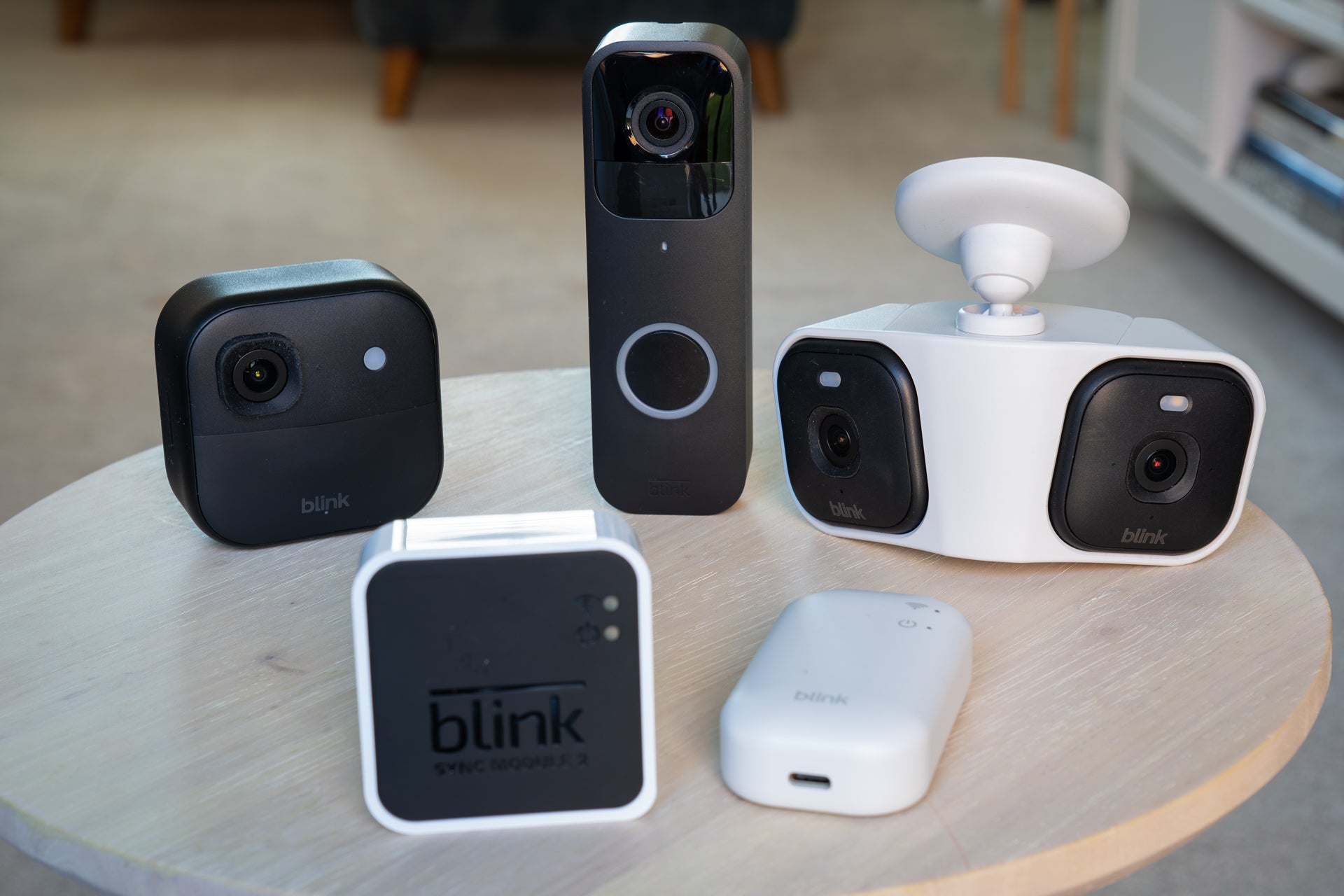
Blink is a budget smart home security company owned by Amazon. Like its sister brand Ring, Blink offers a range of indoor and outdoor security cameras, plus a video doorbell and a subscription service for cloud video storage. Unlike Ring, the Blink system does not include security devices like door or window sensors and motion detectors. There’s also no keypad or siren. Even without those components, it’s still possible to build a usable home security system – and for those shopping on a budget, a few Blink devices could make all the security system you need.
Since the cameras are each mounted with just a couple of included screws, installing Blink devices is easy. It’s also easy to add new devices to the Blink app, then give them a name (like garden or front door), and adjust settings like motion sensitivity, or create activity and privacy zones.
Cameras
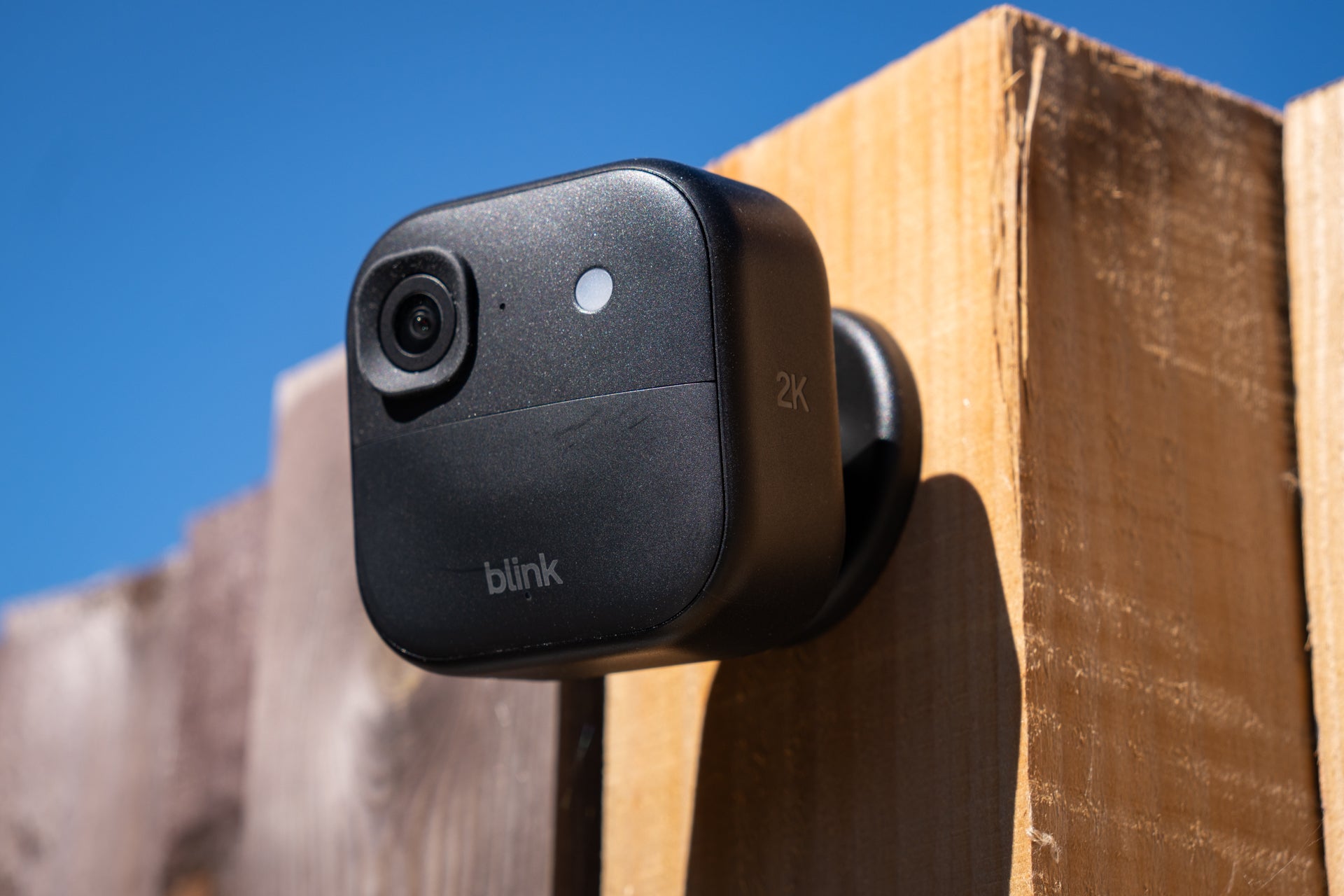
As of 2026, Blink sells its mini 2K+ wired indoor security camera for just £40, and frequent Amazon sales mean it’s often available for less than that. Then there’s the latest-generation Blink video doorbell for £60 (but also often discounted), the outdoor 4 wireless camera for £70, a motorised indoor camera for £35, and an outdoor camera with dual LED spotlights for £90.
Bundles are also available to help bring the cost down even further. For example, at the time of writing, Amazon is offering a set of three Blink outdoor 4 cameras, the sync module core hub and a video doorbell for £190, down from £240.
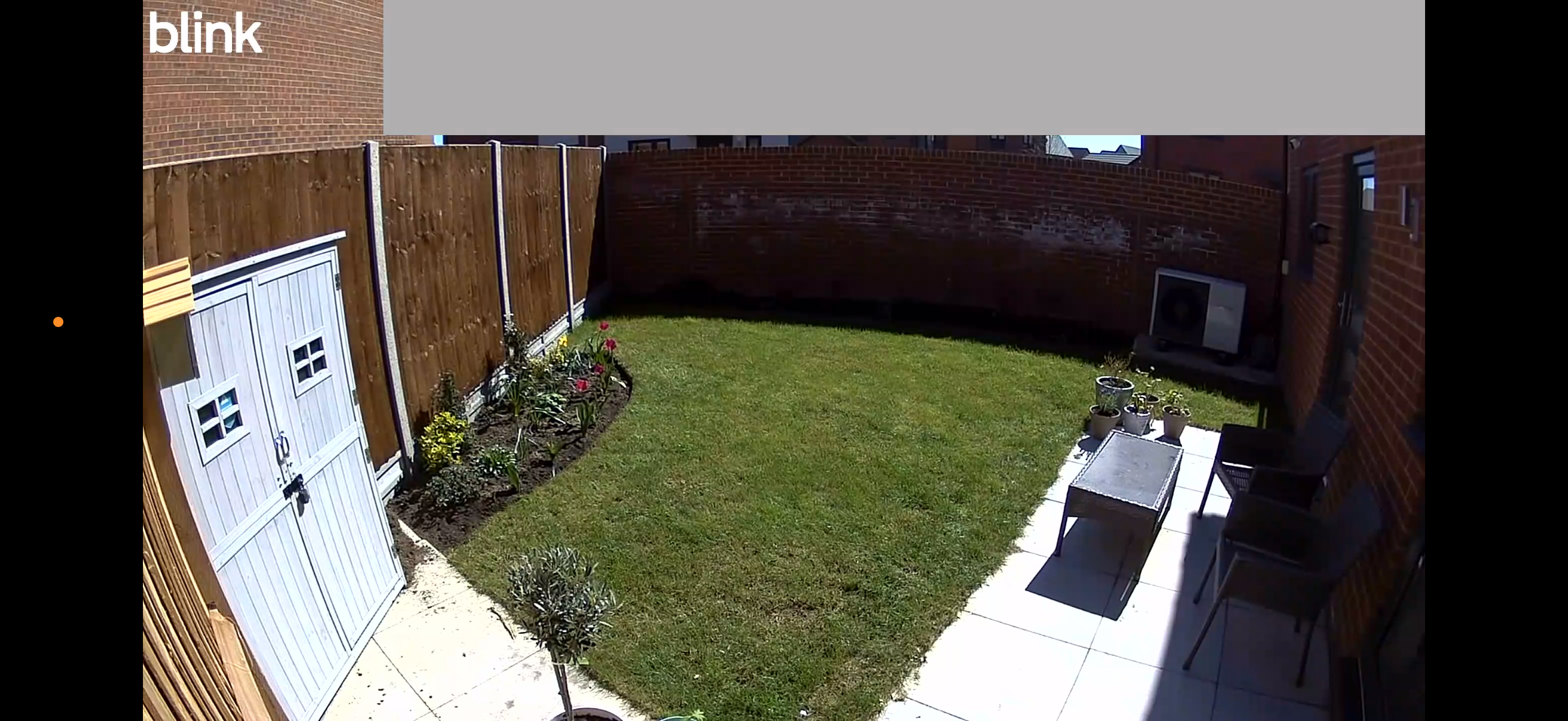
The screenshot below is from a Blink outdoor 2K+ installed in my garden; these cameras are available as a pair with the Blink sync module core for £154.99, but at the time of writing (April 2026), the price was reduced to £76.99. Footage is sharp and clear, especially when the camera is set to prioritise quality over battery life, and phone notifications arrive promptly when movement is spotted.
Monitoring
Like Ring, Eufy and Tapo, Blink’s security systems are self-monitored. This means when the alarm is triggered – such as when a security camera detects movement – you are alerted via the Blink smartphone app. A professional security agent is not contacted, and there’s no direct way of reaching the emergency services.
If you want professional monitoring, where an agent checks every alarm trigger and can call the police, you’ll be more interested in a security system from SimpliSafe or Verisure.
Subscription
Blink subscription plans start at £2.50 a month for a single device (camera or doorbell) and £8 for unlimited devices. By paying for a subscription, you’ll get features such as 30 days of cloud storage for as many cameras as you like, person and vehicle detection, live-view videos extended to 90 minutes for wired cameras, a custom snooze function and extended warranties. Subscribing also enables a panoramic live view for the Blink arc, where two cameras mounted next to each other record a single, extra-wide view.
Buy now £116, Amazon.co.uk
TP-Link Tapo
Rating: 4/5
Best: For smart home builders
Wifi: Yes, 5GHz
Cellular backup: No
Battery backup: No
Base station range: Not stated
Sensor/accessory limit: 16 cameras and 64 sensors
Base station dimensions: 16 x 9.9 x 8.3 cm
Outdoor siren: No
Professional monitoring: No
Why we love it
- Good value
- Highly configurable
- H500 hub has Matter support
Take note
- No professional monitoring
- No keypad or external siren
- More complexity than some might want
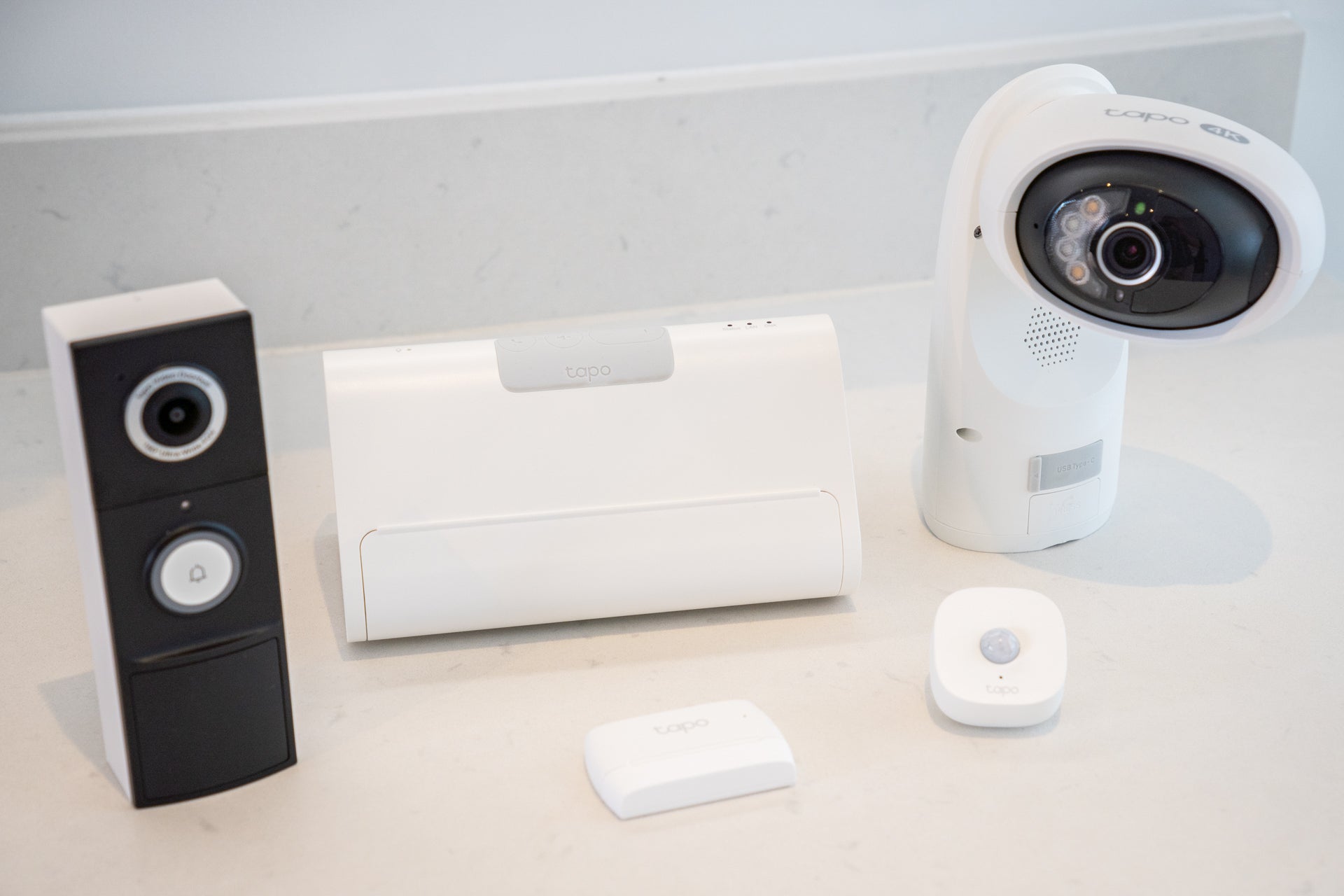
TP-Link’s Tapo brand is also a home security system with no ongoing fees. Tapo offers a range of indoor and outdoor cameras, plus video doorbells, a motion detector and door/window sensor. It can’t quite match fully-fledged alarm systems for breadth of products, but a solid surveillance and alarm system can be created from Tapo’s catalogue.
What really helps here is the new Tapo H500 Smart HomeBase. Similar to the Eufy S380 mentioned in the previous section, the H500 acts as a central hub for expandable video storage, adds AI-powered facial recognition to compatible Tapo cameras, and doubles as a burglar alarm and doorbell chime. There’s also a microphone, so with a press of a button you can answer doorbell calls by speaking to the H500, instead of opening the Tapo phone app.
What sets the H500 apart is how it can act as a tablet dock, with an iPad or compatible Android tablet turning into a central command system for your smart home. It can show security camera recordings, but also has an interface for controlling smart switches, plugs, light bulbs and other devices compatible with the Matter smart home standard. This all works well, and Matter support will be great news to smart home builders who want to combine their Tapo products with devices from other companies.
Cameras
I’ve recently been impressed by several Tapo security cameras – especially the C660, an outdoor 4K camera with solar charging and motorised movement. Similar to Eufy, the Tapo system offers a wide range of indoor and outdoor cameras, including some models with solar panels, floodlights and excellent image quality. You can also choose between wired, always-on cameras and wireless, battery-powered options too.
Tapo’s indoor cameras start from under £20, while more advanced models include powered movement and 2K video, plus the company makes a dedicated baby monitor too.
Monitoring
The Tapo system lacks a keypad and external siren, so it can’t quite be used like a traditional home alarm. There’s also no professional monitoring, like you get with SimpliSafe and Verisure, but given there’s no subscription fee with Tapo, that shouldn’t be a surprise.
Instead, the app will alert you when the alarm is triggered, such as by a door or window opening while the system is armed, or motion being spotted by a camera.
Subscription
A subscription isn’t required, since Tapo cameras save video recordings locally and there’s no professional alarm monitoring to pay for. That said, Tapo Care is available if you want to store recordings in the cloud and add extra functions like AI-powered detection and privacy zones. Prices range from £2.99 to £9.99 a month.
Read the full TP-Link Tapo review
Buy now £159.99, Amazon
Yale mart alarm starter kit
Rating: 4/5

Best: For wireless networking range
Wifi: Yes, Ethernet optional
Cellular backup: Yes (subscription required)
Battery backup: Yes, 12 hours
Base station range: 1km (0.62 miles)
Sensor/accessory limit: 100
Base station dimensions: 17.5 x 17.5 x 3 cm
Outdoor siren: Yes
Professional monitoring: Yes, subscription required
Why we love it
- Outdoor siren included
- Optional professional monitoring
- Large wireless range
Take note
- Expensive
- Some poor hardware design
Yale’s smart alarm kit is a welcome step forward from the company’s ageing sync system. Packs of various sizes are available, and additional components can be purchased separately to expand the system. The starter kit I tested came with two door and window sensors – more than the single sensor offered by most rivals – plus an external siren, which is also omitted by most other security systems, and helps provide both a visual and audible deterrent.
It all works with the Yale Home app, which is also used to set up and control Yale’s latest cameras, door locks and video doorbell, creating a simple, subscription-free security and home alarm system.
Setup is quick and easy, with everything needed to mount the sensors and siren included in the box. The central control hub connects to your router with wifi or Ethernet, and the system can be armed or disarmed via the Yale Home app, the included keypad, or by interacting with a compatible smart home platform like Alexa. There are fewer features here than with other systems, like Eufy, but the simplicity will no doubt be appealing to customers who just want the basics.
Cameras
Yale’s security cameras work well, the alarm system is quick to respond, and video footage is stored locally on each device or an inserted microSD card – no cloud storage necessary.
Monitoring
Professional monitoring is available. Like with SimpliSafe and Verisure, this sees an agent respond when your alarm is triggered, check to see if you’re okay via the cameras, then call the emergency services if required. At £36 a month, this is more expensive than SimpliSafe’s equivalent offering.
Subscription
While this system can operate with no ongoing fee, Yale’s optional subscription tiers and priced from £3.50 to £35 a month and include cloud video hosting, automated phone call alerts and cellular backup to keep the alarm working during a broadband outage. None of this is required, though. The core alarm works perfectly well without a subscription, making it an attractive option if you want traditional, easy-to-use home security from a trusted name and with no ongoing cost.
Read the full Yale smart alarm review
Buy now £379.05, Amazon
Yale sync alarm
Rating: 3/5
Best: For covering the basics
Wifi: No, Ethernet only
Cellular backup: No
Battery backup: Yes, up to 12 hours
Base station range: 200 metres
Sensor/accessory limit: 40
Base station dimensions: 9.5cm x 9.5cm x 2.5 cm
Outdoor siren: Yes
Professional monitoring: No
Why we love it
- Quality hardware
- Gets the basics right
- No subscription required
Take note
- Basic software
- Hub lacks wifi
- No professional monitoring
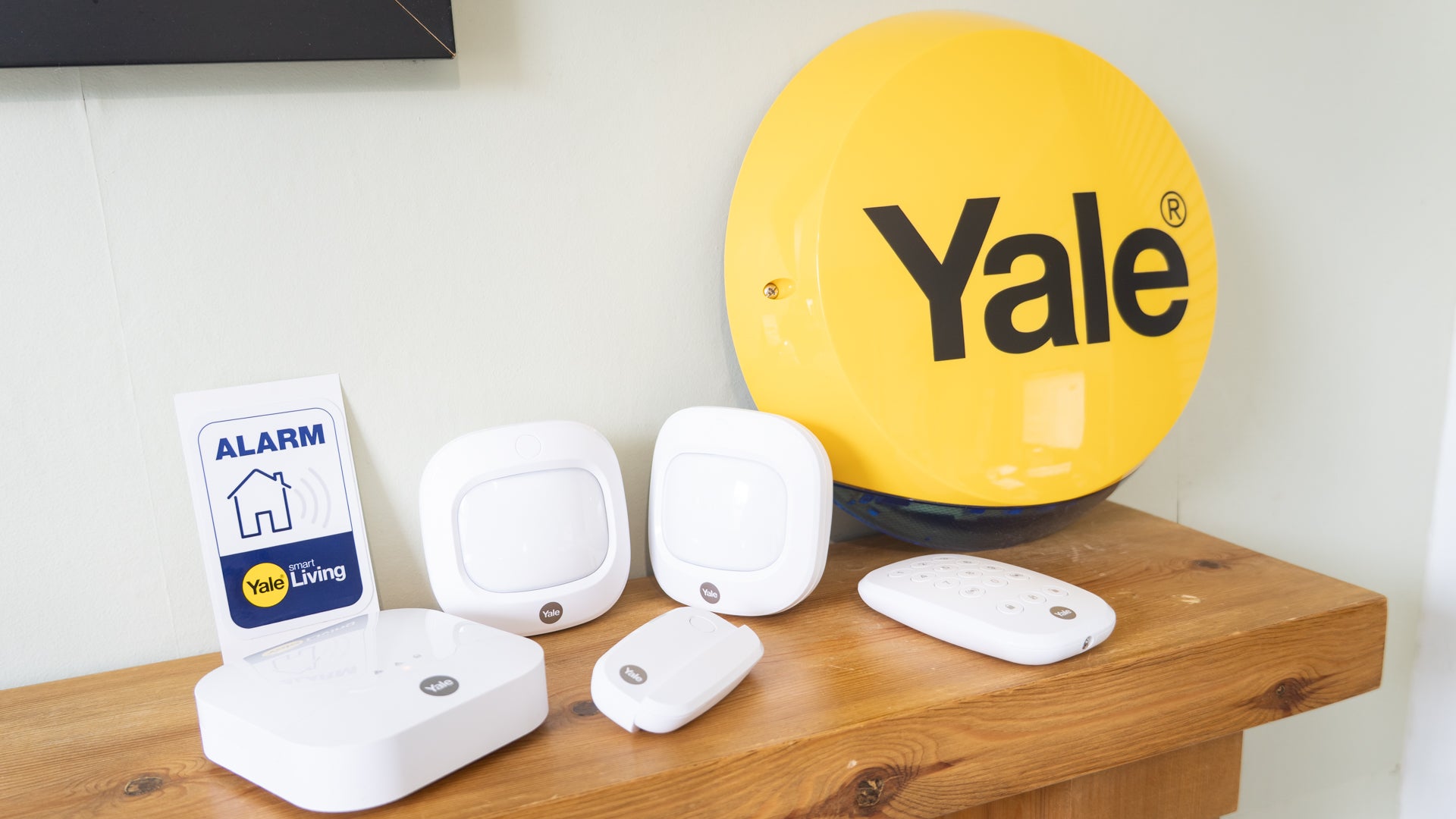
If you only need the basics, the Yale sync is a solid option for your home. It doesn’t have the bells and whistles of other systems – and nor does it offer professional monitoring – but it includes a wireless outdoor siren that other systems lack. It also has a more compact base station than most, and the keypad is nice and small, too.
Coming from a name synonymous with door locks and home security, the Yale Sync is a little more expensive than some rivals. But the inclusion of the siren helps make up for this, along with the lack of any costly subscription services. There’s support for Amazon Alexa and Philips Hue smart lighting, and the base station has a battery that can keep the alarm working for up to 12 hours during a power cut.
There’s no cellular backup, though, so you won’t receive a smartphone alert if your home internet is down when the alarm is triggered, and the base station doesn’t have wifi. This means it needs to be plugged into your router with an Ethernet cable, which limits where you can locate it.
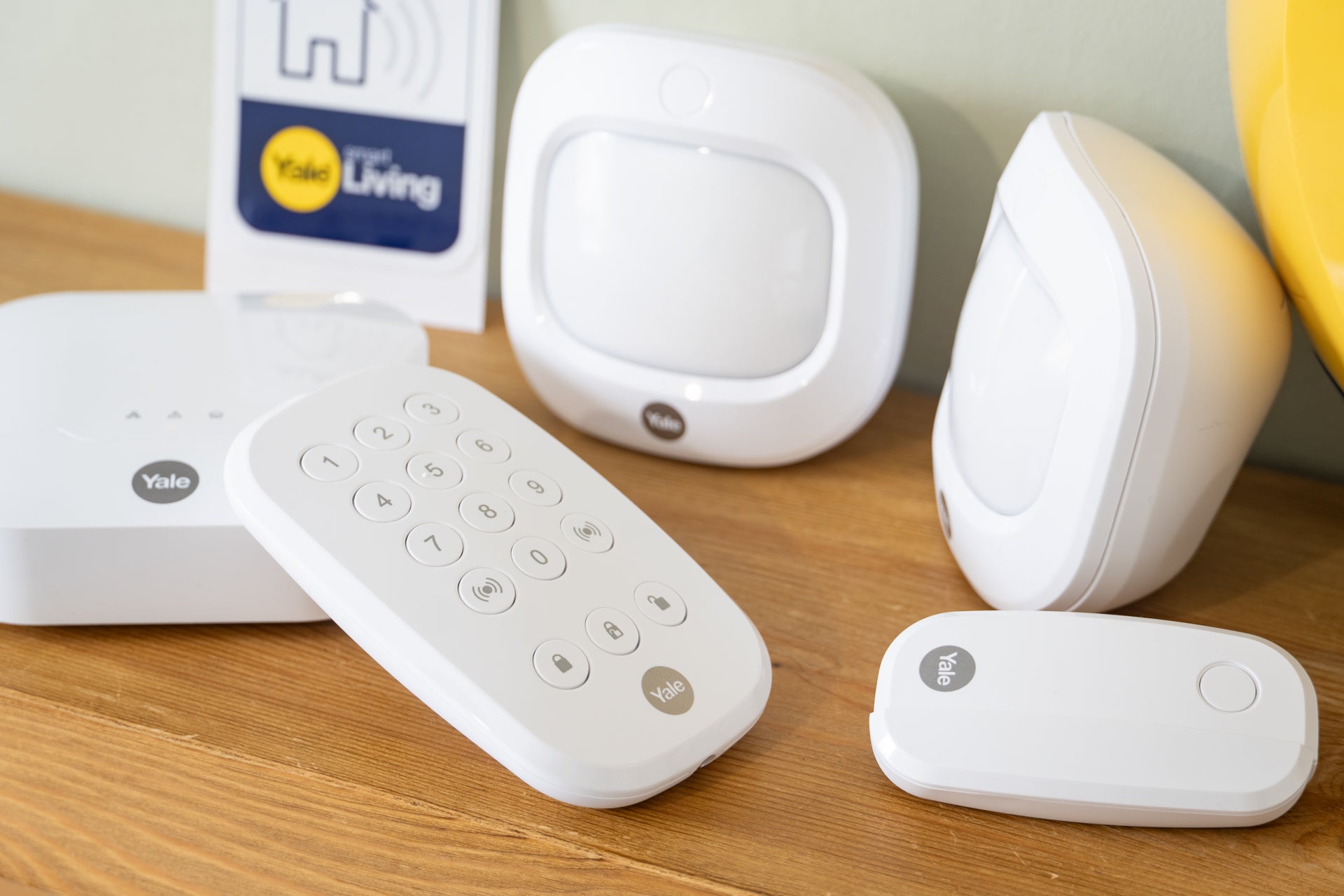
Yale sells extra accessories like motion detectors and door/window sensors, letting you build up a larger system than what’s included in the kit. The base station works with up to 40 devices at a distance of up to 200 metres, giving you the option to secure an outbuilding like a shed or garage as well as your house.
I liked how the outdoor siren and door/window sensors come with tamper sensors, which send an alert to the app if they are removed from their mounting.
This system is a little older than Yale’s latest Smart alarm system, which uses the equally new Yale Home app. Instead, the Sync kit featured here uses the older Yale Alarm app, which is starting to show its age with limited functionality and a sense that it is no longer being developed.
Cameras
As well as its range of smart cameras mentioned earlier, Yale also sells standalone indoor and outdoor security cameras. Some models feature floodlights and sirens to act as an intruder deterrent, while others offer motorised panning and tilting to capture a full view of their environment.
Yale’s more conventional home CCTV kits can be bought with two or four cameras and offer wired or wireless installation.
Monitoring
A simpler system than the Yale Smart alarm featured above, Yale’s Sync kit does not offer monitoring. As such, this is a system that you monitor and control yourself entirely. Although more expensive, Yale’s newer alarm kits have the option to subscribe to professional monitoring by Securitas.
Subscription
There are no subscriptions available for Yale Sync.
Read the full Yale Sync review
Buy now £236.98, Yalehome.co.uk
Smart home security FAQs
What is the best smart home security system?
SimpliSafe is currently my favourite smart home security system. It is very easy to set up and install, and there’s a wide range of optional extras to build a whole-home system. But what helps this house alarm stand out from its rivals is the option to pay £27.99 a month for professional monitoring. Since Ring and Eufy don’t offer this service in the UK, it’s something that puts SimpliSafe at the top of our list.
Verisure is a close second place, since it also has professional monitoring – and can even activate a smoke screen to force intruders out – but is more expensive, with the monthly fee starting at £37.90 per month. I found Verisure’s service worked well, with high-quality hardware, professional installation included as standard, and a prompt, professional response from the UK call centre when the alarm was triggered. But Verisure’s refusal to disclose any prices (even for the actual system I had installed in my home), beyond the most basic package being £399 plus £37.90 a month, means I didn't have enough information to award it the top spot.
If you don’t need professional monitoring, then check out Ring alarm and the Eufy home alarm kit. Both offer excellent alarm kits that connect to their wider smart home systems comprising security cameras, video doorbells and more. I especially like how Eufy records footage locally, thus avoiding the cloud storage fees imposed by Ring. Or, if you want a security system on a budget, Blink performs well and its simple security cameras are often priced from below £30.
Finally, if you want to build a large smart home system, I recommend TP-Link Tapo, since the H500 smart HomeBase hub has Matter support that makes it compatible with a huge number of smart home devices and accessories, beyond just security products.
How to choose the best home security system for you
Most smart home security and alarm systems are designed to be installed with simple DIY skills. They connect to your router and use wireless, battery-powered sensors that attach to doors, windows and walls with included adhesive pads or screws and wall plugs. You might need a ladder and a drill to mount outdoor security cameras and sirens – and some basic electrical knowledge if hardwiring a video doorbell – but that’s as complex as it gets. After installation, the systems are usually set up using a smartphone app.
Verisure stands apart among the systems tested here, since it requires professional installation, and each system is tailored to your property size and layout.
The essentials
When choosing a home security system, start with the essentials. This usually includes a hub or base station that connects devices (like door sensors and motion detectors) to a smartphone app and the internet. Basic kits usually also include the aforementioned sensors and a keypad or fob for arming and disarming the system; some come with external sirens too. Additional sensors, cameras and other devices can be bought separately and added to expand your system.
Key features
Key features to look out for are battery and cellular backup, which keep the system working during a power cut or broadband blackout. Smart home compatibility can be a useful extra, where voice assistants like Siri, Alexa and Google Assistants control the alarm. If you already own connected cameras or a video doorbell, then it’s worth checking if there’s an alarm system that works with your existing devices for a more seamless installation.
Subscriptions
Costs vary depending on system size and subscription options. Some systems charge a monthly or annual subscription fee for cloud video storage; these fees also sometimes unlock extras like smarter, AI-powered person recognition for security cameras, and cellular backup.
Alarm systems from Simplisafe, Yale and Verisure charge for professional monitoring, where an agent responds to alerts and can even call the emergency services on your behalf. Professional monitoring is not available in the UK from Ring, Tapo or Eufy – but the latter two remain good options if you want to monitor things yourself, since they store camera footage locally and charge no ongoing fee.
Other smart security brands to consider
We haven’t yet tested every smart security system on the market. Other options, which we will be looking at soon, include smart, expandable and app-controlled systems from Nest, Blink, Abode, Somfy and Philips Hue, whose security devices integrate with its smart lighting products.
Nest is owned by Alphabet and therefore a sibling of Google and taps into the Google Home smart home ecosystem, with Google Assistant voice control.
Similarly, since Philips Hue is already such a big name in the smart lighting market, we’ll be reviewing its security products too. The Hue brand doesn’t offer a fully-fledged home alarm system, but its new security camera, door sensors and video doorbell, along with lighting that reacts to motion detection, could offer something unique among its rivals.
Professionally installed alarm brands to consider
All of the products highlighted in this article are intended for DIY installation. This makes them accessible and, while they come with instructions to help you install everything in the best location, their performance can vary depending on how and where each component is installed.
For a fully hands-off approach, where professionals take care of everything for you, there are other options to consider. These include Verisure, which works in a similar way to Simplisafe but requires professional installation. Verisure provides 24/7 UK-based monitoring, where trained staff respond to and verify alarm triggers, make contact with you, and call the emergency services and/or private security guard if required. There’s a smartphone app too, and even a deployable smoke screen to disorientate burglars.
Other options include companies you'll likely have heard of, since they’ve been in the security and home alarm business for years. These include ADT and Banham Security, and while they might lack the smart home gadgets of Ring and Eufy, they have masses of experience – case in point, Banham is now over 100 years old.
Professionally-installed systems tend to be more expensive than DIY alternatives, and pricing them here is tricky because every installation is different. But with the extra cost comes reassurance that the various cameras, sensors and other components have been installed correctly, and in the best possible location. These systems also incur costs for their professional monitoring services – but this is where the likes of Verisure really come into their own, offering a level of protection that Ring, Eufy, Tapo, Hue and others simply can’t match.
How do smart home security systems work?
Unlike traditional alarm systems, smart home security kits are wireless and connect to your smartphone via an internet connection. Such kits usually consist of a base station which connects to your router, either with wifi or an Ethernet cable, then connects to dozens of wireless accessories like motion detectors, door/window sensors, sirens, keypads, cameras and more. Most kits also come with a wireless keypad for arming and disarming the alarm, although this can also be done via a smartphone app and, often, by speaking to a voice assistant like Amazon Alexa or Google Assistant. Some systems can be configured to turn on and off based on the location of your smartphone, and that of anyone you live with. When triggered by a break-in or movement, these alarms alert you via the smartphone app. Some also make an automated phone call to you or whoever is on your emergency contacts list. Some systems offer professional monitoring for a monthly fee, where service agents respond to your alarm, use the cameras (with your prior permission) to see what’s going on, and even call the emergency services if required.
Do home security systems affect home insurance?
This will depend on your specific circumstances, but it’s definitely worth telling your insurer when you've fitted a security system. That said, not every insurance provider will automatically reduce your premium, and some will ask that a certain type of system be fitted before considering any changes. It’s worth checking with your insurance provider first, since they might only agree to a reduced premium if you fit a certain brand or type of system. A professionally monitored system, like those from Simplisafe and Verisure, is more likely to result in a discount than simpler, self-monitored systems. But it’s worth checking to be sure. In any case, there were over 250,000 residential and non-residential burglaries in the UK in 2024, according to the Office for National Statistics. And, while that was down six per cent on the previous – and down a massive 71 per cent on 2003, when current record-taking began – it still means hundreds of properties are being broken into every day. So, regardless of whether an alarm system lowers your insurance premium, the peace of mind it brings could be worth it alone.
What is NSI accreditation?
NSI accreditation is a UK industry standard issued by the National Security Inspectorate. Accreditation is a sign that a security company meets recognised professional, technical and operational standards. This covers aspects such as system design, installation, and the vetting of staff involved with the installation and professional monitoring services. Accreditation is often required for police response to monitored alarm systems, so this isn't something that applies to self-install systems from companies like Ring, Tapo, Nest and Eufy.
Why you can trust us
The Independent is committed to providing unbiased reviews and expert shopping advice across a range of home improvement products. Our team of experts has spent years testing and rating the latest smart home tech in our homes, gardens and under real-world conditions, so you can be sure our verdicts are authentic and based on personal experience with each product featured. When it comes to security systems, our expert testers consider everything from app features and ease of setup to ongoing subscription costs.





.png?w=600)