
If you haven’t been hitting your shots lately, it might be worth considering adding Raw Accel power to your VALORANT experience. While there’s not much work to set it up, beginners may find things a bit confusing.
Raw Accel is a third-party mouse acceleration tool, often used by VALORANT players who want more control over their aim. It lets you fine-tune how your mouse speed scales with movement, giving you flexibility that the standard Windows or in-game settings don’t offer.
Here is everything you need to know about Raw Accel in VALORANT, including Tyson “TenZ” Ngo’s settings.
Raw Accel in VALORANT overview
- Raw Accel is a third-party mouse acceleration tool that makes your pointer travel farther when you move your mouse quickly.
- Raw Accel shouldn’t be bannable, but use it at your own discretion.
- Raw Accel is only available on Windows PC.
Best Raw Accel settings for VALORANT
In the Raw Accel window, click on the Charts tab, select Scale by mouse settings, and enter your current mouse DPI and poll rate (usually 1000).
TenZ’s Raw Accel settings for VALORANT
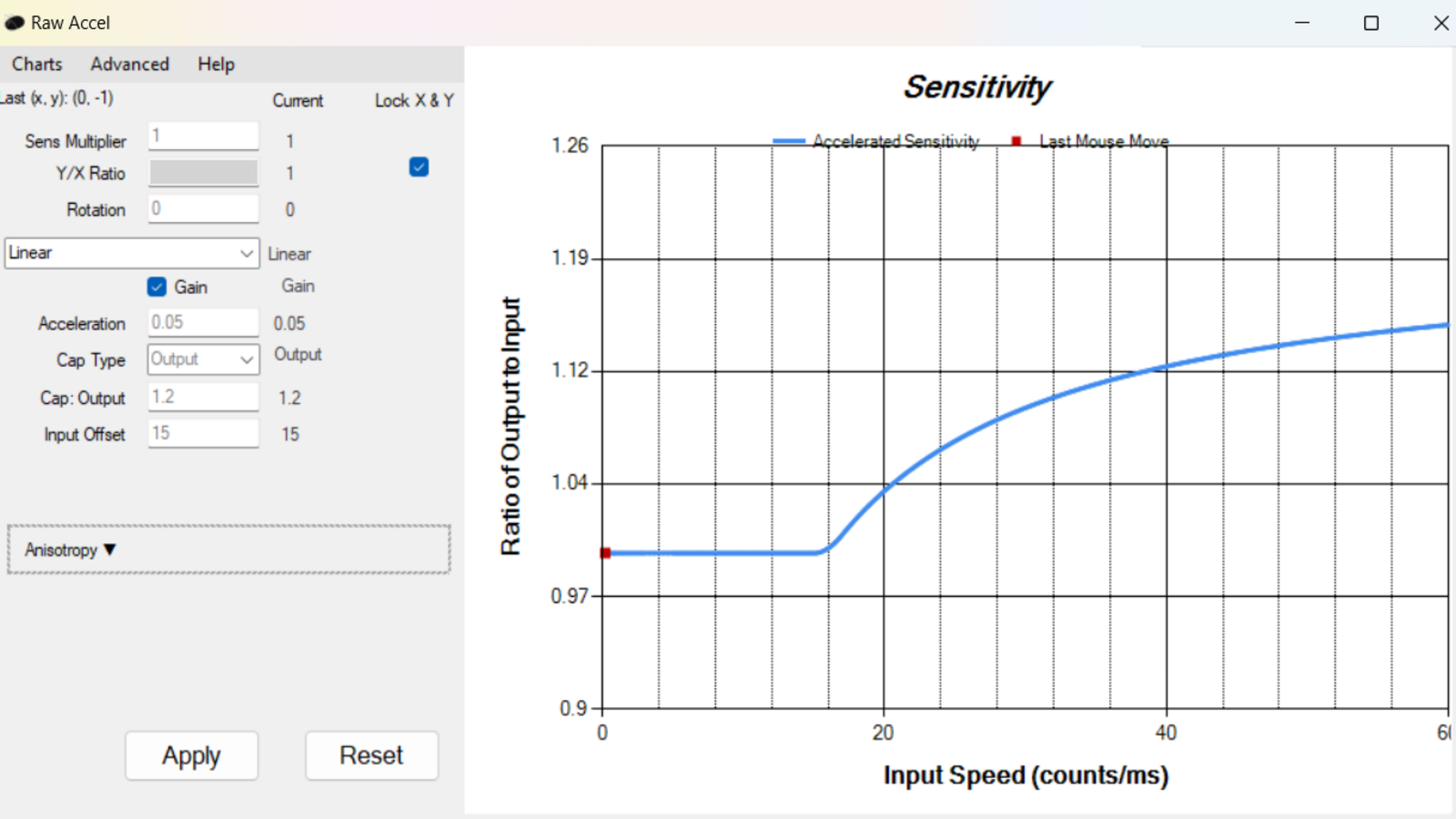
Here are TenZ’s Raw Accel settings in VALORANT:
- Sens Multiplier: 1
- Y/X ratio: Check the box for Lock X & Y
- Rotation: 0
- Acceleration type (drop-down): Linear
- Gain box : Checked
- Acceleration : 0.05
- Cap Type : Output
- Cap Output : 1.2
- Input Offset : 15
Set your in-game sensitivity to 0.16 and mouse DPI to 1600 to get the exact experience as TenZ. After you input and apply all the values, the effective mouse acceleration curve will be displayed on the right-hand side of Raw Accel’s window.
If you decide to use TenZ’s settings, check if they suit your playstyle in the game. You can always adjust the values.
How to find the best Raw Accel settings in VALORANT
If you are willing to take the extra step in finding the best settings for yourself, we have included everything you need to know about the process below.
- Start by opening Raw Accel, clicking the Charts tab, and selecting your mouse DPI and poll rate .
- Next, select an acceleration type from the drop-down list—preferably Natural Gain , Classic , or Linear —and then input a sens multiplier value of your choice.
- Use an aim trainer or the VALORANT practice grounds to test the acceleration graph. If you find keeping the cursor within the target difficult, try lowering the sens multiplier. Similarly, if you can’t move your cursor enough, increase the sens multiplier.
- Find the perfect offset value and enter it once you determine a comfortable sens multiplier. The offset is the time after which the acceleration to a higher sensitivity kicks in.
- Like the sens multiplier, you’ll need to choose a value for acceleration and limit to build the best curve. Enter 0.05 as the acceleration value and check if it suits you by practicing popular shooting exercises on Aim Lab (e.g., Gridshot) or KovaacK’s (e.g., Tile Frenzy). Tweak the value as needed; do the same for the limit parameter.
The ideal offset value allows you to flick comfortably while not messing up the tracking of targets. Most Raw Accel users recommend using 10 as the offset, but you can always pick a value suited to your situation.
Use Raw Accel Curve Helper to find the best sens multiplier for you
You can also use a free tool named Raw Accel Curve Helper, created by ItsHappyGoLucky, to calculate the perfect sens multiplier for Raw Accel and eventually find the best multipliers for your playstyle in VALORANT.
Remember that the trick to cracking the best Raw Accel settings for VALORANT is to experiment and practice as much as possible.
Is using Raw Accel bannable in VALORANT?
Mostly, no. Riot Games shouldn’t punish you for using Raw Accel in VALORANT. It might be a third-party software, but it doesn’t offer an unfair advantage like cheats or other programs do. It only tweaks your mouse settings to help suit your playstyle. That said, since it’s a third-party tool, we recommend using it at your own discretion.
What does Raw Accel do in VALORANT?

Mouse acceleration makes your pointer travel farther when you move your mouse quickly, instead of just matching your hand’s movement. With it off, your pointer always moves exactly in line with your hand.
Raw Accel doesn’t introduce anything entirely new to your PC. Windows already has a built-in feature called “Enhance pointer precision,” which works as a basic form of mouse acceleration. The difference is that Raw Accel lets you create a custom acceleration curve, tailored to your comfort and playstyle.
| Pros | Cons |
|---|---|
| + Makes flicks feel snappier + Helpful for players with small mousepads + Combines precision and flicking |
– Inconsistency – Difficult to build solid muscle memory |
Most VALORANT players prefer to turn off Windows’ default mouse acceleration since it isn’t built for gaming and usually does more harm than good. Raw Accel, on the other hand, lets you customize the feature according to your preferred in-game sensitivity and DPI. So if you’re planning to use mouse acceleration despite the cons, Raw Accel is the optimal choice.
Raw Accel isn’t limited to VALORANT. Players have been using it in Counter-Strike and other shooter games for years before it was adapted to work in Riot Games’ tac shooter.
How to download Raw Accel for VALORANT
Download Raw Accel from the official GitHub page. When you open the program, you’ll see a dynamic graph showcasing the effect your mouse input speed has on the sensitivity on the right and multiple editable factors, like the sensitivity multiplier, acceleration type, and more, on the left.
Don’t wander into other websites hosting a namesake of Raw Accel. It’s an open-source tool, and downloading from platforms different from the official GitHub page may come with security risks.
console:Raw Accel is only supported for gaming mice and on Windows PCs, so you can’t use it to tweak your controller. To improve your aim in VALORANT on console, you can enable the Focus mode instead.
Who should use Raw Accel in VALORANT and common mistakes
Raw Accel is primarily for those who play with low sensitivity but have a flick-heavy playstyle. Raw Accel allows you to maintain precision during regular gameplay while making flicking snappier. It also helps if you have a small mousepad or prefer to aim using your wrist rather than your forearm.
One of the common mistakes players make with Raw Accel is blindly copying settings. Much like with sensitivity, try out the base settings in the Deathmatch, Firing Range, or an aim trainer, and tailor it to your own playstyle. Another common mistake is increasing Raw Accel multipliers too much. Adjust it using small increments and leave enough time for you to test them.