After loading Battlefield 6, you will find a list of confusing controller settings. Don’t want to bother fiddling around with everything before you land on the right config? I have the best controller settings for you.
Controller optimisation is one of the most critical aspects of maximising performance in multiplayer. These settings enhance aiming and movement, while streamlining interactions and special actions.
You may opt for the default options for a baseline experience, but the minute adjustments, from stick deadzones and sensitivity curves to toggles for aim assist and on-the-fly button remapping, will help you achieve the best results. Here are the best controller settings to use in Battlefield 6.
Best Battlefield 6 controller settings
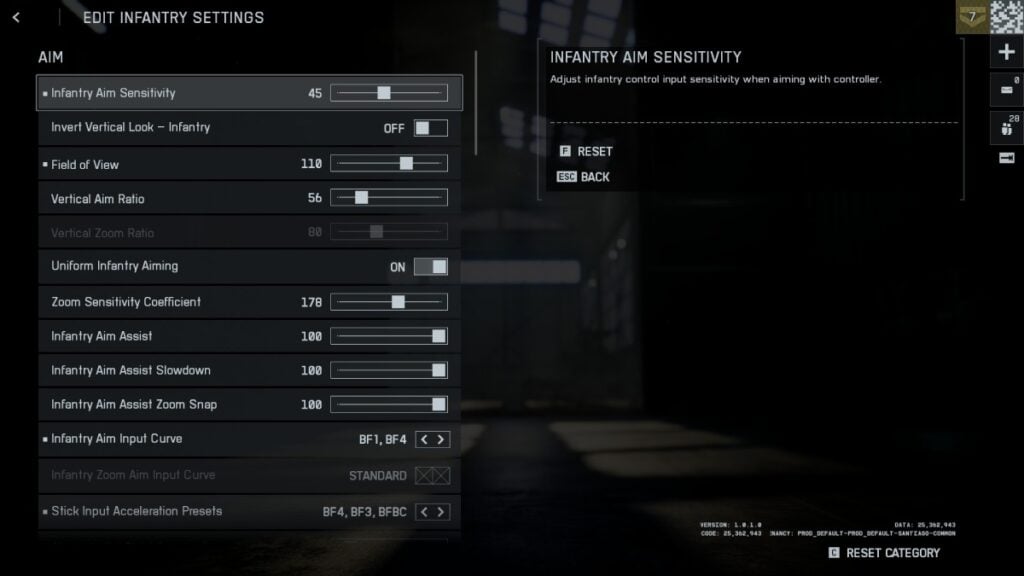
Aim
- Infantry Aim Sensitivity: 45
- Invert Vertical Look – Infantry: Off
- Field of View: 110
- Vertical Aim Ratio: 56
- Uniform Infantry Aiming: On
- Zoom Sensitivity Coefficient: 178
- Infantry Aim Input Curve: BF1, BF4
- Stick Input Acceleration Presets: BF4, BF3, BFBC
- Aiming Left / Right Acceleration: 12
Movement
- Infantry Sprint: Toggle
- Double Tap Forward To Sprint: Off
- Sprint: L3 or LS
- Crouch Toggle Sprint: Crouch
- Vault Over Sprint: On
- Crouch Slide: All
- Double Tap Crouch For Sprint Slide: Off
Zoom
- Infantry Weapon Zoom: Hold
- Zoom: LT or L1
- Steady Scope: Hold
- Infantry Zoom Aim Sensitivity: 86
Other
- Parachute Autodeploy: Skydive / Insertions
- Interact & Reload: Prioritize Interact
- Interacts: Toggle
- Skip Revive: Hold
- Request Revive: Toggle
- Invert Demolition Charge: Off
- Mount Breakout: Instant
- Mount Type: Side and Up
- Mount Presets: Combo
- Peek Type: Side and Up
Gyro
- Infantry Gyro Button: Enable
- Infantry Gyro Aiming Mode: Always
Flick Look
- Infantry Flick Look Mode: Always
- Infantry Flick Look Threshold: 90
- Infantry Flick Look Speed: 100
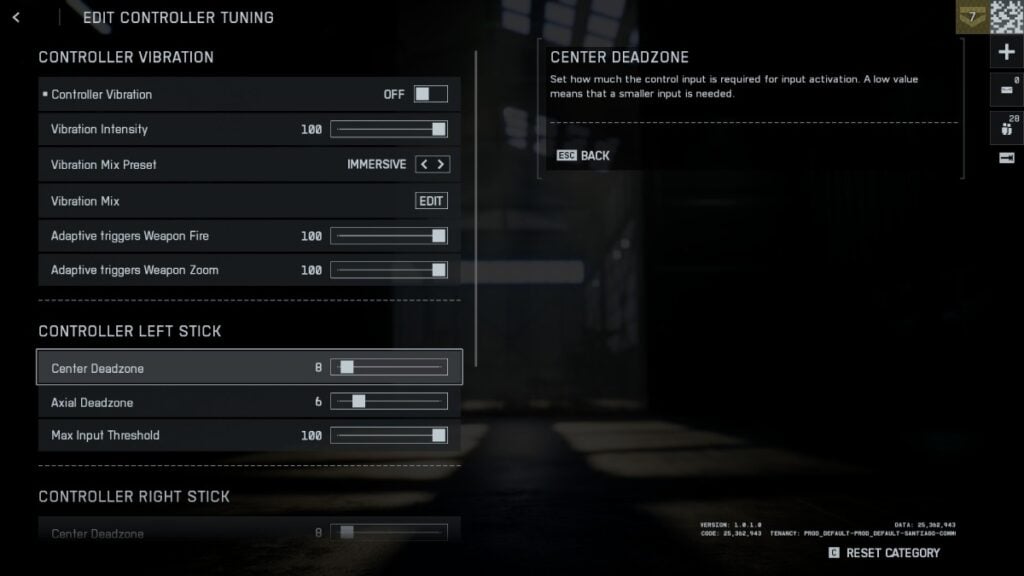
Controller Vibration (under Controller Tuning)
- Controller Vibration: Off
- Vibration Mix Preset: Immersive
- Adaptive Triggers Weapon Fire: 100
- Adaptive Triggers Weapon Zoom: 100
Controller Left Stick
- Centre Deadzone: Adjust according to your controller’s stick drift (leave it default if there’s none)
- Axial Deadzone: 6
- Max Input Threshold: 100
Controller Right Stick
- Centre Deadzone: Adjust according to your controller’s stick drift (leave it default if there’s none)
- Axial Deadzone: 6
- Max Input Threshold: 100
Use these settings, and you’ll be racking up more kills than ever. Like always, controller settings boil down to personal preference, too. So, for the best results, always test these settings in matches and adjust according to what suits your reflexes and playstyle.
In the meantime, check out how to farm XP and level up fast in Battlefield 6. While you’re here, take a look at all the camos and how to unlock them.