What you need to know
- A bug in Wear OS 6 is causing third-party watch faces to freeze mid-transition, creating a "ghosting" effect where the active face and Always-On Display overlap.
- Pixel Watch and Galaxy Watch users are both affected, including newer models like the Galaxy Watch 8 and Watch Ultra.
- The issue specifically targets downloaded third-party faces; stock faces pre-installed by Google and Samsung appear to be immune.
Wear OS 6 was supposed to be a quiet quality-of-life upgrade, such as a more polished always-on display experience. Instead, it’s kicked off an unexpected headache for Pixel Watch and Galaxy Watch owners who rely on third-party watch faces.
Users have taken to both Google and Samsung forums to report that Always-On Display (AOD) transitions are broken on Wear OS 6 for many third-party faces, as reported by PiunikaWeb. Under normal conditions, a Wear OS watch shifts between its full, interactive watch face and a simplified AOD version smoothly when your wrist drops. On Wear OS 6, however, something in that handoff has gone sideways.
Owners report seeing a "ghosting" effect in which the active watch face and the AOD version overlap. Instead of a smooth fade from bright to dim, you get a frozen, transparent mess of overlapping numbers and hands.
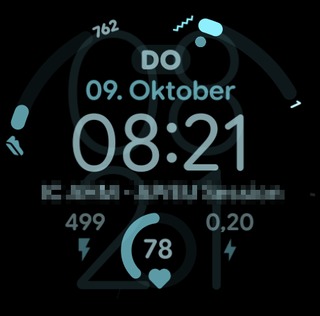
This isn’t limited to one brand. Reports are coming in from both Pixel Watch and Galaxy Watch owners, including those running the latest Pixel Watch models and Samsung’s Galaxy Watch 8 and Watch Ultra. That’s important because it suggests this is a Wear OS 6 platform-level problem.
The root of the problem appears to be a change in how Wear OS 6 handles AOD rendering for third-party watch faces. Google introduced new APIs meant to improve efficiency and consistency, but those changes seem to have broken compatibility with existing watch face frameworks.
Stock faces still work fine
The system gets stuck halfway, leaving a broken, half-finished screen. This bug mostly affects third-party watch faces. If you use the watch faces that came with your device, you probably have not seen this problem because those faces work differently.
Some users have temporarily fixed the issue by switching to an official Pixel or Samsung watch face, but that’s more of a workaround than a solution.
This is not the customization you expected, but it is better than looking at a messy screen every time you check your steps. Google and Samsung seem to be aware of the problem, but since it is a system issue, we have to wait for an update to fix it.
Until the update arrives, avoid third-party watch faces and watch for the next firmware update.