- 1Password has announced a new phishing protection tool
- Autofill won't happen automatically on unrecognized websites
- The tool will warn users of malicious URLs if they try to paste credentials
Phishing attacks can cost businesses and consumers dearly, from million dollar losses to ruined credit scores and stolen bank accounts.
Luckily, 1Password, one of the best password managers, has unveiled a new built-in phishing protection tool.
The new tool will compare the URL saved alongside your stored credentials with the URL you are trying to access, and provide a warning if something doesn’t quite match up.
Spoof URLs may be a thing of the past
Hackers will often use a technique known as typo-squatting or URL hijacking to lure victims into handing over their credentials without them knowing. In fact, a recent 1Password survey found that 89% of Americans have encountered a phishing scam, and 61% have fallen victim at least once.
In some cases, hackers will remove a singular letter that could be easily overlooked or mistyped (gogle.com or google.co), or add characters within the URL that look correct if you don’t check properly (gccgle.com or gooogle.com).
Now, when accessing a potential phishing site, 1Password will compare the URL of the site to the URL stored in a user’s credential vault. If the two don’t match, 1Password won’t autofill the credentials.
If the user then tries to paste your stored credentials into the site, a popup will appear warning them that the URL doesn’t match any URL in the credential vault, and that the URL might not be legitimate.
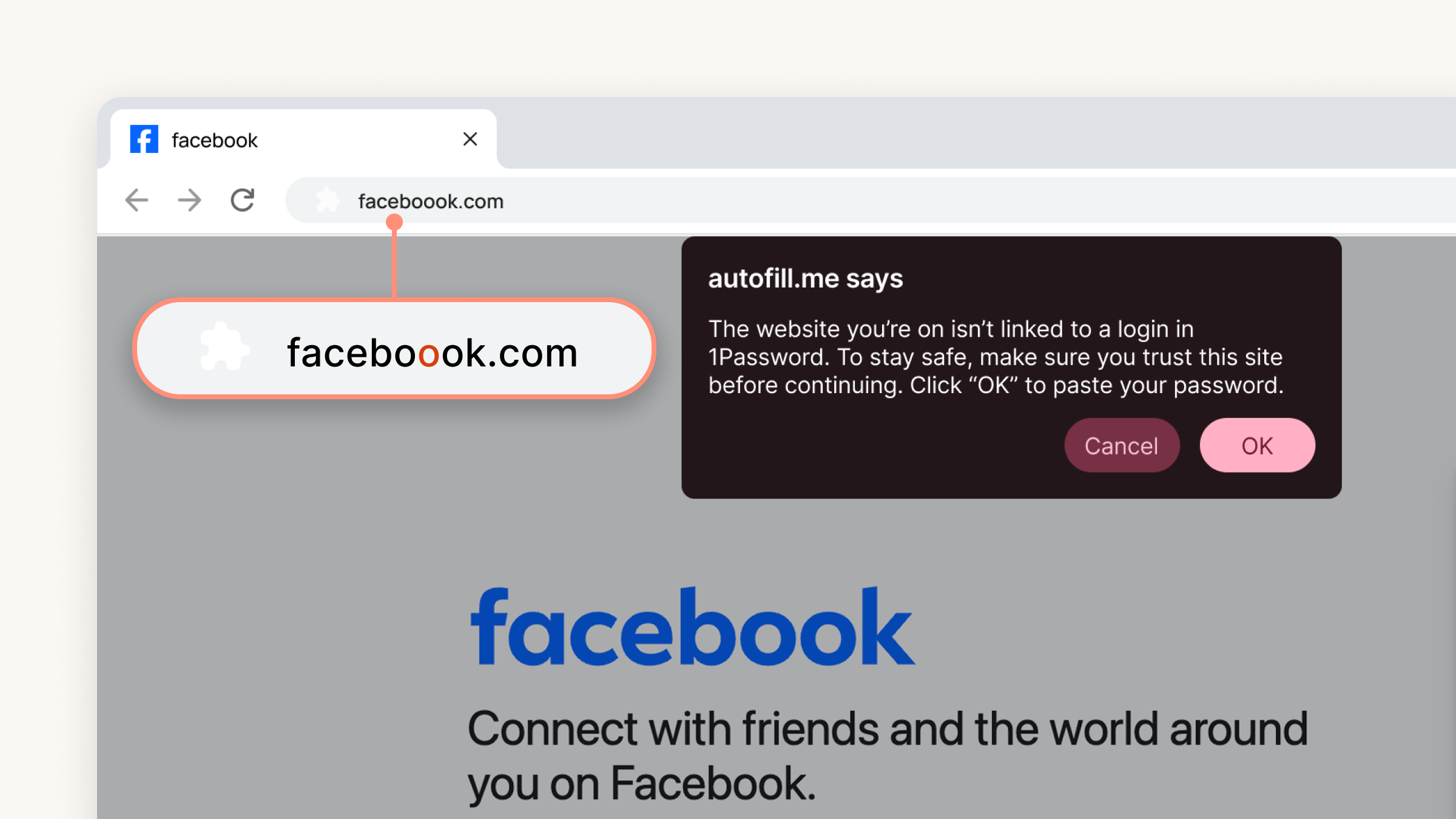
The new feature will be enabled by default upon rollout for all individual and family plans, and administrators of 1Password for Business will be able to enable enhanced phishing protection for employees via the Authentication Policies in the 1Password admin console.
Dave Lewis, Global Advisory CISO, 1Password, said, “Getting ahead of phishing attacks is all about communication, that’s what disrupts the scammer’s plan. The most important thing an employee can do if they receive a suspicious message is tell someone.”
“A lot of attacks could be prevented by simply knocking on the cubicle next door and saying ‘hey, does this look right to you?’ If someone believes they’ve already been phished, they should notify IT immediately. Those are the skills you learn with good training, and they need to be constantly reinforced, so people remember them when they get those urgent, scary-looking messages.”
For more tips on spotting and avoiding phishing scams and more information on the new tool, take a look at the 1Password blog.